
Table of Contents
A customer receives an order, opens the package, and hopefully loves what they see. But once the order is delivered, there is still one small thing that can make a big difference to your business: asking the customer to share their experience.
For many online stores, getting customers to leave reviews is harder than expected. People are busy, messages get buried, and even happy customers may forget to leave feedback.
That is where WhatsApp can help.
A simple, friendly request for review on WhatsApp gives customers an easy way to share their thoughts without searching through their emails or navigating complicated forms. For ecommerce businesses, it can also become a regular part of the post-purchase customer experience.
In this guide, you will learn how to request for review on WhatsApp, when to send your message, and which templates you can use for different situations.
What Is a Request for Review on WhatsApp?
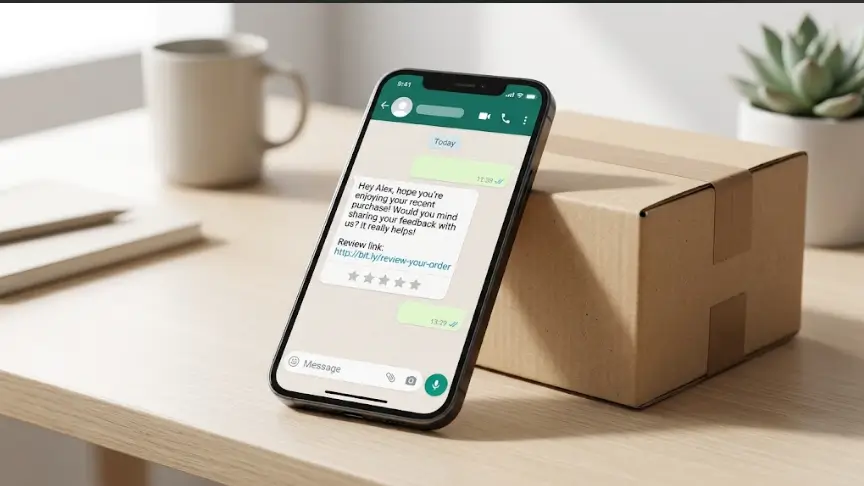
A request for review on WhatsApp is a message sent to a customer asking them to share feedback about a product, service, or shopping experience.
Instead of relying only on email or SMS, businesses can use WhatsApp to send a short, personalized message after a purchase or service.
For example, an online clothing store might send a review request a few days after delivery to ask whether the customer liked the fit and quality. A beauty brand might ask how a skincare product is working for them after they have had enough time to try it.
The goal is not to pressure customers into leaving positive reviews. It is to make sharing honest feedback simple and convenient.
For Shopify stores, review requests can also become part of a broader customer communication process that includes order confirmation, delivery updates, and post-purchase support.
Why Should Businesses Request Reviews on WhatsApp?
Customer reviews help people make purchasing decisions. When shoppers are unsure about a product, feedback from someone who has already purchased it can provide useful reassurance.
Here are a few reasons to consider WhatsApp review requests.
1. Make It Easier for Customers to Respond
Customers do not always want to open an email, find a review link, and complete a long form. A short WhatsApp message with a direct link can reduce the effort required.
Keep the process simple: ask one question, provide one clear action, and let the customer decide whether to respond.
2. Build Better Customer Relationships
A review request shows that your business is interested in the customer’s experience after the payment has been made.
A personal message such as “We hope your order arrived safely. How was your experience?” feels more considerate than a generic message asking for five stars.
3. Collect Useful Product Feedback
Not every review will be positive, and that is okay. Honest feedback can help you identify issues with product quality, packaging, delivery, sizing, or customer support.
You can use these insights to improve your products and the overall shopping experience.
4. Support Future Purchase Decisions
With permission and appropriate review practices, genuine customer feedback can help prospective buyers understand what to expect from your products.
For online stores, reviews may also provide useful information about product fit, quality, usability, and value.
How to Request for Review on WhatsApp
If you are wondering how to request for review on WhatsApp without sounding pushy, start with a straightforward message and a clear reason for contacting the customer.
Step 1: Choose the Right Time
Timing depends on what the customer purchased.
For a clothing or home accessories store, you might send a review request a few days after confirmed delivery. For skincare or other products that need time to show results, wait until the customer has had a reasonable opportunity to use the product.
For services, request feedback after the work has been completed.
Avoid asking for a review immediately after an order is placed. The customer has not experienced the product yet.
Step 2: Personalize Your Message
Use the customer’s name when appropriate and mention their purchase or recent interaction if you have reliable information.
For example:
“Hi Ayesha, we hope you are enjoying your new handbag! We would love to hear what you think about its quality and design.”
This sounds more natural than sending the same impersonal message to every customer.
Step 3: Include a Direct Review Link
If you want customers to leave a review on Google, your Shopify product page, or another review platform, include the appropriate direct link.
Make sure the link works on mobile devices and takes the customer directly to the intended review page.
If you want private feedback instead, invite the customer to reply to your WhatsApp message.
Step 4: Keep the Request Short
Customers should understand the message within a few seconds.
A good review request usually includes:
- A friendly greeting.
- A brief reference to their purchase or experience.
- A polite request for honest feedback.
- A direct link or simple way to respond.
Avoid lengthy explanations or repeated follow-ups.
Step 5: Automate Requests Carefully
If your store receives many orders, sending review requests manually can take time.
You can use a suitable ecommerce automation tool to trigger a message after an order reaches a specified status, such as Delivered, where that status is reliably available.
For Shopify merchants, Haleria can help automate customer communication through WhatsApp, including review requests when the relevant feature is enabled. This can reduce repetitive work while keeping post-purchase communication organized.
Before activating an automated workflow, test the timing, message wording, customer eligibility, and review link.
Request for Review Template: Ready-to-Use WhatsApp Messages
The best request for review template sounds like something a real person would send. Choose a version that suits your business and adjust the details before sending it.
1. Friendly Review Request After Delivery
Best for clothing stores, accessories, home products, and general ecommerce purchases.
“Hi [Customer Name]! 😊 We hope your order from [Store Name] arrived safely and that you’re enjoying it.
We’d love to hear about your experience. Would you mind sharing a quick review here?
[Review Link]
Thanks for shopping with us!”
2. Short WhatsApp Review Request
Best for customers who prefer quick, direct messages.
“Hi [Customer Name]! Thank you for shopping with [Store Name]. We’d love to know how you liked your purchase. Could you share your honest feedback here? [Review Link]
Thanks for your support! 💛”
3. Shopify Product Review Request
Best for stores that want feedback on a specific product.
“Hi [Customer Name], thanks for ordering [Product Name] from [Store Name]!
How did you find the product? Your honest feedback can help other shoppers make informed decisions.
Leave your review here: [Product Review Link]
We appreciate your time!”
4. Google Review Request Template
Best for local businesses and service providers who want customers to share their experience on Google.
“Hi [Customer Name], thank you for choosing [Business Name]! We hope you had a great experience with us.
If you have a moment, we’d appreciate your honest feedback on Google:
[Google Review Link]
Thanks for helping us improve!”
Ask customers for an honest review, not specifically a five-star rating. If you are requesting Google reviews, follow Google’s policies on genuine reviews and incentives.
5. Review Request for a Service Business
Best for agencies, consultants, salons, repair services, and freelancers.
“Hi [Customer Name], it was a pleasure working with you!
We’d love to hear how your experience with [Business Name] went. If you have a moment, please share your honest feedback here:
[Review Link]
Thank you for trusting us!”
6. Review Request for Pakistani Customers
Best for local ecommerce stores that communicate in a friendly Urdu-English style.
“Assalam-o-Alaikum [Customer Name]! 😊 Umeed hai aapko apna order pasand aaya hoga.
Aapka experience kaisa raha? Agar aap thora sa time nikal kar apna honest feedback share kar dein to humein bohat khushi hogi.
Review link: [Review Link]
Thank you for shopping with [Store Name]! ❤️”
7. Gentle Review Reminder
Use this only when a previous request has gone unanswered and a follow-up is appropriate.
“Hi [Customer Name]! Just a gentle reminder in case you missed our earlier message. If you have a moment, we’d still love to hear your honest feedback about your recent purchase.
You can share it here: [Review Link]
No worries if you’re busy. Thanks again for choosing [Store Name]!”
One polite reminder is generally enough. Avoid repeatedly messaging customers who do not respond.
How to Automate WhatsApp Review Requests for Shopify Stores
For a growing Shopify store, review requests can become difficult to manage manually, especially during busy sales periods.
An automated workflow can help send the right message at the right stage of the customer journey.
A Simple Post-Purchase Automation Workflow
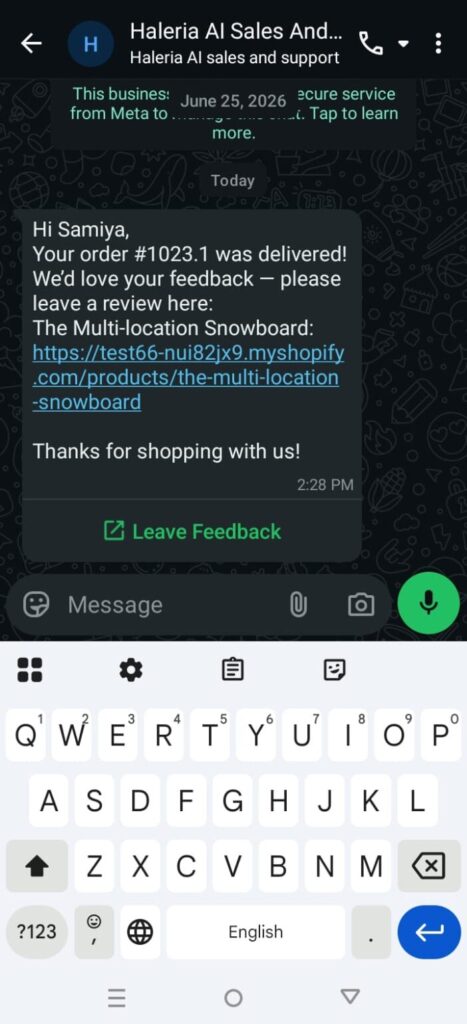
1. Order is delivered: The store records a reliable delivery status.
2. Wait for the appropriate period: Allow enough time for the customer to receive and experience the product.
3. Check eligibility: Confirm that the customer can be contacted and has not already received the same request.
4. Send the WhatsApp message: Use an approved message template when required by WhatsApp’s Business Platform rules.
5. Add the review link: Direct the customer to the relevant product review page or review platform.
6. Track the outcome: Monitor message delivery, clicks where available, and reviews collected.
For example, a fashion store might request feedback a few days after delivery, while a store selling products that require longer use may wait longer.
The ideal delay depends on the product and customer experience, so test your workflow instead of assuming one schedule will work for every store.
How Haleria Can Help
Haleria AI Sales & Support helps Shopify merchants automate customer communication through the official WhatsApp Business Platform.
When review requests are enabled and configured, merchants can use Haleria to organize post-purchase review messages rather than contacting every customer manually.
This is particularly useful for stores that also need to manage order confirmations, customer questions, and delivery-related communication.
Before launching a workflow, verify the available settings, message template requirements, and the order status used to trigger the request.
WhatsApp Review Request Best Practices
A good message is only one part of a successful review process. How you send it matters just as much.
Ask for Honest Feedback
Invite customers to share their genuine experience. Do not ask only satisfied customers to leave public reviews while directing unhappy customers elsewhere.
Follow WhatsApp Messaging Rules
WhatsApp Business Platform messaging is subject to its current policies, including requirements around customer opt-in, approved templates for business-initiated messages, and the applicable customer service window.
Make sure your review workflow follows the rules that apply to your account and message type.
Respect Customer Privacy
Use customer details only for appropriate purposes, protect their information, and honor requests to stop receiving messages.
Avoid sharing private customer feedback publicly without appropriate permission.
Do Not Buy or Manipulate Reviews
Do not offer incentives in exchange for positive reviews or pressure customers to change their ratings. Follow the policies of the review platform you use.
For Google reviews, review its rules on prohibited and incentivized content before launching a campaign.
Test Your Message Before Automating It
Send a test message to check spelling, personalization fields, links, timing, and mobile readability. A broken review link or an incorrect customer name can make an otherwise useful message feel careless.
Measure the Results
Track a few practical metrics:
- Number of review requests sent.
- Delivery rate, where available.
- Review link clicks, where measurable.
- Number of reviews received.
- Time between delivery and review.
Use these figures to understand which timing and message style works best for your customers.
What Is a Meta Request for Review?
The phrase “meta request for review” can refer to different things depending on the context.
In WhatsApp Business messaging, a review request is a message asking a customer to share feedback about a purchase or service. Meta provides the WhatsApp Business Platform through which eligible businesses and approved integrations can send business messages according to applicable policies.
A Meta request for review may also refer to a separate review or appeal request submitted to Meta about an account, content, advertising decision, or policy enforcement action. That is different from asking a customer to review a product.
If your goal is to collect customer reviews through WhatsApp, focus on an appropriate post-purchase message, a clear review link, customer consent, and compliance with WhatsApp’s messaging rules.
If you need to appeal a Meta account or content decision, use the relevant review or appeal option in the appropriate Meta product instead.
Frequently Asked Questions
1. How do I request a review on WhatsApp?
Send a short, friendly message after the customer has had time to experience the product or service. Explain that you would appreciate their honest feedback and include a direct review link or invite them to reply.
2. What is the best request for review template?
A useful template is personalized, brief, and easy to act on. For example:
“Hi [Customer Name], we hope you’re enjoying your purchase from [Store Name]! We’d love to hear your honest feedback. You can share your review here: [Review Link]. Thanks for your support!”
3. When should I send a WhatsApp review request?
For most physical products, consider sending the request a few days after confirmed delivery. Adjust the timing based on the product, shipping experience, and how long customers need to use it before providing meaningful feedback.
4. Can I automate WhatsApp review requests on Shopify?
Yes. You can use a compatible Shopify integration or automation tool to trigger review requests based on configured order events. Check that the tool supports your required workflow, complies with WhatsApp policies, and uses a reliable delivery status.
5. Can I ask customers for Google reviews on WhatsApp?
Yes, you can invite customers to share an honest Google review by providing a direct review link. Do not offer prohibited incentives, request only positive reviews, or selectively solicit positive public feedback.
6. Does WhatsApp charge for review request messages?
Costs depend on the messaging setup, the applicable WhatsApp Business Platform pricing rules, and the provider or integration you use. Check current Meta pricing and any additional platform fees before estimating your costs.
7. What is the difference between a WhatsApp review request and a Meta request for review?
A WhatsApp review request asks a customer to review a product, service, or business. A Meta request for review can refer to an appeal or review process for a Meta account, content, advertisement, or enforcement decision. The correct process depends on your objective.
8. How can I get more customers to leave reviews?
Make the request at a suitable time, keep the message simple, provide a working review link, and avoid unnecessary follow-ups. Most importantly, make the overall customer experience worth reviewing.
Final Thoughts
Getting customer reviews does not have to involve long emails or repeated reminders. A thoughtful WhatsApp message, sent at the right time, can make it easier for customers to share their experiences and help your business learn from real feedback.
Start with one simple request for review template, test it with your customer journey, and improve the timing and message based on the results.
If you run a Shopify store and want to reduce repetitive post-purchase work, explore how Haleria can help you organize WhatsApp customer communication and automate review requests when enabled.
The aim is simple: make it easy for customers to share honest feedback, and use what they tell you to create a better shopping experience.