
Table of Contents
Imagine this.
A customer visits your Shopify store, finds a product they like, adds it to their cart, and places a Cash on Delivery (COD) order.
Your team receives the notification. The product gets packed, the shipping label is printed, and the parcel is handed over to the courier.
A few days later, the courier calls the customer.
The customer refuses to accept the parcel.
Maybe they changed their mind. Maybe they forgot about the order. Perhaps someone placed it using their phone number without permission. Or maybe they simply don’t want the product anymore.
Whatever the reason, your business has already spent time and money processing an order that never became a sale.
And this is one of the biggest challenges for online stores that depend on Cash on Delivery.
The problem isn’t always a lack of customers. Sometimes, it’s the lack of proper order confirmation before dispatch.
If you’re running a Shopify store, especially in a market where COD is popular, a simple verification process can make a noticeable difference.
Let’s look at why customers reject COD parcels, what happens behind the scenes, and how you can prevent unnecessary returns using smarter order confirmation methods.
Why Do Customers Reject COD Orders at the Doorstep?
Cash on Delivery makes online shopping easier because customers don’t have to pay before receiving their products. But it also creates a problem for merchants: placing an order doesn’t always mean the customer is ready to receive it.
Here are some common reasons behind rejected COD orders.
1. Customers Place Orders Without Serious Buying Intent
Some shoppers place orders simply because they like a product at that moment.
They might be browsing during a break, comparing prices, or adding products to their cart without thinking about the actual purchase.
By the time the parcel arrives, their interest has disappeared.
This is particularly common when checkout is quick and doesn’t require any payment commitment.
2. Someone Places an Order as a Joke
Fake orders are another frustrating issue for online sellers.
A person may enter someone else’s phone number, use an incorrect address, or submit an order without the actual recipient knowing about it.
Your team sees a new order and starts preparing the parcel, but the person receiving the delivery has no idea what it is.
3. Customers Change Their Minds Before Delivery
A customer might find the same product at a lower price, decide they no longer need it, or simply lose interest.
Sometimes, delivery also takes longer than expected.
Without an update from the store, customers may forget about their purchase or assume the order was never processed.
4. Incorrect Phone Numbers and Delivery Addresses
Small mistakes at checkout can create big delivery problems.
A missing house number, incorrect phone number, or incomplete address can prevent the courier from reaching the customer.
In some cases, the customer may also be unavailable when the delivery arrives.
5. Customers Don’t Remember What They Ordered
This sounds surprising, but it happens.
Customers who shop from multiple online stores may forget which products they ordered, especially when several days pass between checkout and delivery.
If they receive a courier call without remembering the purchase, they may refuse the parcel.
The common factor behind many of these situations is simple: nobody verified the order properly before shipping it.
What Does a Rejected COD Order Actually Cost Your Business?
Many Shopify merchants calculate their profit based on successful deliveries. But rejected orders create expenses even when no sale happens.
Consider what happens when a COD parcel gets rejected:
- Packaging material has already been used.
- Your team has spent time processing the order.
- Courier charges may apply for delivery attempts and return shipping.
- Inventory remains unavailable while the parcel is in transit.
- Customer support has to handle additional calls and messages.
- Your team loses time that could have been spent on genuine customers.
Let’s take a simple example.
Suppose your store receives 1,000 COD orders in a month. If 250 are rejected, that’s 250 parcels that fail to become completed sales.
The actual loss depends on your courier agreement, product category, shipping charges, and operational costs.
But even a small reduction in rejected orders can help protect your profit margins.
That’s why order confirmation should be treated as an important part of your sales process, not just another notification.
7 Practical Ways to Prevent COD Order Rejections
You don’t have to stop offering Cash on Delivery to protect your business.
Instead, focus on making sure customers are genuinely interested in receiving their orders before you hand parcels to the courier.
Here are seven practical methods.
1. Confirm Every COD Order Before Dispatch
This should be your first step.
Before shipping a COD order, contact the customer and ask them to confirm their purchase.
A simple confirmation message can help you identify customers who:
- Placed an order accidentally.
- Entered someone else’s number.
- No longer want the product.
- Need to correct their delivery address.
For example:
“Hi Sarah! Thank you for shopping with us. Your order #1024 is ready for processing.
Please confirm whether you’d like us to deliver your order.
[Confirm Order] [Cancel Order]”
This gives customers an easy way to respond instead of making your team chase every order manually.
2. Use WhatsApp for Faster Order Verification
Most customers are already comfortable using WhatsApp to communicate.
Instead of relying only on emails or traditional phone calls, send an order confirmation message directly to the customer’s WhatsApp number.
A Shopify WhatsApp automation app can connect your store with WhatsApp and send order-related notifications automatically.
For example, when someone places a COD order:
- The Shopify store receives the order.
- An automated WhatsApp confirmation message is triggered.
- The customer receives order details.
- The customer selects Confirm or Cancel.
- The store updates the order status based on the response.
This saves time and creates a clear record of the customer’s decision.
Make sure your WhatsApp messaging setup follows Meta’s business messaging policies, including approved templates where required.
3. Automate Confirmation Instead of Calling Every Customer Manually
Think about how much time your team spends calling customers.
If your store receives 100 COD orders every day, manually calling every customer can become a full-time task.
And what happens when customers don’t answer?
Your team has to call again, send messages, and keep checking order statuses.
This is where Shopify WhatsApp automation becomes useful.
You can create a workflow that automatically sends confirmation requests as soon as a new COD order is placed.
Customers who confirm can move forward in your fulfilment process, while cancelled orders can be handled separately.
You can also create a follow-up process for customers who don’t respond.
The goal is to reduce repetitive work while making sure genuine orders don’t get delayed.
4. Add AI WhatsApp Automation to Handle Customer Responses
Traditional automation works well when customers select predefined options.
But what if someone replies:
- “Please deliver it tomorrow.”
- “Can you change my address?”
- “I ordered the wrong size.”
- “I want to cancel this order.”
- “Is this product available in another colour?”
A basic automated message might not understand what the customer means.
AI WhatsApp automation can make this interaction more flexible.
An AI-powered assistant can understand common customer questions, provide relevant responses, and guide customers through the next step.
For example, if someone asks to change their delivery date, the assistant can respond according to the available order-management workflow or direct the request to a human team member.
This makes order confirmation feel more like a conversation and less like a one-way notification.
5. Use Automated Phone Calls for Customers Who Don’t Respond
Not every customer checks WhatsApp messages.
Some customers may have an inactive WhatsApp number, ignore notifications, or prefer receiving a phone call.
That’s why using more than one confirmation channel can be helpful.
An automated phone confirmation system can call customers who haven’t responded to the WhatsApp confirmation request.
For example:
“Hello! You have placed a Cash on Delivery order with [Store Name]. Press 1 to confirm your order or press 2 to cancel it.”
The response can then be used to update the order status.
This approach gives customers another way to verify their purchases without requiring your team to make every call manually.
6. Send Delivery Updates After Confirmation
Order confirmation shouldn’t be the last time customers hear from your store.
Keep them informed about important order updates, including:
- Order confirmed.
- Order packed.
- Order shipped.
- Parcel out for delivery.
- Delivery completed.
These updates remind customers about their purchases and help them prepare for delivery.
For example:
“Good news! Your order is on its way. Our delivery partner will contact you soon. Please keep your phone available so you don’t miss the delivery.”
A customer who remembers the purchase and knows when to expect the parcel is less likely to be surprised by an unexpected delivery attempt.
7. Track Rejected Orders and Identify Patterns
Don’t treat every rejected order as an isolated incident.
Look for patterns in your Shopify store.
Ask yourself:
- Which products have the highest rejection rate?
- Are certain cities generating more refused parcels?
- Do customers who don’t confirm orders reject deliveries more often?
- Are particular courier routes causing delivery problems?
- Are repeat customers more reliable than first-time buyers?
This information can help you improve your verification process.
For example, you might introduce additional verification for high-value COD orders or review delivery details for locations with frequent failed deliveries.
The important thing is to make decisions based on your own store’s order history rather than assuming every customer or location has the same risk.
How Shopify WhatsApp Automation Helps Prevent Fake COD Orders
If your store runs on Shopify, managing every order manually becomes difficult as your business grows.
This is where the right automation system can make a difference.
A Shopify WhatsApp automation app connects your store’s order workflow with WhatsApp, allowing you to manage confirmations and customer communication from one system.
Instead of manually checking every order, you can automate repetitive tasks and focus on the orders that actually need attention.
Automated WhatsApp Order Confirmation
Send confirmation requests automatically when customers place COD orders.
Customers can confirm or cancel directly through interactive WhatsApp buttons.
This makes the process simple for both customers and store owners.
Automatic Order Status Updates
Once a customer confirms an order, the system can update the relevant Shopify order status or add a tag to identify the confirmation.
For example:
- Confirmed through WhatsApp.
- Cancelled through WhatsApp.
- Confirmed through phone call.
These tags help your team identify which orders are ready for fulfilment.
Follow-Ups for Unresponsive Customers
Some customers won’t respond to the first message.
An automated follow-up workflow can remind them to confirm their orders.
You can then decide how to handle orders that remain unconfirmed instead of automatically shipping every parcel.
WhatsApp and Phone Confirmation Together
A more complete verification process uses both messaging and phone calls.
For example:
- Send the WhatsApp confirmation request.
- Give the customer time to respond.
- If there’s no response, trigger a phone confirmation call.
- Record the customer’s response.
- Process confirmed orders and handle cancellations separately.
This combination helps merchants reach customers through different communication channels.
What Should You Look for in the Best WhatsApp Automation Software?
Not every WhatsApp tool is designed for Shopify order verification.
Some tools focus mainly on bulk marketing messages, while others offer customer support or chatbot features.
If your main goal is reducing rejected COD orders, look for software that supports the following features:
Shopify Integration
The platform should connect with your Shopify store and receive order information automatically.
Interactive Confirm and Cancel Buttons
Customers should be able to confirm or cancel orders without typing complicated replies.
Automated Phone Confirmation
Look for an option to call customers who don’t respond to WhatsApp messages.
AI-Powered Customer Support
AI can help answer customer questions and manage common requests without requiring a team member to respond to every message.
Order Status and Tag Management
Your team should be able to identify confirmed, cancelled, and unresponsive orders easily.
Official WhatsApp Business API
Choose a solution that uses the official WhatsApp Business Platform rather than relying on unofficial WhatsApp Web or QR-based connections.
Also check whether the provider supports Meta-approved templates, customer consent requirements, and the relevant messaging charges.
The best WhatsApp automation software is not necessarily the one with the most features. It’s the one that solves the problems your store actually faces.
How Haleria Helps Shopify Stores Confirm COD Orders Automatically
For Shopify merchants who want to reduce manual order verification, Haleria AI Sales & Support brings WhatsApp automation and phone confirmation together.
Instead of asking your team to contact every customer individually, Haleria helps automate important parts of the order confirmation process.
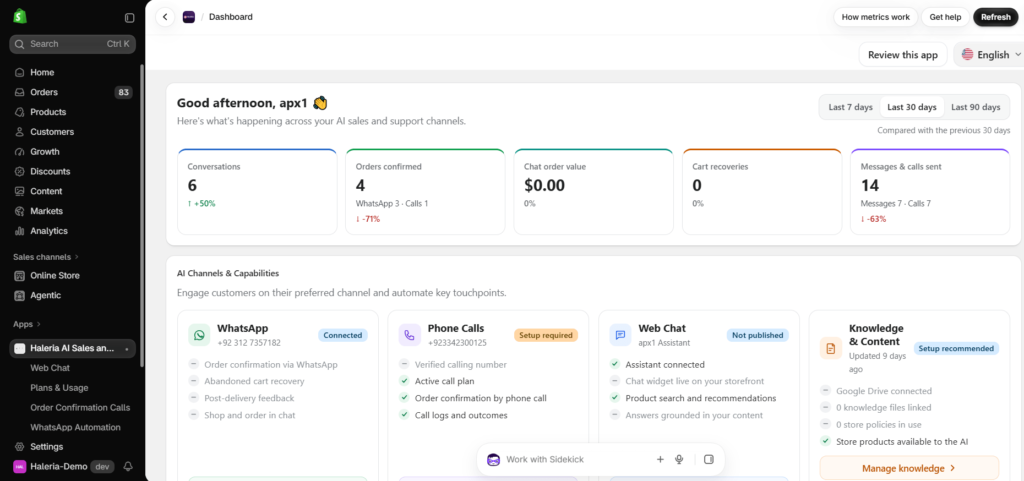
Here’s how it works.
1. Automated WhatsApp Confirmation Requests
When a customer places a COD order, Haleria can send an automated WhatsApp message with order details and Confirm and Cancel buttons.
Customers can respond directly from WhatsApp.
2. Automatic Shopify Order Tagging
When a customer confirms or cancels an order through WhatsApp, Haleria can update the order with the corresponding Shopify tag.
Your fulfilment team can quickly identify the customer’s response before dispatch.
3. Phone Confirmation for Unresponsive Customers
What happens when a customer doesn’t respond on WhatsApp?
Haleria also supports automated phone confirmation calls.
Customers can press 1 to confirm their order or 2 to cancel it.
This provides another verification option for customers who don’t respond to WhatsApp messages.
4. AI-Powered Customer Conversations
Haleria also includes AI-powered sales and support capabilities.
Customers can ask questions about products, orders, and store information through supported chat channels.
This helps merchants manage customer communication without depending entirely on manual replies.
5. More Than Just Order Confirmation
Order verification is only one part of running an online store.
Haleria also supports features such as:
- Abandoned checkout recovery.
- Automated order updates.
- AI-powered customer support.
- WhatsApp bulk marketing campaigns.
- AI webchat.
- Product discovery through chat.
These features help Shopify merchants manage different stages of the customer journey from one platform.
If you’re spending too much time confirming COD orders manually, you can explore Haleria AI Sales & Support and see how its automation features can fit into your store’s workflow.
Final Thoughts: Confirm Before You Dispatch
Cash on Delivery is still an important payment option for many online shoppers.
Removing it completely isn’t always the right solution.
The better approach is to make sure customers are ready to receive their purchases before your team spends money preparing and shipping them.
Start with a simple confirmation message. Add automated follow-ups. Use phone verification when needed. Keep customers updated about their deliveries and review your rejected-order data regularly.
Most importantly, don’t let your team spend hours doing work that can be handled automatically.
With the right Shopify WhatsApp automation, order confirmation becomes easier to manage, customers stay informed, and your team gets more time to focus on growing the business.
A placed order is a good start. A confirmed order is a much better one.
Frequently Asked Questions (FAQs)
1. What is order confirmation in eCommerce?
Order confirmation is the process of notifying customers that their purchase has been received and verifying that the order details are correct. For COD orders, it can also involve asking customers to confirm that they are willing to receive and pay for the parcel.
2. Why do customers reject Cash on Delivery orders?
Customers may reject COD orders because they change their minds, forget about their purchases, place orders accidentally, provide incorrect contact details, or never intended to receive the products. Delivery delays and poor communication can also contribute to refusals.
3. How can I reduce fake COD orders on Shopify?
You can reduce fake COD orders by verifying customer phone numbers, sending WhatsApp confirmation requests, using automated phone calls, checking suspicious order patterns, and reviewing customer responses before dispatch.
4. How does WhatsApp automation help with order confirmation?
WhatsApp automation sends order confirmation messages automatically after checkout. Customers can confirm or cancel their orders using interactive buttons, while the store can update order statuses and tags based on their responses.
5. What is the best Shopify WhatsApp automation app for COD order verification?
The best app depends on your store’s requirements. Look for a solution that offers Shopify integration, automated WhatsApp confirmation, interactive buttons, phone verification, order tagging, and reliable customer support. Haleria is one option for merchants looking to combine these capabilities.
6. Can WhatsApp automatically confirm Shopify COD orders?
Yes. With a compatible Shopify WhatsApp automation integration, merchants can automatically send confirmation requests and record customer responses. However, the system should only treat an order as confirmed after the customer actually responds.
7. Can AI WhatsApp automation handle customer questions about orders?
Yes. AI-powered WhatsApp automation can understand common questions about orders, products, delivery, and store policies. Depending on the integration, it can provide answers, guide customers through supported actions, or transfer more complicated requests to a human agent.
8. Is WhatsApp Business API required for automated Shopify order confirmation?
For automated messaging through the official WhatsApp Business Platform, businesses need an eligible WhatsApp Business Platform/API setup. Business-initiated messages generally require approved templates, and businesses must follow Meta’s messaging policies.
9. Can I use automated phone calls if customers don’t respond on WhatsApp?
Yes. Some order verification solutions support automated phone calls as an additional confirmation channel. Customers can respond through keypad options, such as pressing 1 to confirm or 2 to cancel.
10. Does order confirmation completely eliminate COD returns?
No. Order confirmation can help reduce avoidable refusals, but it cannot guarantee successful delivery. Customers may still be unavailable, change their minds, or face unexpected delivery issues. Combining confirmation with accurate addresses and timely delivery updates creates a stronger process.