
Table of Contents
Running an online store means dealing with more than just receiving orders. Every new order needs attention, and if you accept Cash on Delivery (COD), confirming those orders becomes an important part of your daily routine.
Many Shopify store owners still call customers manually to verify their orders. Some send individual WhatsApp messages, while others wait for customers to respond. This takes time, especially when orders start increasing.
But what if customers could confirm or cancel their orders directly through WhatsApp without waiting for someone from your team?
That’s exactly what order confirmation automation makes possible.
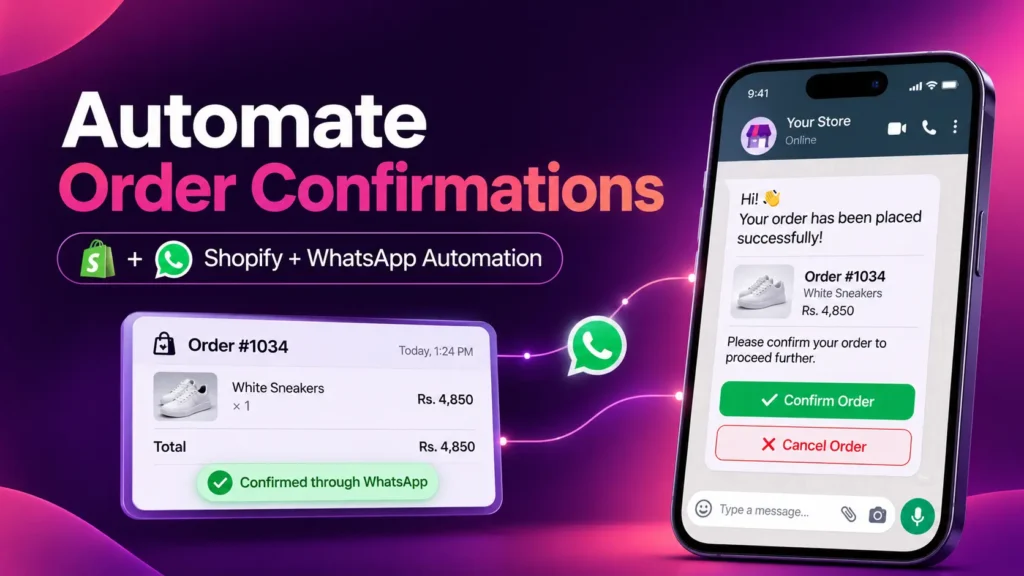
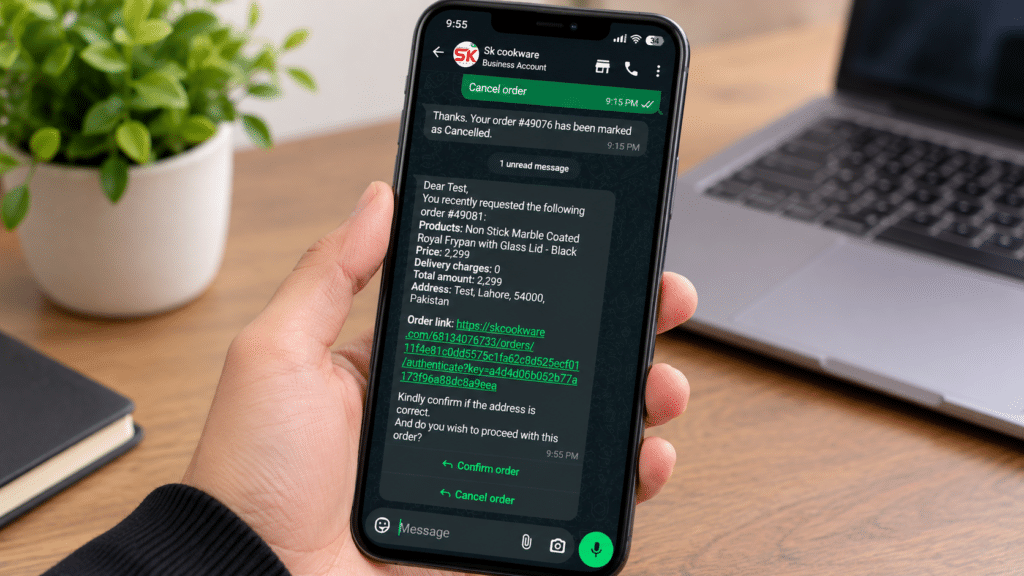
With Haleria, Shopify store owners can automatically send WhatsApp order confirmation messages as soon as a customer places an order. Customers receive two simple buttons: Confirm and Cancel. Once they select an option, the corresponding tag is automatically added to the order in the Shopify dashboard.
This makes the confirmation process faster, easier, and less dependent on manual work.
What Is Order Confirmation Automation?
Order confirmation automation is the process of automatically sending an order confirmation message to customers immediately after they place an order.
Instead of manually calling or messaging every customer, an automated system handles the first step for you.
For Shopify stores, this process can be connected with WhatsApp through the Official WhatsApp Business API.
Here’s how it works:
- A customer places an order on your Shopify store.
- An automated WhatsApp order confirmation message is sent to the customer’s phone.
- The message includes the order details and two buttons: Confirm and Cancel.
- The customer selects their preferred option.
- Haleria automatically updates the order in Shopify with the relevant WhatsApp confirmation tag.
For example:
- If the customer clicks Confirm, the order receives the
Confirm through WhatsApptag. - If the customer clicks Cancel, the order receives the
Cancel through WhatsApptag.
Your team can check these tags directly from the Shopify dashboard and identify which orders are confirmed or cancelled.
No need to call every customer individually just to ask whether they want their order.
Why Do Shopify Stores Need Automated Order Confirmation?
For many eCommerce businesses, especially those handling COD orders, order verification is an important part of daily operations.
A store might receive dozens or hundreds of orders in a day. Calling every customer takes valuable time that could be spent managing deliveries, customer queries, and business growth.
Here are some reasons why automated order confirmation is useful.
1. Reduce Manual Confirmation Calls
Calling customers one by one can become exhausting when your store receives multiple orders throughout the day.
An automated order confirmation system sends messages without requiring your team to contact each customer manually.
Your customers can simply confirm or cancel their orders through WhatsApp.
2. Get Faster Customer Responses
Customers are already familiar with WhatsApp. Instead of answering phone calls or responding to individual messages, they can select an option directly from the confirmation message.
This creates a simpler experience for both customers and store owners.
3. Identify Confirmed and Cancelled Orders
Keeping track of customer responses manually can lead to mistakes.
With Haleria, customer selections automatically generate the corresponding tags in your Shopify dashboard.
| Customer action | Shopify order tag |
|---|---|
| Clicks Confirm | Confirm through WhatsApp |
| Clicks Cancel | Cancel through WhatsApp |
This makes it easier for your team to review order statuses and organize order processing.
4. Save Time as Your Store Grows
As your Shopify store receives more orders, manual confirmation becomes harder to manage.
Automated order confirmation helps you handle this process without increasing the workload on your support team.
5. Improve the Customer Experience
Customers don’t have to wait for someone to call them or send a separate message.
They receive an instant confirmation request after placing their order and can respond whenever it’s convenient.
How Does WhatsApp Order Confirmation Work with Shopify?
Haleria connects your Shopify store with the Official WhatsApp Business API to automate order confirmation messages.
The entire process works automatically after the initial setup.
Step 1: Customer Places an Order
A customer visits your Shopify store, selects a product, and completes the checkout process.
As soon as the order is placed, Haleria triggers the automated order confirmation workflow.
Step 2: Customer Receives a WhatsApp Message
The customer receives an order confirmation message on WhatsApp.
The message can include relevant order information and two interactive buttons:
- Confirm Order
- Cancel Order
This allows customers to respond directly from WhatsApp without visiting your website again.
Step 3: Customer Confirms or Cancels
When the customer clicks one of the buttons, Haleria processes the response.
If the customer selects Confirm, the system adds the Confirm through WhatsApp tag to the Shopify order.
If the customer selects Cancel, it adds the Cancel through WhatsApp tag.
Step 4: Check the Response in Shopify
Your team can open the Shopify dashboard and check the order tags to see the customer’s response.
This makes it easier to identify orders that are ready for further processing and orders that have been cancelled.
The best part? Your team doesn’t need to manually update these confirmation tags after every customer response.
How to Set Up WhatsApp Order Confirmation Automation in Shopify with Haleria
Setting up WhatsApp order confirmation with Haleria is straightforward. Follow these steps to connect your Shopify store and enable automated order confirmation.
Step 1: Install the Haleria Shopify App
First, install the Haleria app on your Shopify store.
Once the installation is complete, open the Haleria dashboard.
Step 2: Connect Your WhatsApp Account
From the Haleria dashboard:
- Open the WhatsApp Automation tab.
- Select the option to connect WhatsApp.
- Follow the on-screen instructions to connect your WhatsApp Business account.
- Complete the required connection steps.
Haleria uses the Official WhatsApp Business API to send automated messages to your customers.
Step 3: Enable Order Confirmation Notifications
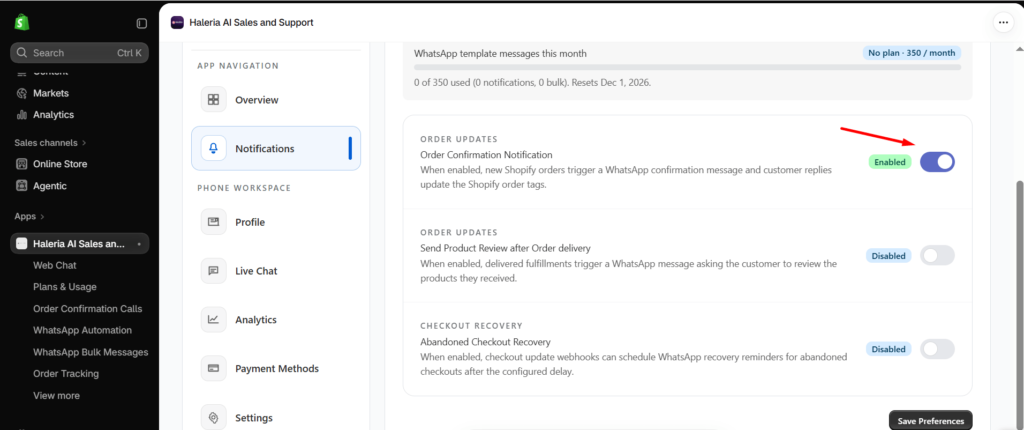
After connecting your WhatsApp account:
- Go to the Notifications section.
- Find the Order Confirmation Notification option.
- Enable the notification.
Once enabled, the order confirmation message template will be submitted to Meta for approval.
Meta generally reviews message templates before they can be used. Allow approximately 24 hours for approval, although the actual review time may vary.
Once the template is approved, Haleria can start sending automated order confirmation messages.
Step 4: Add Payment Details in Meta Business Suite
This is an important step that you shouldn’t skip.
Since Haleria is integrated with the Official WhatsApp Business API, Meta charges businesses for applicable template messages according to its current pricing structure.
To make sure your automated notifications can be sent, you need to add your payment details.
Follow these steps:
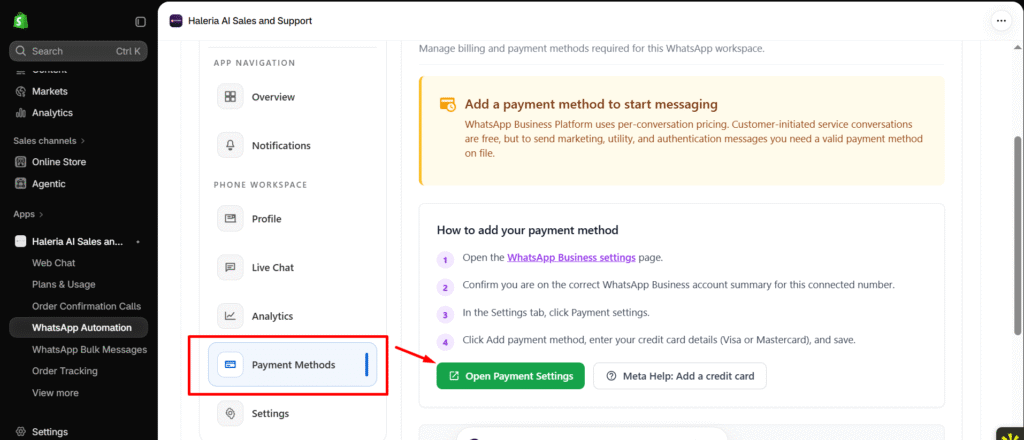
- Open the Payment Methods section in Haleria.
- Click Open Payment Settings.
- Your Meta Business Suite payment settings will open.
- Add your required payment details.
- Complete the payment setup.
Once your payment method is configured and your message template is approved, your WhatsApp order confirmation automation is ready to work.
Step 5: Test Your Order Confirmation Workflow
Before relying on automation for all your orders, place a test order on your Shopify store.
Check the following:
- Did the WhatsApp confirmation message arrive?
- Are both Confirm and Cancel buttons visible?
- Does clicking Confirm add the correct Shopify tag?
- Does clicking Cancel add the correct Shopify tag?
- Are the responses visible in the Shopify dashboard?
Testing the complete workflow helps you identify any setup issues before handling real customer orders.
How Order Confirmation Automation Saves Time for Your Business
Imagine receiving 50 orders in one day.
Without automation, your team may need to contact every customer, wait for their response, and manually update the order status.
With Haleria, the confirmation request is sent automatically, and customers can respond through WhatsApp.
Your team can then review the Shopify order tags instead of spending the entire day making confirmation calls.
Here’s a simple comparison:
| Manual confirmation | Automated confirmation |
|---|---|
| Call each customer individually | Automatic WhatsApp message |
| Wait for customer response | Customer selects a button |
| Manually track responses | Shopify tags update automatically |
| More repetitive work | Less manual workload |
| Difficult to manage at scale | Easier to manage growing orders |
The goal isn’t to remove your team from the process. It’s to remove repetitive tasks so your team can focus on more important business activities.
Why Use Haleria for WhatsApp Order Confirmation on Shopify?
There are different ways to communicate with customers after they place an order. However, connecting your order confirmation process directly with Shopify and WhatsApp makes the workflow much more convenient.
Haleria brings these two platforms together through the Official WhatsApp Business API.
Here’s what makes the process useful:
- Instant notifications: Send automated order confirmation messages after customers place orders.
- Interactive buttons: Let customers confirm or cancel orders directly through WhatsApp.
- Automatic Shopify tags: Identify customer responses through order tags.
- Official WhatsApp integration: Send notifications using the Official WhatsApp Business API.
- Less manual work: Reduce repetitive confirmation calls and individual messages.
- Simple order management: Review customer responses directly in your Shopify dashboard.
Whether you’re running a small Shopify store or managing a growing eCommerce business, automating order confirmation can make daily operations easier.
Start Automating Your Shopify Order Confirmations with Haleria
Still calling customers to confirm every COD order?
It’s time to make that process easier.
With Haleria, you can connect your Shopify store with WhatsApp, send automated order confirmation messages, and let customers confirm or cancel orders with a single click.
No more spending hours on repetitive confirmation calls. Let automation handle the initial customer response while your team focuses on running the business.
Install Haleria today and simplify your Shopify order confirmation process.
Explore Haleria’s Shopify app and get started with WhatsApp order confirmation automation.
Frequently Asked Questions About Order Confirmation Automation
1. What is order confirmation automation?
Order confirmation automation is a process that automatically sends customers a confirmation message after they place an order. Customers can confirm or cancel their orders through the message without requiring manual calls from the store team.
2. How can I automate order confirmation on Shopify?
You can automate Shopify order confirmation using Haleria. Install the Haleria Shopify app, connect your WhatsApp account, enable Order Confirmation Notification under Notifications, and configure your Meta payment details.
Once the message template is approved, automated notifications can start reaching your customers.
3. How does WhatsApp order confirmation work with Shopify?
When a customer places an order, Haleria sends an automated WhatsApp message with Confirm and Cancel buttons. Based on the customer’s selection, Haleria adds the relevant confirmation tag to the Shopify order.
4. Can customers confirm or cancel orders directly through WhatsApp?
Yes. Customers can select the Confirm or Cancel button directly in the WhatsApp message. They don’t need to visit your Shopify store or contact your support team to submit their response.
5. What happens when a customer confirms an order?
When a customer clicks Confirm, Haleria automatically adds the Confirm through WhatsApp tag to that order in your Shopify dashboard. Your team can use this tag to identify confirmed orders.
6. What happens when a customer cancels an order?
When a customer clicks Cancel, Haleria adds the Cancel through WhatsApp tag to the Shopify order. This helps your team identify cancellation requests and take the next appropriate action.
7. Do I need the Official WhatsApp Business API for order confirmation automation?
Yes. Haleria uses the Official WhatsApp Business API to send automated order confirmation template messages through WhatsApp.
8. Why do I need to add payment details to Meta Business Suite?
Meta charges for applicable WhatsApp template messages according to its pricing rules. You need to configure an accepted payment method in your Meta business payment settings so applicable messaging charges can be processed.
The actual charges depend on factors such as message category and the recipient’s country. Check WhatsApp Business pricing for current rates.
9. How long does Meta take to approve an order confirmation message template?
Template approval can take up to 24 hours, although some templates may be reviewed sooner. Haleria can start sending the notification once the required template is approved.
10. What if a customer doesn’t click Confirm or Cancel?
If a customer doesn’t interact with the message, their order will not receive either of the response tags through that interaction. Your team can review such orders separately and follow up if necessary.
11. Does order confirmation automation eliminate manual work?
It reduces repetitive work such as calling customers individually, sending confirmation messages, and manually recording their responses. Your team can focus on reviewing orders and handling cases that need personal attention.