
Table of Contents
GaaS vs SaaS: Understanding the Shift from Software to AI-Powered Services
For years, businesses have relied on software to manage their daily operations. Whether it is managing customer relationships, sending marketing emails, tracking sales, or handling customer support, SaaS products have made business operations easier and more accessible.
But something is changing.
Businesses are no longer interested only in having access to another dashboard or adding another tool to their software collection. They want solutions that actually get things done.
Imagine telling a system, “Find customers who abandoned their carts, send them a personalized WhatsApp message, answer their questions, and update their order status.”
Instead of opening multiple applications and completing each step manually, an AI-powered agent could handle the entire workflow using connected tools and predefined permissions.
This is where GaaS enters the conversation.
The discussion around GaaS vs SaaS is not simply about introducing another software model. It is about changing how businesses use technology, automate operations, and measure the value of digital services.
Let’s understand what makes these two models different and why this shift matters.
What Is SaaS (Software as a Service)?
SaaS stands for Software as a Service. It is a software delivery model in which applications are hosted by a service provider and made available to customers through the internet.
Instead of purchasing software, installing it on individual computers, and managing technical updates, users can access the application through a browser or mobile app.
Think about the tools you probably use every day:
- CRM platforms for managing customer relationships.
- Email marketing software for creating and sending campaigns.
- Project management tools for organizing tasks.
- Accounting software for managing business finances.
- E-commerce platforms for managing online stores.
These are common examples of SaaS products.
How Does the SaaS Model Work?
The SaaS model is built around providing users with access to software features.
A business subscribes to a platform, creates an account, configures its settings, and uses the available features to complete its work.
For example, imagine you own an online store and want to send promotional emails to your customers.
Using traditional SaaS:
- You log in to your email marketing platform.
- You select your customer list.
- You create an email campaign.
- You write the subject line and email content.
- You schedule or send the campaign.
- You check the results through analytics.
The software provides everything you need, but your team is responsible for operating it.
How Does SaaS Generate Revenue?
Most SaaS companies follow subscription-based pricing models.
Common pricing structures include:
- Monthly or annual subscriptions.
- Per-user or per-seat pricing.
- Feature-based pricing plans.
- Usage-based pricing.
- Tiered plans based on business requirements.
For example, a company might offer a basic plan for small businesses and advanced plans for larger teams.
The customer pays for continued access to the platform, its features, and the infrastructure behind it.
What Is GaaS (Generative or Agentic as a Service)?
GaaS is increasingly used to describe Generative as a Service or Agentic as a Service, although the terminology is still evolving and does not have one universally accepted industry definition.
In the context of the SaaS vs GaaS discussion, we are using GaaS to describe an AI-powered service model in which intelligent agents can understand goals, plan actions, interact with connected tools, and complete multi-step tasks on behalf of users.
The biggest difference is that users do not necessarily need to perform every step themselves.
They can define the objective, provide the necessary permissions, and let the AI agent handle the workflow within its assigned boundaries.
For example, instead of asking for software that helps you manage customer support, you could use an AI agent that:
- Reads incoming customer messages.
- Understands customer questions.
- Retrieves relevant order information.
- Provides personalized responses.
- Updates customer records.
- Escalates complicated issues to a human representative.
The service focuses on completing the task rather than simply providing access to a tool.
How Does the GaaS Model Work?
A typical agent-based workflow involves several connected stages:
- Goal setting: The user explains what needs to be accomplished.
- Planning: The AI agent breaks the objective into smaller tasks.
- Tool selection: It identifies the applications, APIs, or data sources needed.
- Execution: It performs permitted actions across connected systems.
- Monitoring: It checks whether the actions are producing the intended results.
- Reporting: It provides the completed result or requests human intervention when necessary.
For instance, a business owner could instruct an AI sales agent:
“Follow up with customers who abandoned their carts yesterday and prepare a report of recovered orders.”
The agent could identify eligible customers, send approved messages, monitor responses, and report the outcome if it has the required integrations and permissions.
This is the important distinction: GaaS moves beyond generating suggestions and towards executing defined business workflows.
How Does GaaS Generate Revenue?
Unlike traditional SaaS, which commonly charges for software access, GaaS providers can charge for the work performed by their AI agents.
Potential pricing models include:
- Task-based pricing: Customers pay for completed tasks.
- Usage-based pricing: Charges depend on API calls, tokens, or other measurable usage.
- Outcome-based pricing: Pricing is linked to agreed results, where measurable and commercially practical.
- Performance-based pricing: Fees depend on defined performance metrics.
- Hybrid pricing: A base subscription combined with usage or execution charges.
For example, an AI agent service could offer a monthly package that includes a certain number of automated customer conversations, with additional charges for higher usage.
However, not every GaaS provider will use outcome-based pricing. The right model depends on the complexity of the work, operating costs, reliability, and the value delivered to the customer.
SaaS vs GaaS: Key Differences Explained
Although both models use technology to deliver services, their approaches to customer value are different.
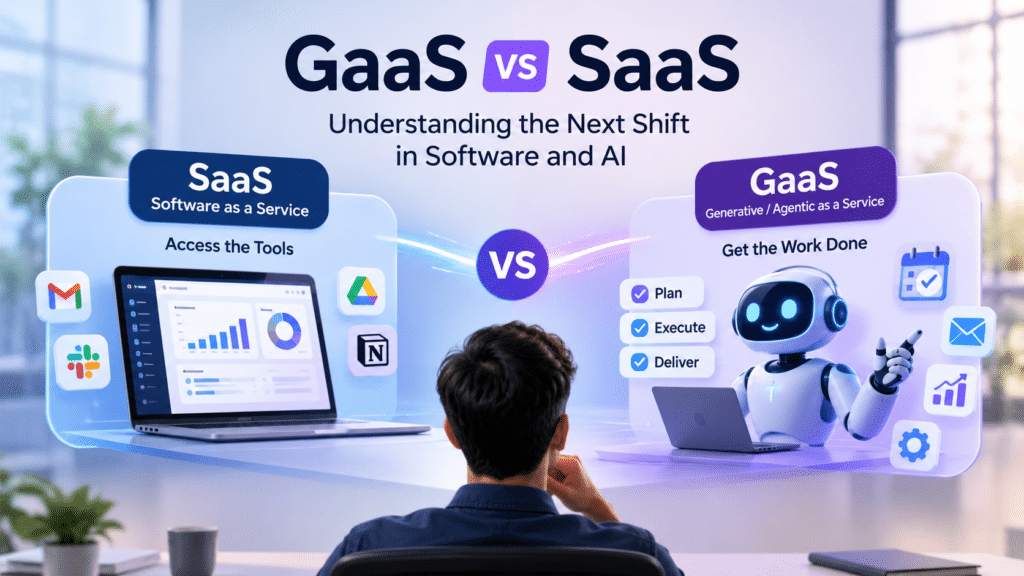
SaaS focuses on providing the software environment, while GaaS focuses on using intelligent agents to complete work.
Here is a practical comparison:
| Comparison | SaaS | GaaS |
|---|---|---|
| Main purpose | Provides software tools | Delivers AI-powered task execution |
| User involvement | Users operate the software | Users define goals and supervise agents |
| Working model | Human-driven workflows | Agent-driven workflows |
| Technology | Cloud applications and APIs | AI models, agents, APIs and connected tools |
| Pricing | Subscription, seats or usage | Tasks, usage, outcomes or hybrid pricing |
| Value proposition | Better tools and productivity | Less manual work and completed tasks |
| Automation | Often follows predefined rules | Can plan and adapt within defined limits |
| Human role | Performs most operational steps | Sets goals, approves and monitors actions |
A Real-World Example: Email Marketing
Let’s take an email marketing campaign to understand the difference.
With SaaS:
A marketing manager opens an email marketing platform, selects a customer segment, creates content, designs the email, schedules delivery, and reviews campaign analytics.
The platform provides the tools, but the marketing manager performs the work.
With GaaS:
A marketing manager gives an AI agent an instruction:
“Prepare a promotional email campaign for customers who haven’t purchased from us in the last 60 days.”
The agent could identify the relevant audience, draft personalized content, prepare the campaign, and schedule it after receiving the required approval.
The manager focuses on reviewing the campaign rather than completing every operational step.
This is how the same business function can operate differently under SaaS and GaaS.
The Shift from SaaS to GaaS: Why Is It Happening?
The shift from SaaS to GaaS is gaining attention because businesses are looking beyond software access. They want measurable improvements in productivity, customer experience, and operational efficiency.
Several developments are contributing to this change.
1. Businesses Want Results, Not More Software
Most growing businesses already use multiple applications for marketing, sales, customer support, accounting, and operations.
The problem is that managing these tools still requires people to move between platforms and complete repetitive tasks.
AI agents introduce another approach.
Instead of asking employees to perform every activity manually, businesses can assign certain workflows to agents that interact with their existing systems.
The goal is not necessarily to replace every application. It is to reduce the manual work required to use those applications.
2. AI Agents Are Becoming More Capable
Early AI tools were mainly used to answer questions, generate text, or provide recommendations.
Modern agentic systems can go further by combining reasoning, planning, memory, and tool usage.
For example, an AI agent can receive a request, retrieve information from a CRM, prepare a response, and update a record through an API.
This ability to connect different actions makes AI more useful for complex business workflows.
3. Businesses Are Looking for Better Operational Efficiency
Repetitive work takes time away from activities that require human judgment and creativity.
Consider an e-commerce business receiving hundreds of orders every day.
Employees may spend hours confirming orders, answering delivery questions, checking order statuses, and following up with customers.
An appropriately configured AI agent can handle many routine interactions and bring unusual cases to the support team’s attention.
This can reduce repetitive workload while allowing employees to focus on more complicated customer requirements.
4. Software Is Becoming More Connected
Modern business applications increasingly offer APIs and integrations that allow different systems to exchange information.
This is important for GaaS because AI agents need access to relevant tools to perform real work.
For example, a sales agent may need to connect with:
- A CRM to access customer information.
- An email platform to communicate with leads.
- A calendar to schedule meetings.
- An analytics platform to track performance.
Without these connections, an AI agent may only provide recommendations rather than completing the entire workflow.
5. Customers Expect Faster and More Personalized Experiences
Customers do not want to wait hours for basic answers or repeat the same information to different support representatives.
AI-powered services can help businesses respond faster, retrieve relevant information, and provide assistance across different communication channels.
This is particularly valuable for e-commerce, where customers often need quick answers about products, payments, deliveries, and returns.
Practical Examples of GaaS Across Different Industries
GaaS is not limited to one industry. Its potential applications extend across different business functions.
Here are some practical examples.
1. E-commerce and Online Retail
An AI-powered e-commerce agent could help businesses manage different stages of the customer journey.
For example, it could:
- Answer product-related questions.
- Recommend relevant products.
- Help customers with order information.
- Send order confirmation messages.
- Follow up with abandoned carts.
- Escalate complicated customer requests.
Imagine a customer asking about a product’s availability on WhatsApp. An AI agent could retrieve product information, answer the question, and guide the customer towards purchasing.
With the necessary integrations and permissions, it could also perform specific actions within the store.
2. Digital Marketing and Sales
Marketing teams spend a considerable amount of time researching leads, writing content, preparing campaigns, and analyzing performance.
A marketing AI agent could support these activities by:
- Researching potential customers.
- Organizing qualified leads.
- Drafting personalized outreach messages.
- Preparing social media content.
- Creating campaign reports.
- Identifying opportunities for follow-up.
For example, a sales team could instruct an agent to research 50 potential Shopify merchants and prepare personalized outreach drafts based on their business websites.
The team can review the information and approve the messages before sending them.
3. Customer Support
Customer support is another area where GaaS can make a meaningful difference.
Instead of relying only on a traditional chatbot that provides predefined answers, an AI support agent can access approved knowledge sources and connected systems to resolve more complex queries.
It could:
- Understand customer questions.
- Retrieve relevant support documentation.
- Check order information.
- Create support tickets.
- Provide troubleshooting steps.
- Escalate unresolved issues.
This creates an opportunity to move from simply answering customer questions towards resolving customer problems.
4. Finance and Accounting
AI agents can also assist finance teams with routine operational activities.
Examples include:
- Organizing financial documents.
- Extracting invoice information.
- Matching transactions with records.
- Preparing expense summaries.
- Flagging unusual entries.
- Generating financial reports.
However, sensitive financial transactions and important accounting decisions should remain subject to appropriate authorization and human review.
5. Human Resources and Recruitment
Recruitment involves several repetitive activities that can be supported by AI agents.
An HR agent could:
- Organize incoming applications.
- Extract relevant candidate information.
- Compare applications against job requirements.
- Prepare interview schedules.
- Send interview reminders.
- Generate recruitment summaries.
Human recruiters would still make important hiring decisions, evaluate candidates, and conduct interviews.
Can SaaS and GaaS Work Together?
Absolutely.
The shift from SaaS to GaaS does not mean that traditional software applications will suddenly disappear.
In fact, SaaS platforms may become the foundation that allows AI agents to perform more useful work.
Think about a business that already uses a CRM, email marketing platform, accounting system, and customer support software.
An AI agent can connect these applications through APIs and perform tasks across them.
For example:
- A customer submits a sales inquiry.
- The AI agent retrieves the customer’s information from the CRM.
- It checks previous interactions.
- It prepares a personalized response.
- It schedules a follow-up.
- It updates the CRM record.
The SaaS applications continue managing business data and providing essential functionality, while the AI agent coordinates the workflow.
This creates a combined model where software provides the infrastructure and AI agents provide execution.
For SaaS companies, this could represent a significant opportunity to add AI-powered capabilities without rebuilding their entire products.
GaaS vs SaaS: Challenges Businesses Should Consider
Although GaaS offers exciting possibilities, businesses should understand its limitations before adopting it.
AI agents can perform actions independently, which means errors can have real operational consequences.
1. Data Security and Privacy
AI agents may need access to customer records, business applications, and internal documents.
Businesses must carefully manage permissions and ensure that agents only access the information necessary for their assigned tasks.
2. Accuracy and Reliability
An AI agent may misunderstand an instruction, retrieve incorrect information, or perform an unexpected action.
For this reason, businesses should test agent workflows before deploying them at scale.
3. Human Supervision
Not every business decision should be automated.
Actions involving payments, refunds, sensitive customer information, or legal commitments may require human approval.
A reliable GaaS implementation should clearly define which tasks an agent can perform independently and which require authorization.
4. Integration Complexity
An AI agent is only as useful as the systems it can access.
If business applications do not provide suitable APIs or integrations, completing complex workflows may become difficult.
5. Unpredictable Operating Costs
AI services may involve model usage, API calls, infrastructure, and third-party integration charges.
Without proper usage limits and monitoring, costs can increase as agents perform more tasks.
Businesses should understand how providers calculate pricing before choosing a GaaS solution.
Is GaaS the Future of SaaS?
GaaS represents an important direction in the development of software and AI-powered business services.
However, it would be inaccurate to say that SaaS is disappearing.
Businesses will continue to need reliable software for storing information, managing processes, securing data, and providing access to essential tools.
What is changing is how people interact with that software.
Instead of manually navigating every dashboard and performing every action, users can increasingly delegate defined workflows to intelligent agents.
For SaaS founders, this creates an opportunity to rethink product development.
Rather than focusing only on adding more features, companies can explore how their platforms can:
- Provide better API access.
- Support AI agent integrations.
- Automate repetitive workflows.
- Deliver measurable business outcomes.
- Offer flexible usage and execution-based pricing.
The companies that understand this shift may find new ways to deliver value to their customers.
The future may not belong exclusively to SaaS or GaaS. It may belong to platforms that combine dependable software with intelligent, well-governed AI execution.
Final Thoughts: From Software Access to Work Completed
The conversation around GaaS vs SaaS highlights an important change in how businesses think about technology.
SaaS made powerful software accessible without requiring businesses to manage complex infrastructure. It changed how companies purchased and used digital tools.
GaaS takes the conversation further by introducing AI agents that can perform multi-step tasks using connected applications and business data.
The difference is not simply about having smarter software. It is about reducing the distance between giving an instruction and achieving a result.
For businesses, the opportunity is to spend less time managing repetitive workflows and more time focusing on growth, customer relationships, and strategic decisions.
For software companies, the challenge is to move beyond selling access to features and explore how their products can deliver greater value through intelligent execution.
SaaS helped businesses access software. GaaS aims to help businesses get work done.
Frequently Asked Questions (FAQs)
1. What is the main difference between SaaS and GaaS?
SaaS provides users with software tools to perform tasks, while GaaS uses AI agents to execute tasks on behalf of users. SaaS focuses on software access, whereas GaaS focuses on task execution and results.
2. What does GaaS stand for?
GaaS can refer to Generative as a Service or Agentic as a Service, depending on the context. In the SaaS vs GaaS discussion, it generally describes AI-powered services that use intelligent agents to perform business tasks.
3. Is GaaS replacing SaaS?
Not necessarily. GaaS is an emerging service model, but SaaS remains essential for providing applications, infrastructure, and business data. Many future solutions will likely combine SaaS platforms with AI agents.
4. How do AI agents work in GaaS?
AI agents receive instructions, understand objectives, break tasks into smaller steps, use connected tools, and perform permitted actions. They can also monitor progress and request human assistance when necessary.
5. How does GaaS make money?
GaaS providers can charge through task-based, usage-based, subscription-based, or outcome-based pricing. Some providers combine a monthly subscription with additional charges for agent usage.
6. Can small businesses use GaaS?
Yes. Small businesses can use AI-powered agents for customer support, lead generation, marketing, sales follow-ups, and repetitive administrative tasks. They can start with specific workflows rather than automating their entire business.
7. What are some examples of GaaS?
Examples include AI customer support agents, sales development agents, automated marketing agents, recruitment agents, and finance workflow agents that interact with connected business applications.
8. Is GaaS the same as AI automation?
No. Traditional automation generally follows predefined rules and workflows. GaaS, when built around agentic AI, can interpret goals, select tools, and adapt its actions within defined permissions. Both approaches can also work together.
9. What are the biggest challenges of GaaS?
The main challenges include data privacy, security, inaccurate outputs, integration complexity, operating costs, and the need for human supervision.
10. What is the future of SaaS and GaaS?
The future is likely to involve a combination of both models. SaaS will continue providing essential software capabilities, while AI agents will increasingly help users perform tasks across different applications.