How to Integrate WhatsApp with Shopify: 7 Easy Steps
How to Integrate WhatsApp with Shopify: A Complete Step-by-Step Guide
If you run a Shopify store, you already know that getting an order is only the beginning.
Customers may want to ask about delivery, check their order status, confirm an order, request product information, or simply contact your store before making a purchase. And when most of those conversations happen on WhatsApp, switching between Shopify and WhatsApp throughout the day can quickly become frustrating.
That is where a Shopify WhatsApp integration can make things easier.
With the right setup, you can connect your Shopify store with WhatsApp and use it for customer communication, order updates, marketing and different types of automation.
In this guide, we’ll explain how to integrate WhatsApp with Shopify, what you need before getting started, the different ways you can use WhatsApp with Shopify, and when a Shopify WhatsApp automation app makes more sense than a basic connection.
Table of Contents
What Is Shopify WhatsApp Integration?
Shopify WhatsApp integration means connecting your Shopify store with WhatsApp so that you can communicate with customers through WhatsApp while using information from your Shopify store.
Depending on the setup you choose, this can include things like:
- WhatsApp order updates
- Order confirmation messages
- Customer support
- Product questions
- Delivery notifications
- Abandoned checkout reminders
- Review requests
- Promotional campaigns
- Automated replies
- Customer notifications
Shopify itself now supports WhatsApp marketing through Shopify Messaging. Shopify’s current setup allows eligible stores to connect a WhatsApp Business Account through Meta’s embedded signup and manage WhatsApp marketing from Shopify.
For stores that need more advanced workflows, a dedicated WhatsApp automation Shopify app can connect Shopify events with automated WhatsApp conversations and notifications.
Why Connect WhatsApp to Your Shopify Store?
Think about a typical Shopify order.
A customer places an order. Your team may need to confirm the order, answer questions, provide updates and follow up if the customer doesn’t respond.
Doing all of this manually becomes difficult as order volume increases.
A Shopify WhatsApp integration can help bring these conversations into a channel customers already use.
1. Send order updates automatically
Instead of manually messaging customers about every order, you can automate notifications for relevant Shopify events.
For example:
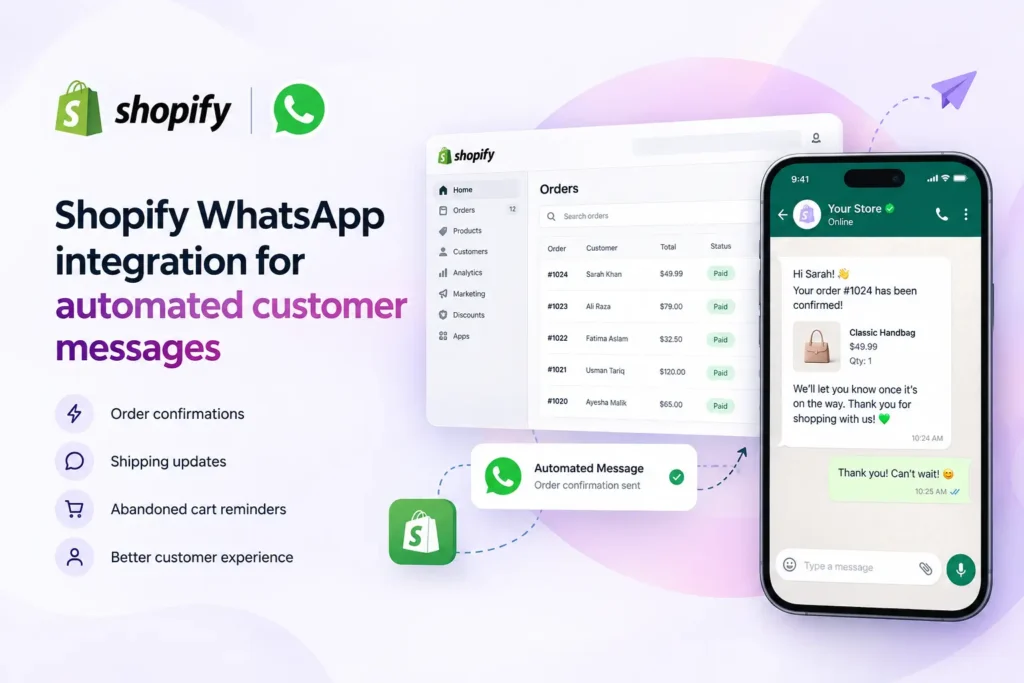
“Hi Sarah, your order #1048 has been received and is being processed.”
Depending on the integration, you can also send updates related to fulfillment and delivery.
2. Make order confirmation easier
This can be particularly useful for stores that receive a lot of COD orders.
Instead of calling every customer manually, an automated WhatsApp workflow can send an order confirmation message and ask the customer to confirm.
This can save your team from repeatedly making the same calls and messages.
3. Give customers a faster way to contact you
Customers often prefer messaging instead of filling out contact forms or waiting for an email response.
A WhatsApp button or chat widget can give shoppers a direct way to contact your business.
4. Recover abandoned checkouts
If your setup supports abandoned checkout automation, you can follow up with customers who started the checkout process but didn’t complete their purchase.
The message can be simple:
“Hi! You left something in your cart. Would you like to complete your order?”
Always make sure your messaging follows the applicable WhatsApp policies and consent requirements.
5. Use WhatsApp for marketing
WhatsApp can also be used as a marketing channel when customers have provided the required consent.
Shopify currently supports WhatsApp marketing campaigns through Shopify Messaging, including templates, media and interactive elements. Shopify also notes that WhatsApp marketing messages require customer opt-in and must follow WhatsApp’s messaging policies.
What Do You Need Before Connecting WhatsApp to Shopify?
Before starting your Shopify WhatsApp integration, prepare a few things.
Shopify store
You obviously need an active Shopify store with access to the Shopify admin.
WhatsApp Business Account
For business messaging and automation, you’ll generally need a WhatsApp Business Account rather than simply using WhatsApp as a personal messaging application.
Shopify’s current WhatsApp setup supports connecting an existing WhatsApp Business Account or creating a new one through the setup process.
Meta Business account
Depending on the integration you’re using, you’ll need access to your Meta Business account and the required permissions.
Business phone number
You’ll also need a phone number for your WhatsApp Business setup.
Shopify currently allows businesses to use an existing business number or add another number during WhatsApp setup.
Customer consent
This is one of the most important parts of WhatsApp marketing.
Don’t treat WhatsApp like an unrestricted email list. For marketing messages, customers need to provide the appropriate consent, and messages must comply with WhatsApp’s policies. Shopify specifically states that customers must explicitly opt in to receive WhatsApp marketing messages.
How to Integrate WhatsApp with Shopify
There are several ways to connect WhatsApp with Shopify. The right option depends on what you actually want WhatsApp to do.
Method 1: Connect WhatsApp Through Shopify Messaging
Shopify has its own WhatsApp marketing functionality through Shopify Messaging.
If your goal is primarily to send WhatsApp marketing campaigns, this can be a straightforward option.
Step 1: Open your Shopify admin
Log in to your Shopify store and open the Shopify admin.
Step 2: Open Shopify Messaging
Go to:
Apps → Messaging → Settings
Shopify’s current setup instructions place the WhatsApp connection under Shopify Messaging settings.
Step 3: Select WhatsApp
Find the WhatsApp section and select Connect WhatsApp.
Step 4: Connect your WhatsApp Business Account
If you already have a WhatsApp Business Account, Shopify provides an option to connect it.
If you don’t have one, you can create a new WhatsApp account during the setup process.
Step 5: Connect through Meta
You’ll be taken through Meta’s business login and WhatsApp setup process.
You may need to provide:
- Business name
- Business category
- Phone number
- WhatsApp Business information
Shopify’s current documentation explains that businesses can use their own phone number or request a number through the setup flow.
Step 6: Verify the phone number
If you’re using your own phone number, you’ll need to verify it through the available verification method.
Step 7: Complete the connection
Once the Meta and Shopify connection is completed, return to Shopify and finish the setup.
Your WhatsApp Business Account is now connected to your Shopify workflow.
Method 2: Use a Shopify WhatsApp Automation App
If your goal goes beyond basic marketing, you may want a dedicated WhatsApp automation Shopify app.
This is useful when you want Shopify events to automatically trigger WhatsApp messages.
For example:
Shopify order placed → WhatsApp order confirmation
or:
Order fulfilled → WhatsApp delivery/review message
or:
Abandoned checkout → WhatsApp reminder
This approach can be particularly useful for stores that want to reduce repetitive customer support work.
A dedicated app can also provide additional automation features that aren’t necessarily part of a basic WhatsApp connection.
What Can Shopify WhatsApp Automation Do?
The exact features depend on the app, but common Shopify WhatsApp automation workflows include:
WhatsApp order confirmation
When a customer places an order, an automated WhatsApp message can be sent with the order information.
For example:
“Hi Alex, thanks for your order! Your order #1052 has been received. Please confirm your order below.”
Abandoned checkout reminders
A reminder can be sent when a customer leaves checkout without completing the purchase.
Order status notifications
Customers can receive updates as their order moves through the fulfillment process.
Review requests
After an order has been delivered, you can automatically ask the customer to leave a review.
Customer support
A WhatsApp integration can also make it easier for customers to ask questions about products, shipping, returns or orders.
Promotional campaigns
With the appropriate customer consent and approved messaging setup, you can use WhatsApp to promote new products, collections and special offers.
Shopify WhatsApp Integration vs WhatsApp Automation
These two terms are often used interchangeably, but there is a difference.
Shopify WhatsApp integration generally means connecting your Shopify store with WhatsApp.
Shopify WhatsApp automation goes one step further by automatically triggering actions based on Shopify events or customer activity.
For example:
| Requirement | Basic Integration | WhatsApp Automation |
|---|---|---|
| Connect WhatsApp | Yes | Yes |
| Customer messaging | Yes | Yes |
| Order updates | Depends on setup | Yes |
| Automated confirmations | Limited/depends on setup | Yes |
| Abandoned checkout reminders | Depends on setup | Often available |
| Review requests | Depends on setup | Often available |
| Marketing campaigns | Available with supported setup | Available with supported setup |
| Automated workflows | Limited | More advanced |
The important thing is to choose the setup based on your store’s actual requirements rather than installing an app simply because it has “WhatsApp” in its name.
How to Choose a WhatsApp Automation Shopify App
If you are comparing different Shopify WhatsApp apps, don’t only look at the app’s star rating.
Look at what the app actually does.
Check WhatsApp API support
If you need business automation, check whether the solution uses the official WhatsApp Business Platform/API and how the provider handles onboarding.
This is especially important if WhatsApp is going to become a major communication channel for your store.
Check which Shopify events are supported
Ask yourself what you actually want to automate.
For example:
- New order
- Order confirmation
- Order fulfillment
- Delivery
- Abandoned checkout
- Customer review
- Promotional campaign
The more specific your requirements are, the easier it becomes to compare apps.
Check message template support
WhatsApp business messaging can involve templates and Meta approval depending on the type of message.
Shopify notes that WhatsApp marketing templates must be submitted to Meta before they can be used in campaigns.
Check pricing
Don’t only compare the Shopify app subscription.
Depending on the provider and messaging type, additional WhatsApp/Meta charges may apply. Shopify also notes that external charges can apply for its WhatsApp functionality.
Check customer support
This is easy to overlook.
If your WhatsApp connection stops working during a busy sales period, you don’t want to spend hours trying to figure out whether the problem is Shopify, Meta, the app or your phone number.
Look for clear documentation and responsive support.
Common Problems When Connecting WhatsApp to Shopify
WhatsApp integration isn’t always completely smooth. Here are some issues you may run into.
Your WhatsApp number is already connected somewhere else
If your WhatsApp Business Account is already connected to another provider, you may need to disconnect it before connecting it through Shopify.
Shopify specifically notes this requirement for its WhatsApp Messaging setup.
Don’t disconnect an existing setup without first understanding what will happen to your current messaging and marketing configuration.
Your business information doesn’t match
Make sure the business information you’re submitting through Meta is accurate and consistent.
Messages aren’t being delivered
There can be several reasons for this, including:
- Incorrect phone number
- Customer hasn’t opted in where required
- Template issue
- WhatsApp policy restrictions
- Account limitations
- Configuration problems
Check the WhatsApp and Shopify status/configuration before assuming the Shopify integration itself is broken.
Marketing messages aren’t sending
Marketing has additional requirements.
Shopify currently requires explicit WhatsApp marketing consent and states that WhatsApp marketing campaigns must follow applicable WhatsApp Business policies.
Is WhatsApp Integration Worth It for a Shopify Store?
It depends on how your customers communicate with your business.
If your customers already use WhatsApp to ask questions, confirm orders or request updates, connecting WhatsApp with Shopify can reduce the amount of repetitive manual communication your team handles.
It becomes even more useful when you move from simply adding a WhatsApp chat button to building useful automations around your Shopify workflow.
For example:
Customer places order → automatic confirmation → fulfillment update → delivery update → review request
Instead of your team remembering every step, the workflow handles routine communication automatically.
That is the real value of Shopify WhatsApp automation.
Frequently Asked Questions
Can I connect WhatsApp to Shopify?
Yes. Shopify currently supports WhatsApp through Shopify Messaging, and there are also dedicated Shopify apps that connect stores with WhatsApp for order updates and other workflows.
Do I need WhatsApp Business for Shopify?
For business messaging and automation, a WhatsApp Business Account is generally the appropriate setup. Shopify’s WhatsApp marketing connection uses a WhatsApp Business Account.
Can I send Shopify order confirmations on WhatsApp?
Yes, depending on the WhatsApp integration or app you choose. Dedicated Shopify WhatsApp solutions can be used for automated order updates and notifications.
Can WhatsApp automatically send abandoned checkout reminders?
Some Shopify WhatsApp automation apps support abandoned checkout workflows. However, the exact trigger and messaging capabilities depend on the app and WhatsApp’s messaging requirements.
Can I use WhatsApp for Shopify marketing?
Yes, where supported and where customers have provided the required consent. Shopify now supports WhatsApp marketing through Shopify Messaging, including campaign templates and interactive features.
Is Shopify WhatsApp integration free?
It depends on the integration you choose. Some Shopify apps are free to install, while additional subscription or messaging charges may apply. Shopify also notes that external charges can apply to WhatsApp messaging.
Can I use my existing WhatsApp phone number?
This depends on how your current WhatsApp Business Account is configured and which integration you choose. Shopify’s current setup supports connecting an existing WhatsApp Business Account, but there are requirements around existing provider connections.
What is the difference between WhatsApp and a WhatsApp automation Shopify app?
A basic WhatsApp connection allows your Shopify store to communicate through WhatsApp. A WhatsApp automation Shopify app is designed to automate specific workflows, such as order confirmations, notifications, abandoned checkout reminders or review requests.
Do I need customer consent for WhatsApp marketing?
Yes. Shopify states that customers must explicitly opt in to receive WhatsApp marketing messages. Always follow the applicable WhatsApp Business messaging policies and local requirements.
Which Shopify WhatsApp integration should I use?
Start with your actual requirement. If you mainly need WhatsApp marketing, Shopify Messaging may be enough. If you need multiple automated workflows around orders, customer support and post-purchase communication, compare dedicated https://haleria.com/ based on their features, API setup, pricing and support.