
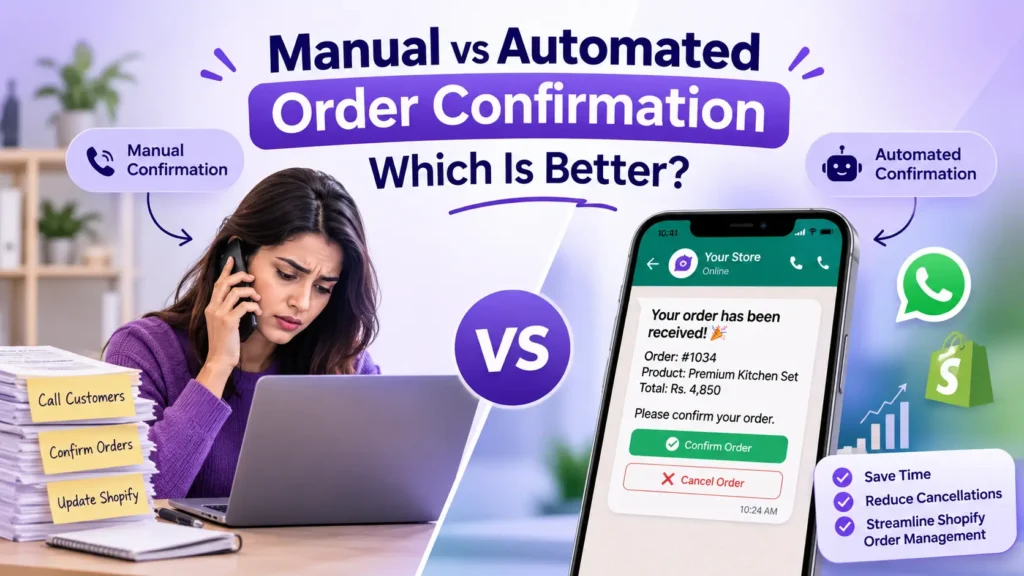
Table of Contents
An order comes in. You receive a notification, open your Shopify dashboard, check the customer’s details, and pick up your phone to confirm the order. Then you wait for a response. Sometimes the customer answers immediately. Other times, you call twice, send a WhatsApp message, and still get no reply.
Now imagine handling 20, 50, or even 100 orders every day.
What seems like a simple task can quickly become one of the most time-consuming parts of running an online store.
Order confirmation is an important step in the buying process. It helps store owners verify customer details, communicate order information, and prepare orders for the next stage. But as an ecommerce business grows, confirming every order manually becomes harder to manage.
This is where automated order confirmation comes in.
But is automation always better? Or does manual confirmation still make sense for some businesses?
Let’s compare both approaches, understand their advantages and limitations, and find out which one makes more sense for your Shopify store.
What Is Order Confirmation in Ecommerce?
Order confirmation is the process of acknowledging a customer’s purchase and communicating that the order has been received.
After completing checkout, customers usually expect to receive an order confirmation message containing important information such as:
- Order number and purchase details
- Products and quantities ordered
- Total order amount
- Shipping or delivery information
- Expected next steps
For store owners, order confirmation can also involve checking whether the customer genuinely placed the order, especially when dealing with Cash on Delivery (COD) purchases.
It’s important to understand that a standard order confirmation notification and customer verification are not exactly the same thing.
A confirmation email tells the customer that an order has been received. An additional verification step asks the customer to confirm whether they actually want to proceed with that order.
This difference matters when choosing between manual and automated order confirmation.
What Is Manual Order Confirmation?
Manual order confirmation means a store owner or support representative personally contacts customers after they place an order.
For example, a customer purchases a product from your Shopify store using Cash on Delivery. Once the order appears in your dashboard, someone from your team calls the customer to verify the purchase.
The conversation usually includes questions like:
- Did you place this order?
- Is your delivery address correct?
- Are you available to receive the package?
- Would you like to proceed with the order?
Once the customer confirms, the team updates the order status or adds an appropriate tag in Shopify.
How Manual Order Confirmation Works
A typical manual process looks like this:
- A customer places an order on your Shopify store.
- The order appears in the Shopify admin dashboard.
- Your team checks the order and customer information.
- A representative calls or messages the customer.
- The customer confirms or cancels the purchase.
- Your team manually updates the order status.
This approach gives businesses direct communication with customers. However, it also means every order requires someone’s attention.
Advantages of Manual Order Confirmation
Personal communication
You can speak directly with customers, understand their concerns, and answer questions before dispatching their orders.
Better for unusual orders
Some orders require additional attention, such as incomplete addresses, special delivery instructions, or unusual product requests.
Direct customer feedback
A conversation can help your team understand why a customer is hesitant or wants to change an order.
Disadvantages of Manual Order Confirmation
Despite its advantages, manual confirmation has some practical limitations.
1. It takes time
Every phone call or WhatsApp conversation requires time. When order volume increases, your team spends more time confirming purchases and less time handling other important tasks.
2. Customers may not answer
You can call a customer multiple times, but there is no guarantee they will pick up. This delays the confirmation process.
3. Human errors can happen
A team member might forget to update an order, enter the wrong information, or miss a customer’s cancellation request.
4. Difficult to manage during busy periods
Sales campaigns, seasonal promotions, and discount events can generate more orders than your team can comfortably handle.
5. Delayed order processing
When confirmations are pending, your team may have to wait before moving orders to the next stage.
Manual confirmation isn’t necessarily a bad approach. It simply becomes harder to maintain as your store grows.
What Is Automated Order Confirmation?
Automated order confirmation uses software or an integrated application to send confirmation requests and collect customer responses without requiring your team to contact every buyer individually.
Instead of manually calling customers, your system can send an order confirmation message as soon as a new order is placed.
Depending on the setup, customers can confirm or cancel their purchases through interactive buttons or other response options.
For Shopify stores, this can be especially useful when handling a large number of COD orders.
How Automated Order Confirmation Works
Here’s a simple example of an automated workflow:
- A customer places an order on your Shopify store.
- The system detects the new order.
- An automated order confirmation message is sent to the customer’s registered contact number.
- The customer receives Confirm and Cancel options.
- The customer selects an option.
- The connected system updates the corresponding order status or adds a relevant tag in Shopify.
For example, a customer places order #1034.
They immediately receive a WhatsApp message:
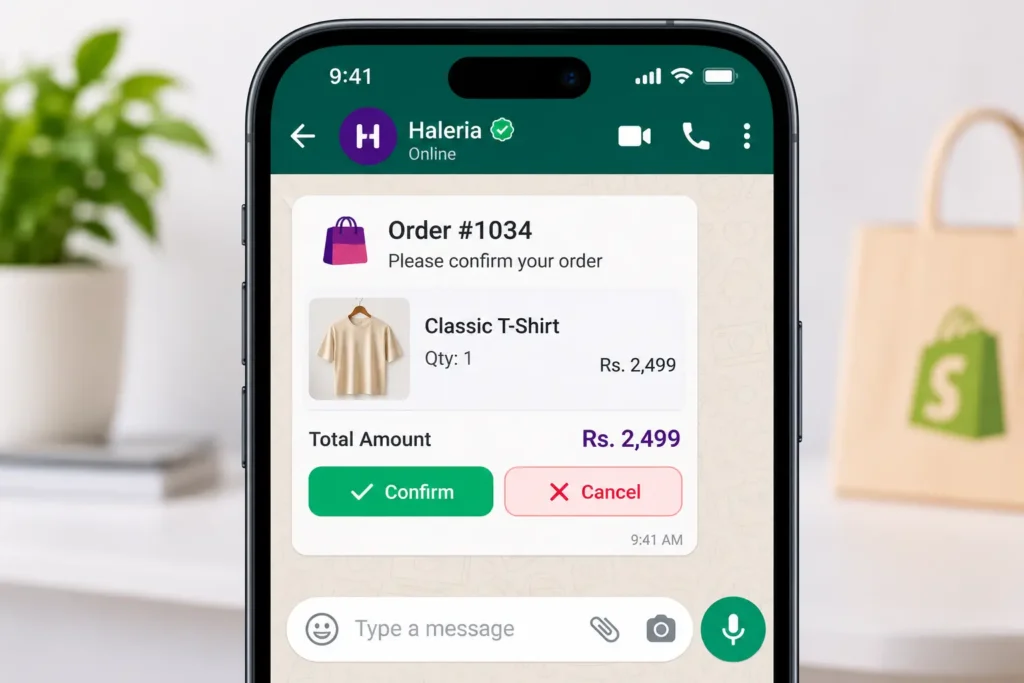
Your order has been received!
Order: #1034
Product: Premium Kitchen Set
Total: Rs. 4,850
Please confirm whether you would like to proceed with your order.
[Confirm Order] [Cancel Order]
If the customer selects Confirm, the order can be tagged as confirmed. If they select Cancel, the store team can identify it without manually contacting the customer.
The entire process can happen automatically, depending on the integration and workflow configuration.
Advantages of Automated Order Confirmation
1. Saves valuable time
Your team no longer needs to call every customer individually. The system handles routine confirmation requests automatically.
2. Faster customer responses
Customers receive their confirmation request immediately after placing an order, rather than waiting for a representative to contact them.
3. Reduces repetitive work
Instead of manually checking every order and updating its status, your team can focus on exceptions and customer requests that need personal attention.
4. Easier Shopify order management
Confirmation responses can be reflected in your Shopify dashboard through order tags or connected workflow updates. Your team can quickly identify which orders are confirmed, cancelled, or still waiting for a response.
5. Supports business growth
Whether you receive 10 orders or several hundred, automated workflows can handle repetitive confirmation requests without requiring the same increase in manual effort.
Are There Any Disadvantages to Automated Order Confirmation?
Automation is useful, but it isn’t a complete replacement for human support.
There are a few things store owners should consider:
- Initial setup: You need to connect the right application, configure the workflow, and test the messages before going live.
- Customer response: Sending a confirmation request doesn’t guarantee that every customer will respond.
- Message costs: Depending on the communication channel, provider, and message category, additional charges may apply.
- Technical reliability: Incorrect settings or integration issues can interrupt the workflow.
- Human assistance: Customers with unusual requests may still need to speak with a real person.
The best setup combines automation for routine tasks with human support when a situation requires personal attention.
Manual vs Automated Order Confirmation: Key Differences
Both methods help businesses confirm customer purchases, but they work differently.
Here’s how they compare:
| Comparison | Manual Confirmation | Automated Confirmation |
|---|---|---|
| Customer contact | Personal calls or messages | Automatic messages |
| Response collection | Handled by staff | Collected through configured workflows |
| Speed | Depends on staff availability | Can start immediately after an order |
| Team involvement | Required for each routine confirmation | Mainly required for exceptions |
| Order updates | Often entered manually | Can be updated through integration |
| Scalability | Requires more staff as volume grows | Handles repetitive tasks at greater scale |
| Customer interaction | Direct conversation | Structured confirmation options |
| Setup | Minimal technical setup | Requires application and workflow configuration |
The main difference is how much manual effort your team needs to invest in every order.
Manual confirmation gives you direct control over every conversation. Automated confirmation makes routine verification easier to manage and gives your team more time for other responsibilities.
Manual vs Automated Order Confirmation: Which Is Better for Your Shopify Store?
The right choice depends on your order volume, business model, and how your customers prefer to communicate.
When Manual Confirmation Makes Sense
Manual confirmation can be a reasonable choice if:
- You receive only a few orders each day.
- Your products require detailed customer discussions.
- You frequently receive special delivery requests.
- You want to personally verify every order.
- Your current team can comfortably manage the workload.
For a small store with limited daily orders, manual calling may be enough.
When Automated Order Confirmation Makes More Sense
Automation becomes more useful when:
- Your Shopify store receives orders throughout the day.
- Most of your orders are Cash on Delivery.
- Your team spends hours calling customers.
- You experience delays because customers don’t answer calls.
- You want a more organized confirmation process.
- You are planning to increase your store’s order volume.
For growing ecommerce businesses, automating repetitive tasks can make daily operations easier without adding unnecessary manual work.
Can You Combine Both Methods?
Absolutely. In fact, combining both methods is often a practical approach.
You can automate routine order confirmation and let your team handle situations that need personal attention.
For example:
- Confirmed orders move to the next processing stage.
- Cancelled orders are identified for review.
- Orders without a response remain pending.
- Customers with special requests can be contacted by your support team.
This way, automation handles repetitive communication while your team stays available for important customer interactions.
How to Automate Order Confirmation on Shopify Using WhatsApp
If your store receives regular COD orders, WhatsApp can be a convenient channel for collecting customer confirmation.
Instead of calling every buyer, you can use an automated WhatsApp workflow connected to your Shopify store.
Here’s how the process can work:
Step 1: Connect your Shopify store
Install an order automation application and connect it to your Shopify store.
Step 2: Connect your WhatsApp Business account
Use an integration that supports the Official WhatsApp Business Platform/API. Make sure your business account and required message templates are properly configured and approved.
Step 3: Enable order confirmation notifications
Set up the workflow to trigger whenever a new order is placed.
Step 4: Customize your order confirmation message
Include useful information such as the order number, product details, total amount, and Confirm and Cancel buttons.
Step 5: Configure Shopify order updates
Connect customer responses to the appropriate Shopify order tags or workflow actions.
Step 6: Test the complete workflow
Place a test order and check whether the message is delivered, the buttons work, and the correct order tag is applied.
Once everything is working properly, your store can start handling routine order confirmations automatically.
How Haleria Helps Shopify Stores Automate Order Confirmation
For Shopify store owners who want to reduce manual work, Haleria offers WhatsApp order confirmation automation through the Official WhatsApp Business API.
Instead of calling every customer after a purchase, store owners can configure an automated WhatsApp message with Confirm and Cancel buttons.
Here’s how the workflow works:
- A customer places an order on your Shopify store.
- Haleria sends an automated WhatsApp order confirmation message.
- The customer selects Confirm or Cancel.
- If the customer confirms, the Shopify order receives the Confirmed through WhatsApp tag.
- If the customer cancels, the order receives the Cancel through WhatsApp tag.
Your team can then identify customer responses directly from the Shopify dashboard.
This makes it easier to organize incoming orders and reduces the need to manually contact every customer.
Haleria also offers automated phone call order confirmation. Customers can press 1 to confirm their order or 2 to cancel it, with the corresponding response reflected through Shopify order tags.
Beyond order confirmation, Haleria brings AI customer support and WhatsApp automation into one application, helping Shopify businesses manage customer conversations and repetitive communication from one place.
If you want to see how it works, explore Haleria AI Sales & Support and try the available plan for your Shopify store.
Final Verdict: Is Automated Order Confirmation Worth It?
Manual order confirmation works when your store has a manageable number of orders and your team has enough time to contact every customer.
But as your business grows, the same process can become difficult to maintain. More orders mean more calls, more follow-ups, and more opportunities for delays or missed updates.
Automated order confirmation offers a more scalable way to handle routine customer verification. It sends messages quickly, collects customer responses, and can update Shopify orders through connected workflows.
You don’t have to remove human communication completely. Let automation handle repetitive confirmations and keep your team available for customers who genuinely need assistance.
The goal isn’t to replace customer communication. It’s to make sure your team spends less time repeating the same tasks and more time growing the business.
Frequently Asked Questions (FAQs)
1. What is the difference between manual and automated order confirmation?
Manual order confirmation requires a store owner or team member to contact customers individually. Automated order confirmation uses software to send confirmation requests and collect responses without requiring a person to handle every routine interaction.
2. How does automated order confirmation work on Shopify?
When a customer places an order, a connected application detects the new order and sends an automatic confirmation request through a supported channel, such as WhatsApp. The customer’s response can then trigger an order tag or another configured action in Shopify.
3. Does Shopify automatically send an order confirmation message?
Shopify supports automatic customer order confirmation notifications, including email notifications. However, an email notification is different from an additional customer verification workflow with Confirm and Cancel options. Store owners can use integrations to create these additional workflows.
4. Can I confirm Shopify COD orders through WhatsApp?
Yes. With a suitable WhatsApp Business API integration, you can send customers an order confirmation message with Confirm and Cancel buttons. Their responses can be connected to Shopify order updates.
5. Does automated order confirmation reduce fake COD orders?
It can help identify customers who do not want to proceed with their purchases by giving them a simple way to confirm or cancel. However, it cannot guarantee that all fake orders will be prevented because customers may ignore messages or provide incorrect information.
6. Can automated order confirmation update Shopify order tags?
Yes. With a properly configured Shopify integration, customer responses can trigger order tags such as Confirmed or Cancelled. The exact tags and actions depend on the application and its settings.
7. Is automated order confirmation suitable for small businesses?
Yes. Even small businesses can benefit from automation when repetitive calls and messages take time away from other responsibilities. The main consideration is whether the time saved justifies the setup and messaging costs.
8. Can I use both manual and automated order confirmation?
Yes. You can automate routine confirmation requests and allow your team to handle unanswered orders, special requests, and customer concerns that need personal attention.
9. Is WhatsApp order confirmation free?
Not necessarily. Costs depend on the WhatsApp Business Platform pricing, message category, recipient country, and integration provider. Check the applicable Meta pricing and your provider’s charges before enabling the workflow.
10. What is the best way to automate Shopify order confirmation?
Choose an application that connects with Shopify, supports your preferred communication channel, provides reliable customer response tracking, and can update order information. Test the entire workflow before using it for live orders.