
Table of Contents
Imagine this: A customer visits your Shopify store, finds exactly what they have been looking for, checks the product details, selects their preferred size or colour, and gets ready to buy.
But there is one problem.
The product is out of stock.
The customer might wait a few days, but most likely, they will leave and look for the same product somewhere else. You have already attracted their attention, but a simple inventory issue could cost you a sale.
Now, imagine that the customer receives a message a few days later:
“Good news! The product you were waiting for is finally back in stock. Order yours before it sells out again!”
That small notification can bring an interested customer back to your store.
This is exactly why a back in stock message matters for eCommerce businesses. Instead of losing customers when popular products sell out, you can give them a reason to return when inventory becomes available again.
Whether you run a Shopify clothing store, electronics business, beauty brand, or any other online shop, back-in-stock notifications can help you reconnect with shoppers who have already shown interest in your products.
Let’s explore how these messages work, some ready-to-use examples, and how Shopify businesses can automate the entire process.
What Is a Back in Stock Message?
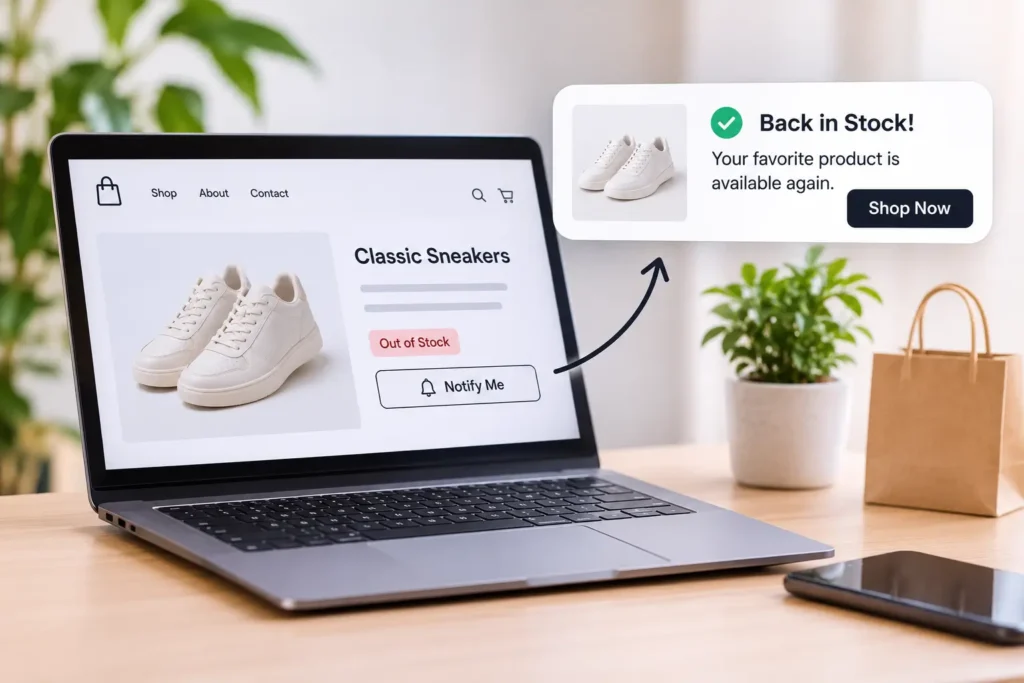
A back in stock message is a notification sent to customers when a previously unavailable product becomes available for purchase again.
For example, suppose someone wants to purchase a particular pair of sneakers from your store, but their preferred size is sold out. Instead of leaving without any further action, they can subscribe to a restock notification.
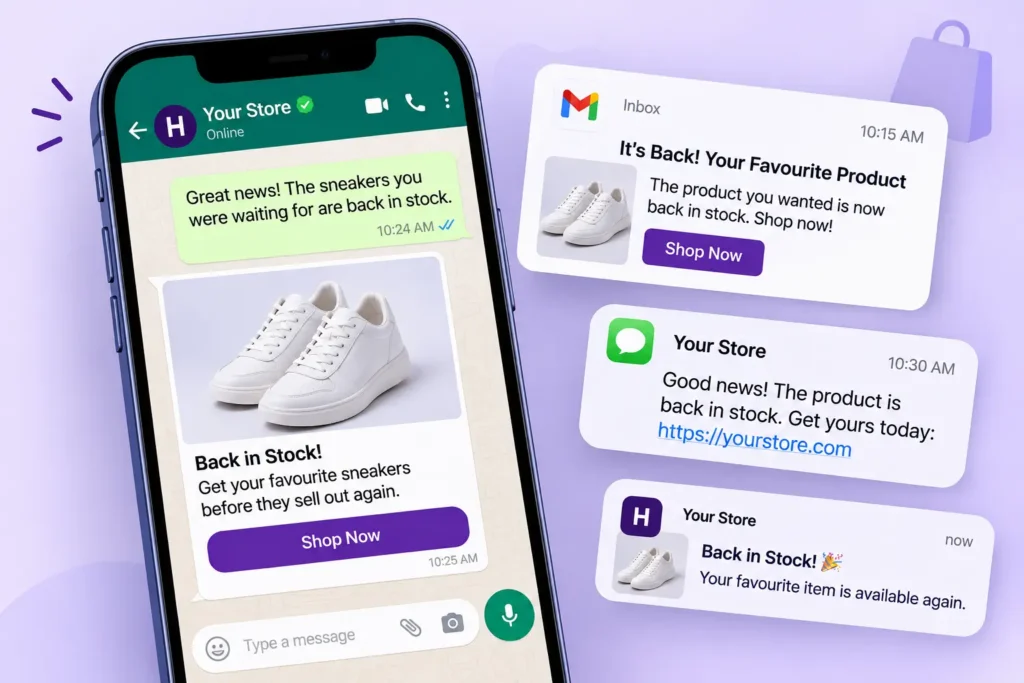
Once you update the inventory and the product becomes available, the customer receives an automatic alert through email, SMS, WhatsApp, or a supported push notification service.
The message usually includes:
- Product name and image
- A short restock announcement
- A direct link to the product page
- A clear call to action, such as “Shop Now”
- Relevant information about availability
The purpose is simple: bring interested shoppers back when the product they wanted is available.
Why Are Back in Stock Notifications Important for eCommerce Stores?
Running out of stock is not always a bad sign. Sometimes, it means your products are selling faster than expected.
However, the real challenge begins when interested customers cannot purchase what they want.
Without a notification system, customers have to remember your store, revisit the product page, and check availability themselves. Most shoppers will not take that extra step.
Here is how back-in-stock messages can help.
1. Recover Sales You Might Otherwise Lose
A customer who signs up for a restock alert has already expressed interest in a particular product.
You do not need to introduce your brand or convince them to explore your store again. You simply need to let them know that the product is available.
A timely notification makes it easier for that customer to complete their purchase.
2. Bring Customers Back to Your Shopify Store
People often forget about products they wanted to purchase, especially when they are shopping across multiple websites.
A back-in-stock notification gives them a relevant reason to revisit your store.
Unlike a general promotional message, this notification is connected to something the customer specifically requested.
3. Create a Better Shopping Experience
Customers do not enjoy repeatedly checking product pages to see whether something is available.
A simple notification removes that inconvenience.
It also shows that your business values customer preferences and makes the shopping experience more convenient.
4. Understand Which Products Customers Actually Want
Restock subscriptions can provide useful information about customer demand.
For example, if 150 people subscribe to receive an alert for one particular product, you have a better indication of the interest in that item.
You can use this information when planning inventory, deciding which products to restock, and identifying popular sizes or variations.
5. Create Another Opportunity to Generate Revenue
Every restock notification creates another opportunity to bring a potential customer back.
Instead of allowing an out-of-stock product to become a dead end, you can turn it into another customer touchpoint.
The key is to notify customers when the item is genuinely available and make purchasing as easy as possible.
15 Back in Stock Message Examples You Can Use
Not every customer responds to the same type of message. Some prefer short and direct notifications, while others appreciate a more personal tone.
Here are some practical back in stock message examples for different industries and marketing channels.
1. Simple Back in Stock Message
“Good news! Your favourite product is back in stock. Don’t miss the chance to get yours. Shop now: [Product Link]”
2. Friendly Restock Notification
“Hey! Remember the product you were waiting for? It’s finally back! Visit our store and grab yours before it sells out again: [Product Link]”
3. Urgent Back in Stock Message
“It’s back! Your favourite item is available again, but stock is limited. Get yours before it’s gone: [Product Link]”
Only use limited-stock language when inventory genuinely is limited.
4. Professional Email Notification
Subject: It’s Back! Your Requested Product Is Available
“Hello [Customer Name],
The product you were interested in is finally back in stock!
You can now visit our store and place your order.
Product: [Product Name]
Shop Now: [Product Link]
Thank you for your interest in our store!”
5. WhatsApp Back in Stock Message
“Hi [Customer Name]! 👋
Great news! The [Product Name] you were interested in is now back in stock.
You can order it directly from our store using the link below.
[Product Link]
Happy Shopping!”
6. SMS Restock Alert
“Good news! [Product Name] is back in stock at [Store Name]. Get yours today: [Product Link].”
7. Clothing Store Restock Message
“Your favourite style is back! ❤️
The [Product Name] in your preferred size is available again.
Don’t wait too long. Shop your favourite look today!
[Product Link]”
8. Beauty and Skincare Restock Message
“Your skincare favourite is back! ✨
The [Product Name] you’ve been waiting for is available again.
Restock your routine today: [Product Link]”
9. Electronics Store Restock Message
“Good news! The [Product Name] is available again.
If you were waiting to get your hands on this product, now is the time to check it out.
Order here: [Product Link]”
10. Back in Stock Message With a Discount
“Your favourite product is back!
And we have something extra for you. Enjoy [X%] off your purchase with code [DISCOUNT CODE].
Shop now: [Product Link]”
Use this approach when you have a genuine promotion running. A discount is optional, not necessary for every restock alert.
11. Exclusive Customer Restock Alert
“You’re among the first to know!
The [Product Name] is back in stock. Visit our store and explore the latest availability.
Shop now: [Product Link]”
12. Short Push Notification
“Back in Stock! 🎉
[Product Name] is available again. Tap to shop!”
13. Friendly Customer Reminder
“Still interested in [Product Name]?
It’s finally available again! Visit our store and get yours while it’s in stock.
[Product Link]”
14. Premium Brand Restock Message
“Good things are worth waiting for.
The [Product Name] has returned and is now available to shop.
Discover it here: [Product Link]”
15. Restock Message for Repeat Customers
“Hi [Customer Name]!
We thought you would like to know that [Product Name] is back in stock.
Thank you for being part of our community. We hope to see you shopping with us again!
[Product Link]”
A small tip: Always include the actual product link. Customers should not have to search your entire store to find the item they requested.
What Is the Best Channel for Sending Back in Stock Alerts?
The right communication channel depends on your audience, the type of products you sell, and the contact information customers have provided.
Here are the most common options.
Email Notifications
Email is a popular choice for restock alerts because it allows you to include product images, descriptions, branding, and clickable shopping links.
It works particularly well for stores that already have an engaged email subscriber base.
Best for: Fashion, beauty, electronics, home decor, and stores with established email marketing lists.
SMS Notifications
SMS messages are short and direct. Customers can receive them without opening an email application.
However, SMS costs, country-specific regulations, and message consent requirements should be considered before using this channel.
Best for: Time-sensitive restock updates and customers who prefer text messages.
WhatsApp Notifications
WhatsApp provides a more conversational way to communicate with customers.
A restock message can include product information and a direct shopping link, making it convenient for customers to return to the store.
Businesses using the WhatsApp Business Platform should follow Meta’s messaging policies, including applicable opt-in and approved-template requirements for business-initiated messages.
Best for: Brands whose customers regularly use WhatsApp for shopping and customer communication.
Web Push Notifications
Web push notifications can reach customers who have subscribed through their browsers.
They are useful for short updates without requiring customers to revisit your website first.
Best for: Stores with repeat visitors and customers who have opted into browser notifications.
How Does an Automated Back in Stock Message Work?
Manually checking inventory and contacting every interested customer is not practical, especially when your store receives hundreds of orders and product enquiries.
Automation makes the process easier.
Here is a simple example of how an automated restock notification system works.
Step 1: Customer Finds an Out-of-Stock Product
A customer visits your product page but discovers that their preferred item or variant is unavailable.
Instead of leaving immediately, they see a “Notify Me When Available” option.
Step 2: Customer Subscribes to a Restock Alert
The customer enters their email address or phone number and provides the required consent to receive a notification.
Their product preference is recorded.
Step 3: Your Store Updates the Inventory
You receive new inventory and update the product or variant quantity in Shopify.
For example, the previously unavailable medium-sized shirt now has 25 units available.
Step 4: An Automated Notification Is Triggered
Your back-in-stock app detects the inventory change and checks the relevant subscriber list.
It sends an alert to customers who requested a notification for that product or variant.
Step 5: Customer Returns and Places an Order
The customer receives the message, clicks the product link, and returns to your Shopify store.
They can now check the available product and complete their purchase.
The entire process can run automatically without your team contacting every customer individually.
How to Choose the Best Back in Stock Shopify App
If you operate a Shopify store, choosing the right app can make a significant difference in how effectively you manage restock notifications.
There are many options in the Shopify App Store, but not every app offers the same features.
Before installing one, consider the following factors.
1. Automatic Restock Notifications
Choose an app that detects inventory changes and sends notifications automatically.
You should not have to manually send an alert every time you restock a product.
2. Multiple Communication Channels
Consider whether the app supports the channels your customers actually use.
Look for email, SMS, WhatsApp, and push notification options where relevant.
3. Product and Variant-Level Alerts
This is particularly important for clothing and footwear stores.
A customer might want a black shirt in medium size, not just any version of that product.
Your app should support notifications for specific product variants.
4. Customizable Message Templates
Your notifications should match your brand’s voice.
Look for options to customize message content, buttons, colours, product information, and language.
5. Shopify Integration
The app should integrate properly with your Shopify inventory and product catalogue.
Check how it handles inventory updates, multiple variants, and products across different locations.
6. Analytics and Reporting
Look for reporting features that help you understand:
- Number of customers joining restock waitlists
- Notifications successfully delivered
- Click-through rates
- Orders generated from notifications
- Revenue attributed to restock campaigns
7. Pricing and Scalability
Check the free plan, paid subscriptions, notification limits, and any additional messaging charges.
Choose a solution that fits your current store size but can also support future growth.
8. Customer Support and Reliability
Read recent reviews and check how quickly the developer responds to customer issues.
Also check whether the app meets Shopify’s relevant security and performance requirements.
Which Is the Best Back in Stock Shopify App?
There is no single best app for every Shopify business. The right choice depends on your communication requirements, budget, store size, and preferred notification channels.
A good starting point is the official Shopify App Store’s stock alerts category.
Some options worth comparing include:
- STOQ – Preorder, Back In Stock: Offers preorder and restock notification functionality.
- Notify Me! Back in Stock Alert: Offers waitlists, restock notifications, preorders, and wishlist features.
- Stok – Back in Stock, Notify Me: Offers email, SMS, WhatsApp, and push notification options.
Before choosing, compare their latest pricing, supported channels, features, and customer reviews.
You can explore available solutions here:
Shopify App Store – Back in Stock Apps
The best choice is the one that works reliably with your store and makes it easier for interested customers to purchase when products become available again.
Back in Stock Alert Best Buy: How Do Retailers Use Restock Notifications?
If you have ever searched for a product on Best Buy and discovered that it was sold out, you may have noticed a “Notify Me” option on certain product pages.
This is a useful example of how restock notifications work in real shopping environments.
When a product is unavailable, eligible shoppers can select the notification option and receive an update when availability changes.
Best Buy’s product pages and customer support information describe email notifications for certain out-of-stock products. Availability and notification options can vary by product.
Best Buy also offers a separate feature called Best Buy Drops, where customers can request app notifications for upcoming limited product releases.
The important lesson for Shopify store owners is that customers appreciate knowing when a product becomes available rather than having to check the website repeatedly.
You do not need to operate a large retail business to offer this experience. Even a small Shopify store can use an appropriate restock notification app to keep interested customers informed.
Best Practices for Writing an Effective Back in Stock Message
Sending a notification is only one part of the process. The message itself also matters.
Here are a few practical tips to make your restock alerts more effective.
Keep the Message Short and Clear
Customers should understand the purpose of the notification immediately.
Start with a direct statement such as “Your favourite product is back in stock.”
Mention the Exact Product
Avoid generic messages that do not identify the item.
Include the product name and, where relevant, the requested size, colour, or variant.
Add a Direct Product Link
Make it easy for customers to return to the correct product page.
Avoid sending them to your homepage when they have already shown interest in a specific item.
Send Notifications Promptly
A notification loses some of its value if customers receive it long after the product has become available.
Use a system that checks stock changes and sends alerts promptly.
Avoid False Urgency
Do not claim that only a few products are remaining unless that is accurate.
Trust is more valuable than creating artificial pressure.
Respect Customer Consent
Only send notifications through the appropriate channels when customers have provided the required consent.
Follow applicable privacy laws, unsubscribe requirements, and messaging platform policies.
Monitor Your Results
Track which messages generate clicks and purchases.
Test different subject lines, message formats, and calls to action to understand what works for your audience.
Final Thoughts
A sold-out product does not always mean a lost customer.
In many cases, shoppers are still interested in purchasing. They simply need to know when the product becomes available again.
A well-written back in stock message gives your business another opportunity to reconnect with those shoppers and bring them back to your store.
For Shopify businesses, the right notification system can reduce manual follow-ups, improve the shopping experience, and create more opportunities to recover sales.
Instead of asking customers to keep checking your website, give them a convenient way to know when their favourite products are available again.
Make every restock an opportunity to reconnect with a potential customer.
Frequently Asked Questions (FAQs)
1. What is a back in stock message?
A back in stock message is an email, SMS, WhatsApp notification, or push alert sent to a customer when a previously unavailable product becomes available for purchase again.
2. How do I write a good back in stock message?
Keep it short, mention the exact product, explain that it is available again, and include a direct shopping link. A clear call to action such as “Shop Now” makes the next step easy.
3. Can Shopify automatically send back in stock notifications?
Yes. Shopify merchants can install compatible back-in-stock notification apps from the Shopify App Store. These apps can track inventory changes and notify customers who have subscribed to product alerts.
4. What is the best channel for back in stock notifications?
Email, SMS, WhatsApp, and web push are common options. The best channel depends on customer preferences, consent, location, and the communication tools supported by your store.
5. What is the best back in stock Shopify app?
The best app depends on your requirements. Compare solutions such as STOQ, Notify Me!, and Stok based on their notification channels, variant support, pricing, integrations, and reviews.
6. How does a back in stock alert work on Best Buy?
For eligible products, Best Buy provides a “Notify Me” option that allows shoppers to request an availability update. Certain products offer email notifications when they become available again.
7. Can I send back in stock messages through WhatsApp?
Yes. Businesses can use supported WhatsApp Business Platform integrations to send eligible restock notifications to customers who have provided the required opt-in. Applicable message templates and Meta policies must be followed.
8. Do back in stock messages help recover lost sales?
They can. These notifications bring interested shoppers back to products they previously wanted to purchase. However, actual results depend on product demand, inventory availability, notification timing, and the customer experience.
9. Should I offer a discount in a back in stock message?
Not necessarily. A clear availability update is often enough. You can offer a discount when you have a genuine promotion, but regular restock alerts do not need to include one.
10. When should I send a back in stock notification?
Ideally, send it promptly after the relevant product or variant becomes available. Make sure inventory is accurate and sufficient to support the purchase before triggering the notification.