
Table of Contents
Imagine someone visits your Shopify store, checks a few products, compares prices, and even adds something to their cart. Everything looks promising. But just when you expect a purchase, they move their cursor towards the browser’s close button and leave.
What happened?
Maybe the shipping cost was higher than expected. Perhaps they wanted to compare prices with another store. Or they simply weren’t ready to buy.
Whatever the reason, you’ve lost an opportunity to make a sale.
This is where an exit intent popup can help.
Instead of letting visitors leave without another interaction, an exit intent popup gives your store one more opportunity to capture their attention. It might offer a special discount, free shipping, a limited-time deal, or a reminder about the products they’re considering.
For Shopify merchants, this can become a useful part of a conversion rate optimization strategy.
In this guide, we’ll explain what exit intent popups are, how they work, why Shopify stores use them, and how you can create one that encourages visitors to take action without annoying them.
What Is an Exit Intent Popup?
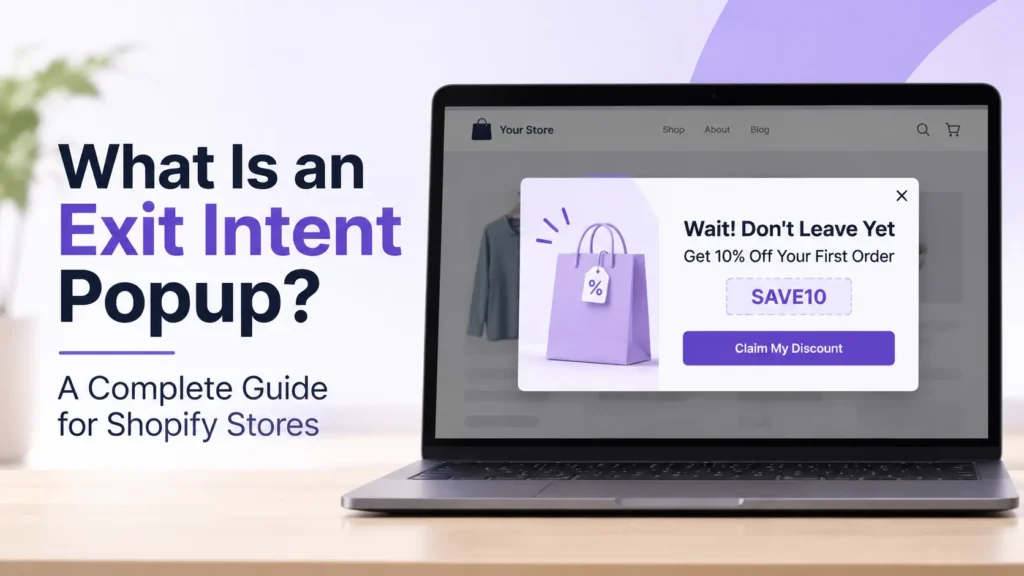
An exit intent popup is a small promotional window that appears when a website detects signs that a visitor is about to leave the page.
Rather than showing a message immediately after someone enters your store, it waits until the visitor demonstrates possible exit behaviour.
For example, imagine a customer browsing your clothing store. They look at a jacket, visit the product details, and then move their mouse towards the top of their browser to close the tab.
At that moment, an exit intent popup might appear with a message like:
“Wait! Before You Go, Get 10% Off Your First Order.”
The visitor now has another reason to consider completing their purchase.
An exit intent popup can be used for different purposes, including:
- Offering discount codes to encourage purchases.
- Collecting email addresses from potential customers.
- Promoting free shipping or special deals.
- Reminding visitors about products they viewed.
- Encouraging shoppers to explore more products.
- Providing a final reason to complete a purchase.
The main idea is simple: give visitors something valuable before they leave.
How Does an Exit Intent Popup Work?
Exit intent technology monitors certain visitor behaviours to identify when someone might be preparing to leave a website.
The exact detection method depends on the device, browser, and software being used.
1. Desktop Exit Intent Detection
On desktop computers, exit intent technology generally tracks mouse movements.
When a visitor moves their cursor towards the top edge of the browser, where the tabs, address bar, or close button are located, the system may interpret this movement as an intention to leave.
The popup then appears before the visitor closes the page.
For example:
A customer visits your Shopify store and spends two minutes exploring your product collection. They move their mouse towards the browser’s close button.
Your popup displays:
“Leaving Already? Enjoy Free Shipping on Your First Order!”
This gives the customer a reason to reconsider.
2. Mobile Exit Intent Detection
Mobile devices work differently because visitors don’t use a mouse cursor.
Depending on the technology, mobile exit-intent experiences may use alternative behavioural signals, such as:
- Back-button navigation attempts.
- Rapid upward scrolling.
- Tab-switching behaviour.
- Periods of inactivity.
Not every exit intent popup tool supports all these methods. Some mobile browsers also limit what websites can detect.
That’s why Shopify merchants should always test their popup experience on actual mobile devices instead of assuming desktop behaviour will work identically.
3. Displaying a Relevant Offer
Once the system detects a possible exit, it displays a message designed to encourage another action.
This could be a discount, a product recommendation, a newsletter subscription, or a reminder about an ongoing promotion.
The effectiveness depends on how relevant the offer is to the visitor.
A customer looking at expensive electronics might respond better to a discount, while someone browsing a clothing collection might appreciate free delivery.
Why Do Shopify Stores Need Exit Intent Popups?
Getting visitors to your Shopify store is only one part of running an online business.
The real challenge is turning those visitors into paying customers.
You might invest in Google Ads, Facebook campaigns, influencer marketing, or SEO to attract traffic. But not everyone who visits your store will purchase immediately.
Some visitors need more information. Others compare prices, hesitate at checkout, or simply get distracted.
An exit intent popup gives you another opportunity to engage these visitors.
Here are some practical benefits.
1. Reduce Lost Sales Opportunities
Not every visitor who leaves your store is uninterested in your products.
Sometimes customers just need an additional reason to complete their purchase.
A relevant popup can introduce an offer at the right moment.
For example:
A customer adds a $75 product to their cart but decides to leave without checking out.
You can display:
“Still Thinking About It? Get 10% Off Your Order Today!”
This may encourage the customer to reconsider.
Remember, an exit popup cannot guarantee a recovered sale, but it can create another opportunity for conversion.
2. Capture More Potential Customers
Not every visitor is ready to purchase during their first visit.
However, they might be interested in hearing about future discounts, new arrivals, or exclusive offers.
An exit intent popup can encourage visitors to subscribe to your email list before leaving.
For example:
“Don’t Miss Our Next Big Deal! Join Our Mailing List for Exclusive Offers.”
Once visitors voluntarily subscribe, you can use appropriate email marketing campaigns to stay connected with them.
Always make your subscription terms clear and obtain the necessary consent.
3. Encourage First-Time Purchases
New visitors may hesitate because they haven’t purchased from your brand before.
They might be unsure about product quality, delivery, pricing, or your return policy.
A well-designed exit popup can provide an incentive to take the first step.
For example:
“Your First Order Deserves Something Special. Enjoy 10% Off Today!”
You can also use the popup to highlight free delivery, product guarantees, or customer support information when those benefits genuinely apply.
4. Promote Special Offers and Discounts
Running a seasonal campaign or special promotion?
An exit intent popup is another way to make visitors aware of it.
For example, during Black Friday, 11.11, Christmas, or a seasonal sale, you can display a campaign-specific offer when visitors show signs of leaving.
This helps bring attention to your promotion without immediately interrupting every visitor.
5. Improve Your Conversion Rate Optimization Strategy
Conversion rate optimization (CRO) is about understanding why visitors don’t take the action you want and making improvements to your website experience.
Exit intent popups can support this process.
You can test different headlines, offers, images, and calls to action to understand which combinations encourage more engagement.
However, don’t judge success only by popup clicks. Also monitor completed purchases, revenue, email subscriptions, and whether the popup affects the overall shopping experience.
Exit Intent Popup Shopify: How Shopify Merchants Can Use It
Shopify makes it relatively straightforward to extend your store’s functionality through apps and integrations.
An exit intent popup Shopify strategy can help merchants engage visitors who are showing signs of leaving without completing a purchase.
But the important question is: what should your popup actually say?
Here are five practical ways to use a Shopify exit intent popup.
1. Offer a Discount to Hesitant Buyers
Discounts can help customers who are interested in a product but are unsure about its price.
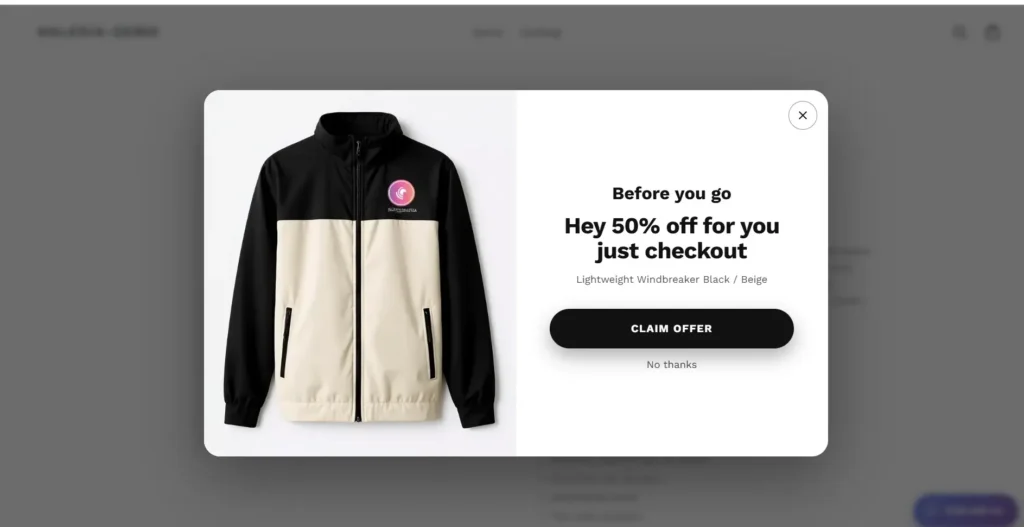
Example:
Headline: Wait! Here’s a Special Offer.
Message: Get 10% off your first purchase when you order today.
CTA: Claim My Discount
Use discounts strategically. Giving every visitor a discount can reduce your profit margins and train customers to wait for promotions.
2. Offer Free Shipping
Sometimes customers abandon their shopping journey because the final delivery cost makes the purchase less attractive.
If your store can afford it, free shipping can be an appealing incentive.
Example:
Headline: Shipping on Us!
Message: Complete your order today and enjoy free shipping on eligible purchases.
CTA: Continue Shopping
Make sure the offer clearly explains any minimum order value or delivery restrictions.
3. Remind Visitors About Their Shopping Cart
A shopper may have already added products to their cart but become distracted before completing checkout.
An exit popup can remind them about their shopping decision.
Example:
Headline: Your Favourites Are Still Waiting!
Message: Don’t leave your selected products behind. Complete your order when you’re ready.
CTA: Return to My Cart
If your popup software supports dynamic cart information, you may also be able to display relevant product details.
4. Collect Email Subscribers
Some visitors aren’t ready to purchase, but they may want to hear about future promotions.
You can use an exit intent popup to invite them to join your mailing list.
Example:
Headline: Stay Updated with Our Latest Deals.
Message: Subscribe to receive exclusive offers, product updates, and special discounts.
CTA: Sign Me Up
Only send marketing emails to subscribers who have provided the appropriate consent.
5. Highlight Your Best-Selling Products
A visitor might leave because they haven’t found the right product yet.
Instead of offering another discount, show them a popular alternative or a product worth exploring.
Example:
Headline: Still Looking for Something Special?
Message: Explore our customer favourites and discover products you’ll love.
CTA: Explore Best Sellers
This approach works particularly well when your store has several product categories.
What Makes a Good Exit Intent Popup? 7 Best Practices
Installing an exit popup isn’t enough. Its design, timing, message, and offer all matter.
A poorly designed popup can interrupt the shopping experience. A useful one can give visitors a reason to stay.
Here are seven practices worth following.
1. Use a Clear and Attention-Grabbing Headline
Visitors should understand your offer within seconds.
Avoid long headlines that require people to read several sentences.
Instead of:
“Welcome to Our Online Store. We Have Something Special for You Today.”
Try:
“Wait! Enjoy 10% Off Before You Go.”
Keep the message direct and relevant.
2. Offer Something Valuable
Don’t create a popup just because your store needs one.
Think about what would genuinely help your customers.
Depending on your business, this could be:
- A first-order discount.
- Free shipping.
- A limited-time promotion.
- A free product sample.
- A helpful buying guide.
- Access to exclusive products.
The offer should make sense for your products and profit margins.
3. Keep the Design Simple
A popup doesn’t need multiple images, several paragraphs, or too many buttons.
Use:
- One clear headline.
- A short supporting message.
- One main call to action.
- Relevant product imagery, if needed.
- A visible close button.
Your popup should match your store’s branding rather than look like an unrelated advertisement.
4. Make It Mobile-Friendly
A significant portion of eCommerce browsing happens on mobile devices.
If your popup looks great on desktop but covers the entire mobile screen, visitors may find it frustrating.
Check that:
- Text is readable without zooming.
- Buttons are easy to tap.
- The popup fits smaller screens.
- The close button is clearly visible.
- The content doesn’t block essential navigation.
Also test the actual mobile triggering behaviour supported by your software.
5. Don’t Show the Same Popup Repeatedly
Imagine visiting a store, closing a popup, and seeing exactly the same offer every time you open another product page.
Annoying, right?
Set sensible frequency limits wherever your popup tool supports them.
For example, show the popup once per session or limit repeat displays for returning visitors.
The goal is to create a useful interaction, not repeatedly interrupt customers.
6. Use a Strong Call to Action
Your CTA should tell visitors exactly what happens when they click.
Good examples include:
- Claim My Discount
- Get Free Shipping
- Continue Shopping
- Complete My Order
- Explore Products
Avoid vague button labels that don’t communicate the next step.
7. Test Different Offers and Messages
What works for one Shopify store may not work for another.
Try testing:
- Discount versus free shipping.
- Short headline versus descriptive headline.
- Product image versus text-only design.
- Different CTA wording.
- Different popup timing and frequency.
Compare results over a meaningful period and use completed actions, not just clicks, to make decisions.
What Is Exit Intent Popup Software?
Exit intent popup software is a tool that helps website owners create, customise, and display popups when visitors show signs of leaving a website.
Instead of manually developing popup functionality, merchants can use software to manage their campaigns through a dashboard.
Depending on the platform, features may include:
- Exit intent detection.
- Custom popup designs.
- Discount and promotional messages.
- Email subscription forms.
- Audience targeting.
- Display rules and frequency controls.
- Campaign performance tracking.
- Shopify integration.
Different tools offer different capabilities, so it’s important to check which features are actually included before choosing one.
What Should You Look for in Shopify Exit Intent Popup Software?
If you’re comparing different solutions, don’t select one simply because it offers attractive templates.
Consider the following:
| Feature | Why It Matters |
|---|---|
| Shopify integration | Makes implementation easier for Shopify merchants |
| Customisation | Allows you to match your store’s branding |
| Exit intent triggers | Helps display messages at relevant moments |
| Mobile responsiveness | Improves the experience on smaller screens |
| Display controls | Helps prevent repeated interruptions |
| CTA customisation | Makes it easier to guide visitor actions |
| Analytics | Helps measure campaign performance |
| Ease of use | Reduces the need for technical work |
The best exit intent popup software is the one that fits your store’s needs, works reliably, and provides a good customer experience.
How to Add an Exit Intent Popup to Your Shopify Store
There are different ways to add popup functionality to a Shopify store. You can use a compatible third-party application or a custom-developed solution.
For most merchants, using an application is a practical starting point.
Here’s a general implementation process:
Step 1: Choose Your Popup Solution
Compare available Shopify popup applications.
Check their compatibility, supported triggers, customisation options, pricing, and mobile behaviour.
Step 2: Decide Your Campaign Goal
Before designing anything, decide what you want visitors to do.
For example:
- Complete a purchase.
- Claim a discount.
- Visit a product page.
- Subscribe to your newsletter.
- Explore a collection.
One popup should ideally focus on one primary action.
Step 3: Design Your Popup
Create a message that matches your campaign.
Use your brand colours, a relevant image, a short headline, and a clear CTA.
Make sure the design looks professional on desktop and mobile.
Step 4: Configure Display Rules
Set up the conditions under which your popup should appear.
Depending on the software, these may include:
- Exit intent behaviour.
- Specific website pages.
- Visitor targeting.
- Display frequency.
- Campaign scheduling.
Avoid displaying the popup to visitors who have already completed the desired action.
Step 5: Test Before Publishing
Visit your store as a customer.
Test the popup on different devices, check the CTA destination, verify any discount code, and make sure the close button works.
Also check that the popup doesn’t interfere with important shopping or checkout actions.
Step 6: Monitor Performance
After launching, monitor how visitors interact with the popup.
Look at impressions, engagement, conversions, and revenue attributed to the campaign where reliable tracking is available.
Use the findings to improve your next campaign.
Meet Haleria: A Smarter Way to Engage Shopify Visitors
Getting traffic to your Shopify store takes time, effort, and marketing investment.
But what happens when visitors arrive, browse your products, and leave without taking action?
That’s an opportunity worth paying attention to.
Haleria helps Shopify merchants improve customer engagement with AI-powered sales and support solutions.
With Haleria’s newly launched Exit Intent Popup feature, merchants can introduce a timely message when visitors show signs of leaving their store.
Instead of allowing a potential customer to leave without another interaction, you can use a relevant popup to encourage them to explore an offer or take the next step.
Why consider Haleria?
- Engage visitors with exit-intent popup campaigns.
- Present relevant offers before visitors leave.
- Create another opportunity to encourage customer action.
- Improve the shopping experience with timely messaging.
- Bring customer engagement and AI-powered sales support together.
Whether you’re running a growing Shopify store or managing an established eCommerce business, every visitor interaction matters.
Don’t let potential customers leave without a reason to stay.
Explore Haleria AI Sales & Support and discover how you can improve your Shopify store’s customer engagement.
Final Thoughts
Not every website visitor will purchase during their first visit. Some need more time, some want to compare prices, and others simply aren’t ready to make a decision.
An exit intent popup gives your store another opportunity to communicate with these visitors before they leave.
But remember, the goal isn’t to stop everyone from exiting. It’s to provide something relevant at the right moment.
Start with one clear offer, keep the design simple, test it on mobile and desktop, and measure the results.
A well-planned exit popup can become a useful addition to your Shopify conversion strategy.
Frequently Asked Questions (FAQs)
1. What is an exit intent popup?
An exit intent popup is a website message that appears when a visitor shows signs of leaving a page. It can display discounts, free shipping offers, newsletter subscriptions, or product recommendations to encourage another interaction.
2. How does an exit intent popup work?
Exit intent technology detects certain visitor behaviours. On desktop, it commonly monitors mouse movement towards the top of the browser. On mobile, supported tools may use alternative signals such as back navigation or scrolling behaviour. When a possible exit is detected, the popup appears.
3. Does Shopify support exit intent popups?
Yes. Shopify merchants can add exit intent popup functionality through compatible third-party applications or custom development. Available triggers and features depend on the chosen solution.
4. What is the best exit intent popup software for Shopify?
The best solution depends on your store’s requirements. Look for Shopify compatibility, reliable exit detection, mobile responsiveness, customisation, display controls, analytics, and ease of use. Always check the current features and pricing before choosing.
5. Do exit intent popups increase conversions?
They can help improve conversion opportunities by presenting relevant offers before visitors leave. However, results depend on the audience, offer, timing, design, and overall shopping experience. They don’t guarantee additional sales.
6. Do exit intent popups work on mobile devices?
Some exit intent solutions support mobile experiences, but mobile detection works differently from desktop because smartphones don’t have a mouse cursor. Available methods depend on the browser and the software.
7. What should I offer in an exit intent popup?
You can offer a first-order discount, free shipping, a special promotion, a free sample, or a newsletter subscription. Choose an incentive that is relevant to your audience and financially sustainable for your business.
8. Are exit intent popups bad for SEO?
Not necessarily. However, intrusive popups that block the main content immediately after a visitor arrives from Google Search can create usability and SEO concerns, particularly on mobile. Use appropriately timed, easily dismissible popups and follow Google’s guidance on intrusive interstitials.
9. How often should an exit intent popup appear?
There isn’t one ideal frequency for every store. A sensible starting point is to limit repeat displays, such as showing the popup once per session or applying a cooldown period. Test what works without frustrating returning visitors.
10. Can I customise an exit intent popup for my Shopify store?
Yes. Most dedicated popup applications offer customisation options for headlines, text, images, buttons, colours, and display rules. The available options depend on the application you choose.