
Table of Contents
Automated Order Verification: How Shopify Stores Stop Fake Orders Before They Ship
Let me describe a morning that many store owners will recognise.
You open your Shopify dashboard and see 40 new orders overnight. Great start. Then you pack all 40, hand them to the courier, and pay for shipping on every single one. A week later, 11 of them come back. Wrong numbers, “customer not available”, or someone who simply changed their mind and never told you.
You paid for the product, the packaging, the delivery, and the return. You earned nothing.
This is the problem automated order verification solves. In this guide, I will explain what it is, how it works, and how to set it up on Shopify using WhatsApp, so you only ship orders that are real.
What Is Automated Order Verification?
Automated order verification means your store checks with the customer, without any human doing it by hand, that the order is genuine before it goes to fulfilment.
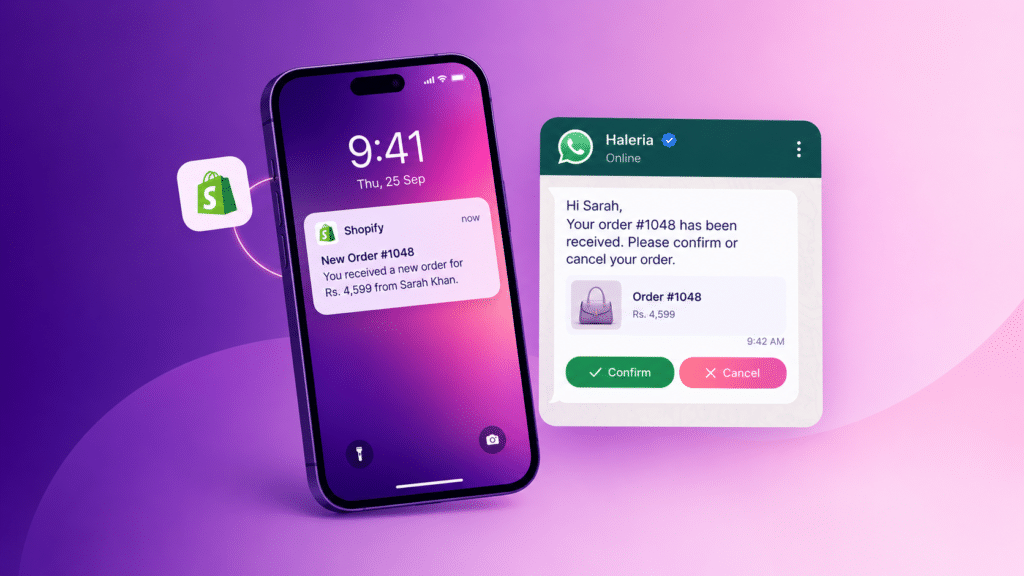
In practice, the customer places an order and, within a minute or two, receives a message or a call asking, “Did you place this order? Is your address correct?” Their reply updates the order in Shopify. A “yes” moves it forward. A “no” cancels it. No reply gets flagged for a follow-up.
Before automation, someone on your team did this manually. They opened each order, copied the phone number, called or messaged the customer, and typed a note. That works at 10 orders a day. At 100, it falls apart.
Why Unverified Orders Cost More Than You Think
Most owners count the obvious loss: the courier fee on a returned parcel. The real damage is wider.
Fake and prank orders
Cash on delivery makes it easy to place an order with no commitment. Some people do it for fun, some to test your store, and some to hurt a competitor. If you have no verification step, every one of these becomes a shipped parcel.
Wrong addresses and unreachable numbers
Customers mistype phone numbers and skip address details all the time. The courier cannot reach them, and the parcel returns after two or three attempts.
The costs you do not see
Returned stock has to be checked and put back on the shelf. Your ad spend is wasted on a sale that never happened. Your courier ratings suffer. And your team spends hours chasing people who never intended to buy. If you track it, I would bet these hidden costs are larger than the shipping fee itself.

How Automated Order Verification Works, Step by Step
The flow is simple once you see it laid out.
- A customer places an order on your Shopify store, usually with COD.
- A trigger fires. The new order tells your automation tool to start.
- A message or call goes out within seconds, containing the order details.
- The customer responds by tapping a button, replying, or pressing a key on a call.
- Shopify updates automatically. The order gets a tag such as “Confirmed” or “Cancelled”, and your fulfilment team only sees the confirmed ones.
- Silent customers get a reminder or a second attempt, then a flag for manual review.
That whole loop can finish before you have made your morning tea.
Three Ways to Verify Orders Automatically
Not every method suits every store. Here is how they compare in real use.
1. WhatsApp confirmation messages
Most customers in our region already live on WhatsApp. A confirmation message with two buttons (“Confirm” and “Cancel”) gets noticed and answered quickly, and it costs less than a phone call. This is the method most stores should start with, and it is where Shopify WhatsApp integration earns its place.
2. Automated phone calls (IVR)
Some customers never open WhatsApp messages from businesses. For them, an automated call works well: the customer hears the order details and presses 1 to confirm or 2 to cancel. It is louder and harder to ignore than a message.
3. A combination of both
The strongest setup uses both. Send the WhatsApp message first. If nobody answers within a set time, place a call. This catches customers who would otherwise slip through, without calling everyone unnecessarily.
Setting Up Shopify WhatsApp Integration for Order Verification
If you decide to go the WhatsApp route, here is what the setup looks like. The exact screens differ from app to app, but the steps are the same.
Step 1: Get access to the official WhatsApp Business API
A regular WhatsApp Business app on your phone cannot send automated messages at scale. You need the WhatsApp Business API, which is what a proper WhatsApp Shopify integration connects to. Using the official API also protects your number from being banned for spam-like behaviour.
Step 2: Create an approved message template
WhatsApp requires businesses to use pre-approved templates when they message a customer first. Order confirmations usually fit the utility category. Keep the text short and clear. For example:
“Hi {{name}}, thanks for your order #{{order_number}} of {{total}}. Please confirm your order by tapping a button below. Delivery to: {{address}}.”
Add two quick-reply buttons: Confirm and Cancel.
Step 3: Connect it to your Shopify store
This is the part a Shopify WhatsApp automation app handles for you. It listens for new orders and sends the template automatically, so you do not need to write any code.
Step 4: Decide what happens after each reply
Plan these before you go live:
- Confirmed: tag the order and release it for fulfilment.
- Cancelled: cancel the order and restock the item.
- No reply after a few hours: send one reminder, then hold the order for manual review.
Step 5: Test with your own orders
Place two or three test orders using your own phone. Check that the message arrives, the buttons work, and the Shopify tag changes correctly. It takes ten minutes and saves you from awkward mistakes with real customers.
Mistakes Stores Make With Order Verification
A few patterns come up again and again.
Sending too many messages. One confirmation and one reminder is enough. More than that feels like spam, and customers start ignoring you.
Writing long, formal messages. People read WhatsApp on the go. Keep it to a few lines with the order number, total, and two buttons.
Ignoring opt-in rules. Only message customers who have given their number at checkout, and follow Meta’s messaging policy. Cutting corners here can get your account restricted.
Never checking the results. Verification is not “set and forget”. Look at your numbers every week for the first month.
How to Know If It Is Working
Track these four numbers before and after you switch on verification:
- Return-to-origin (RTO) rate: the share of shipped orders that come back
- Confirmation rate: the share of customers who reply “confirm”
- Time to confirm: how long customers take to respond
- Cancelled-before-shipping rate: orders you avoided shipping at all
If your RTO rate drops and your confirmation rate stays healthy, it is working.
Is Automated Order Verification Right for Your Store?
It makes the most sense if you take cash on delivery, ship more than a handful of orders a day, or have already been burned by returns. If you only sell prepaid orders in small volumes, you may not need it yet.
For everyone else, it is one of the lowest-effort ways to protect your margins. A Shopify WhatsApp integration takes an afternoon to set up, and it works every hour of every day.
Final Thoughts
You cannot stop every fake order. But you can stop most of them before they cost you money. Automated order verification gives you a clear line between “someone clicked buy” and “someone actually wants this parcel”.
If you would like to try it on your own store, Haleria’s WhatsApp automation can confirm orders for you automatically, with an optional phone-call fallback for customers who do not reply.
Frequently Asked Questions
1. What is automated order verification?
It is a system that automatically contacts a customer after they place an order to confirm the order is real and the details are correct. The customer’s reply updates the order status in your store without manual work.
2. Does automated order verification work only for COD orders?
It helps most with cash on delivery, because that is where fake and abandoned orders are most common. Some stores also use it for high-value prepaid orders to double-check the delivery address.
3. How does Shopify WhatsApp integration help with order verification?
It connects your store to the WhatsApp Business API, so a confirmation message goes out to the customer automatically when an order is placed. Their button reply then updates the order in Shopify.
4. Do I need the official WhatsApp Business API for Shopify WhatsApp automation?
Yes, if you want automated, high-volume messaging. The regular WhatsApp Business app is meant for manual chats and can put your number at risk if you use it for bulk sending.
5. What should I do if a customer does not reply?
Send a single reminder, then either place an automated call or hold the order for a manual check. Avoid shipping unconfirmed orders when your store has a high return rate.
6. Will verification messages annoy my customers?
Not if you keep them short and send only one message plus one reminder. Most customers appreciate a quick check that their address and order are correct.
7. How long does it take to set up a WhatsApp Shopify integration?
With an app that handles the API connection and template approval, most stores can be live within a day. Template approval by Meta is usually the slowest part.
8. Can automated order verification reduce my RTO rate?
It can, because fake, mistaken, and unreachable orders are filtered out before shipping. The size of the improvement depends on your product, your market, and how you handle unconfirmed orders.