

Table of Contents
WhatsApp has become one of the easiest ways for businesses to communicate with customers.
A customer asks about a product. Someone wants to know where their order is. Another customer needs an update about a delivery. A new order arrives and your team needs to confirm it.
When the number of conversations is small, replying manually is manageable. But once a business starts receiving dozens or hundreds of WhatsApp messages every day, things become different.
Messages get missed. Replies become slower. Order confirmations take time. Customers ask the same questions repeatedly.
This is where a free WhatsApp automation tool can be useful.
Instead of manually sending every routine message, WhatsApp automation allows businesses to create workflows that respond to specific events or customer actions.
For Shopify stores, this can include order notifications, abandoned checkout reminders, customer support replies, delivery updates, and other routine conversations.
The important part is understanding what “free” actually means, what you can automate, and whether a free tool is enough for your business.
What Is a Free WhatsApp Automation Tool?
A free WhatsApp automation tool is software that helps businesses automate repetitive WhatsApp communication without requiring a monthly subscription, or with a free plan that provides a limited amount of automation.
The exact meaning of “free” depends on the provider.
Some tools offer:
- A free plan with limited messages
- Free installation with usage charges
- A free trial for a limited period
- Free basic automation with paid advanced features
- Free software where WhatsApp or Meta messaging charges still apply
This distinction matters.
For example, Shopify currently lists Meta’s official WhatsApp app as free to install, while also noting that additional charges may apply. The app focuses on sending timely WhatsApp order updates and connecting a Shopify store with WhatsApp.
So before choosing a free WhatsApp automation tool, always check both the software pricing and the messaging costs associated with the WhatsApp platform.
Why Do Businesses Use WhatsApp Automation?
The biggest reason is simple: repetitive communication takes time.
Imagine a Shopify store receiving 50 orders in a day.
Without automation, the team may need to:
- Check every new order.
- Find the customer’s phone number.
- Open WhatsApp.
- Write a confirmation message.
- Send the message.
- Record whether the customer confirmed.
- Follow up with customers who did not respond.
That process becomes difficult to maintain as order volume increases.
With WhatsApp automation, some of those steps can happen automatically.
A Shopify store can connect an automation workflow to events such as:
- New order
- Order confirmation
- Payment confirmation
- Fulfillment
- Shipping
- Abandoned checkout
- Customer inquiry
- Delivery
- Review request
The exact automation available depends on the tool and its integrations.
What Can You Automate on WhatsApp?
WhatsApp automation is much broader than simply sending automatic messages.
A well-designed automation system can handle different parts of the customer journey.
Order Confirmation
For stores that receive cash-on-delivery orders, confirmation can be particularly useful.
Instead of asking an employee to manually contact every customer, an automated WhatsApp message can be triggered after an order is placed.
For example:
“Hi Sarah, we received your order #1042. Please confirm your order by selecting Confirm or Cancel.”
The customer’s response can then be connected to the store’s workflow.
This type of automation is especially useful for businesses where unconfirmed COD orders create additional delivery or return problems.
Abandoned Checkout Reminders
A customer can add products to their cart and leave without completing checkout.
A WhatsApp automation workflow can send a reminder after a defined period, depending on the platform and customer consent.
The message could simply remind the customer that their checkout is still incomplete.
The goal isn’t to repeatedly message customers. It is to create a timely reminder that helps recover potentially lost sales.
Shipping and Order Updates
Customers often ask:
“Has my order shipped?”
“Where is my parcel?”
“When will it arrive?”
Automated order and fulfillment updates can reduce the number of repetitive support questions.
Shopify’s official WhatsApp app, for example, is designed around timely order updates and allows merchants to connect their Shopify store with WhatsApp.
Customer Support
Another common use case is automated replies.
Businesses receive the same questions every day:
- What are your delivery charges?
- Do you offer cash on delivery?
- What is your return policy?
- How long does delivery take?
- What sizes are available?
- Where is my order?
A basic automation can provide predefined answers.
More advanced systems can use AI WhatsApp automation to understand customer questions and provide responses based on business information.
However, AI should not replace human support in every situation. Complex complaints, payment disputes, unusual orders, and sensitive customer issues may still need a real person.
Free WhatsApp Automation vs Paid WhatsApp Automation
The biggest mistake businesses make is assuming that every free WhatsApp automation tool provides unlimited automation.
Usually, it doesn’t.
A free plan may limit:
- Monthly messages
- Number of contacts
- Automation workflows
- Number of users
- Message templates
- Analytics
- Integrations
- AI conversations
- Campaign features
Some Shopify apps currently advertise free plans with specific message limits, while others are free to install but charge for usage or advanced features.
Therefore, instead of asking only:
“Is this WhatsApp automation tool free?”
Ask:
“What can I actually automate for free?”
That question gives you a much more realistic picture of the total cost.
How to Choose the Best WhatsApp Automation Software
There isn’t one automation tool that works perfectly for every business.
The right choice depends on your business model, customer volume, automation requirements, and WhatsApp setup.
When comparing the best WhatsApp automation software, look at the following factors.
1. WhatsApp Business API Support
Check whether the tool supports the official WhatsApp Business Platform/API.
This is particularly important for businesses that want to build structured, scalable automation rather than relying on manual WhatsApp conversations.
2. Shopify Integration
If you operate a Shopify store, the tool should be able to access relevant Shopify events or data.
Look for integrations with:
- Shopify orders
- Customers
- Checkout events
- Fulfillment
- Order status
- Products
- Customer tags
A dedicated shopify whatsapp automation app can make these workflows easier to manage because the WhatsApp communication is connected directly to the store.
3. Automation Triggers
A good tool should allow you to decide when an automated message is sent.
For example:
New order → Send confirmation
Order fulfilled → Send shipping update
Checkout abandoned → Send reminder
Delivery completed → Request review
The more flexible the triggers, the more useful the automation becomes.
4. Message Templates
WhatsApp automation often relies on approved or predefined message templates depending on the type of communication.
Look for a platform that makes template management straightforward.
5. Customer Replies
Sending messages is only one side of automation.
You should also consider what happens when customers reply.
Can the system:
- Detect the response?
- Tag the customer?
- Update an order?
- Notify an employee?
- Continue the workflow?
- Transfer the conversation to a human?
These features can make a significant difference to a growing business.
6. Usage Limits
Always check the free plan’s limits.
A tool might appear free until you discover that it only allows a small number of automated messages each month.
That may be enough for a small store but insufficient for a store processing hundreds of orders.
What Is Shopify WhatsApp Automation?
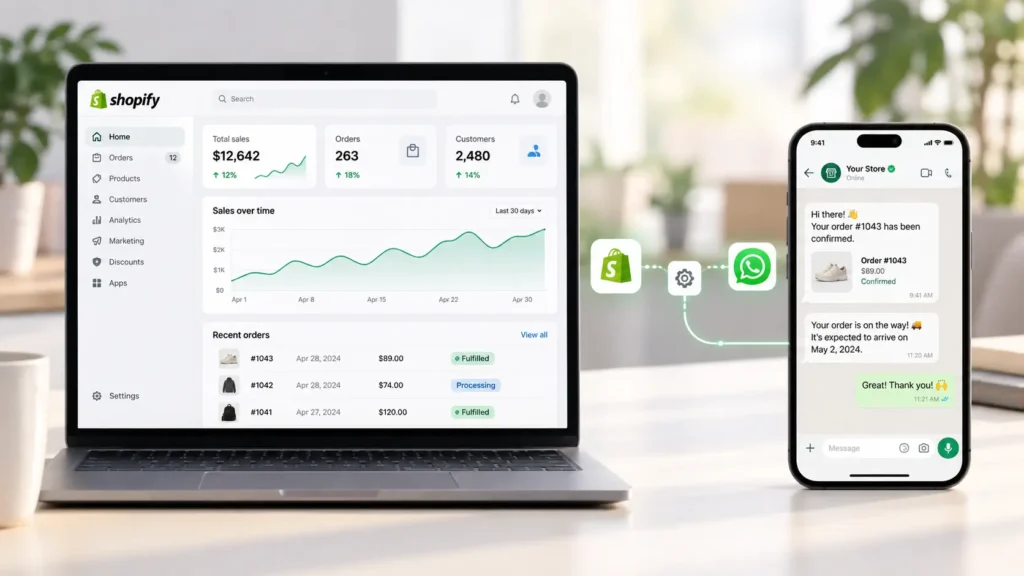
Shopify WhatsApp automation connects your Shopify store with WhatsApp so that specific store events can trigger customer communication.
Instead of treating WhatsApp as a completely separate communication channel, automation connects it to your store’s data.
For example:
Shopify order created
↓
Automation trigger
↓
WhatsApp confirmation message
↓
Customer responds
↓
Store workflow continues
The same concept can be used for abandoned checkouts, fulfillment notifications, shipping updates, support questions, and other customer interactions.
Several Shopify apps currently offer WhatsApp automation features such as order confirmations, abandoned checkout recovery, fulfillment updates, and automated replies.
How to Start WhatsApp Automation for a Shopify Store
You don’t need to automate everything on day one.
In fact, starting small is usually easier.
Step 1: Identify Your Most Repetitive Conversation
Look at your WhatsApp inbox.
What question appears most frequently?
If customers constantly ask about order status, start with order updates.
If your team spends hours confirming COD orders, start with order confirmation.
If customers frequently leave checkout without completing their purchase, consider checkout recovery.
Step 2: Choose Your WhatsApp Setup
Decide whether your business needs basic WhatsApp communication or a more structured WhatsApp Business API setup.
This decision affects the tools, templates, workflows, and costs involved.
Step 3: Connect Shopify
For Shopify merchants, choose a solution that can connect relevant store events to WhatsApp.
The Shopify App Store currently includes several WhatsApp automation solutions with different pricing models and feature sets.
Step 4: Create One Automation
Don’t create ten workflows immediately.
Start with one.
For example:
New COD order → WhatsApp confirmation → Customer confirms → Order receives confirmation tag.
Once that workflow works reliably, add another.
Step 5: Measure the Result
Track simple numbers:
- Number of automated messages
- Customer response rate
- Confirmed orders
- Cancelled orders
- Abandoned checkouts recovered
- Support conversations reduced
- Manual hours saved
Automation should solve a business problem, not simply create more software to manage.
Can AI Be Used for WhatsApp Automation?
Yes.
AI WhatsApp automation can make automated conversations more flexible than traditional rule-based replies.
Traditional automation might work like this:
Customer asks “What is your return policy?”
→ Send saved return-policy message.
AI-based automation can interpret variations such as:
“How can I return my order?”
“I received the wrong product. Can I return it?”
“What is your refund process?”
The system can identify the general intent and respond using information provided by the business.
For an online store, AI can potentially help with:
- Product questions
- FAQs
- Order-related questions
- Shipping questions
- Return-policy questions
- Product discovery
- Basic customer support
But accuracy matters.
An AI system should have access to reliable business information and should have clear boundaries for situations that require human support.
Are Free WhatsApp Automation Tools Safe?
“Free” should never be the only factor you consider.
Before connecting your WhatsApp account or Shopify store, check:
- Who operates the software?
- What permissions does it request?
- Does it use official WhatsApp infrastructure?
- How is customer data handled?
- Is there a privacy policy?
- Can you remove your data?
- Does it support your required message types?
- What happens if you exceed the free limit?
- Are additional WhatsApp/Meta charges involved?
For Shopify merchants, it is also worth checking the app’s Shopify listing, developer information, permissions, reviews, and pricing before installation.
The Shopify App Store currently shows several different WhatsApp automation products, including free-plan and free-install options, but their capabilities and limits vary considerably.
Free WhatsApp Automation Tool: Is It Enough for a Small Business?
For a small business, a free tool can be enough if the automation requirements are simple.
For example, you might only need:
- Basic order notifications
- A few automated replies
- A WhatsApp chat button
- A small number of monthly messages
In that situation, paying for a large automation platform may not be necessary.
But growing stores often need more advanced workflows.
They may require:
- Higher message limits
- Multiple automation flows
- Customer segmentation
- AI support
- Abandoned checkout recovery
- Order tagging
- Analytics
- Multiple team members
- Marketing campaigns
- Advanced Shopify integrations
At that point, comparing paid plans becomes more useful than focusing exclusively on free software.
WhatsApp Automation Services: When Do You Need Them?
Not every business needs WhatsApp automation services.
If your team can connect the tool, create templates, and manage basic workflows internally, an app may be enough.
Professional help becomes more useful when you need custom workflows.
For example:
Shopify
→ WhatsApp confirmation
→ Customer response
→ Order tag
→ Delivery workflow
→ Review request
Or:
Shopify checkout
→ Abandoned checkout trigger
→ WhatsApp reminder
→ Customer returns to checkout
→ Purchase completed
→ Order confirmation
Custom integrations can also become useful when a business uses a CRM, shipping platform, helpdesk, analytics system, or custom Shopify application.
Common Mistakes When Setting Up WhatsApp Automation
Automation can save time, but poor automation can create a different problem.
Automating Too Many Messages
Customers don’t want to receive unnecessary notifications.
Only automate messages that provide useful information or serve a clear business purpose.
Writing Long Messages
Automated messages should be easy to scan.
Use:
- Short sentences
- Clear information
- One primary action
- Simple language
Ignoring Customer Consent
WhatsApp communication should be designed around applicable messaging and consent requirements.
Don’t treat a customer’s phone number as automatic permission to send unlimited promotional messages.
Forgetting the Human Handoff
There should always be a way for customers to reach a real person when automation isn’t enough.
Choosing a Tool Only Because It Is Free
A free tool that doesn’t solve your actual problem isn’t really saving you time.
The better question is:
“Does this tool automate the task that is currently costing my team the most time?”
A Simple WhatsApp Automation Workflow for Shopify
Here’s a practical starting workflow for a Shopify store:
New Order
Customer places an order.
↓
WhatsApp Message
Customer receives an order confirmation message.
↓
Customer Response
Customer confirms or requests cancellation.
↓
Shopify Action
The store records the response or applies an appropriate order status/tag, depending on the automation platform.
↓
Fulfillment
When the order is fulfilled, the customer receives an update.
↓
Delivery
After delivery, the business can request feedback or a product review.
This approach turns WhatsApp from a simple chat channel into part of the customer’s order journey.
Free WhatsApp Automation Tool: What Should You Look For?
Before installing any tool, use this checklist:
| Feature | Why It Matters |
|---|---|
| Free plan | Helps test the system before paying |
| Official WhatsApp integration | Important for scalable business messaging |
| Shopify integration | Connects store events with WhatsApp |
| Order automation | Reduces repetitive manual work |
| Abandoned checkout automation | Can help recover unfinished purchases |
| Automated replies | Reduces repetitive support questions |
| AI support | Handles natural-language questions |
| Templates | Helps structure business messages |
| Analytics | Shows whether automation is working |
| Human handoff | Keeps complex conversations with your team |
| Transparent pricing | Helps avoid unexpected costs |
Final Thoughts
A free WhatsApp automation tool can be a practical starting point for a small business or Shopify store.
The goal isn’t to automate every conversation.
The goal is to remove repetitive work while keeping customer communication useful and personal.
Start with one problem. Maybe it is COD order confirmation. Maybe it is abandoned checkout recovery. Maybe your support team spends too much time answering the same questions.
Automate that workflow first.
Once it works reliably, measure the results and decide whether you need additional features.
For Shopify merchants, a shopify whatsapp automation app can be particularly useful because store events and customer communication can be connected in one workflow. But the right choice depends on your message volume, required features, WhatsApp setup, and budget.
Free is a good place to start.
It shouldn’t be the only thing you consider.
Frequently Asked Questions
What is a free WhatsApp automation tool?
A free WhatsApp automation tool allows businesses to automate certain WhatsApp messages or workflows without paying a recurring software subscription, usually within specific usage or feature limits.
Is WhatsApp automation free?
Not necessarily.
Some software offers a free plan or free installation, but WhatsApp-related messaging or usage charges may still apply. Shopify’s official WhatsApp app, for example, is currently listed as free to install with additional charges potentially applying.
Can I automate WhatsApp messages for Shopify?
Yes. Several Shopify apps support WhatsApp automation for use cases such as order confirmations, abandoned checkout recovery, fulfillment updates, and customer replies.
What is the best WhatsApp automation software?
There isn’t one solution that is best for every business. Compare tools based on WhatsApp integration, Shopify compatibility, automation triggers, message limits, AI capabilities, analytics, customer support, and total messaging costs.
Can I use AI for WhatsApp automation?
Yes. AI WhatsApp automation can understand natural-language customer questions and provide responses based on information supplied by the business.
Can WhatsApp automation confirm COD orders?
Yes, depending on the automation platform. Some Shopify WhatsApp apps provide automated COD confirmation workflows where customers can respond to confirm or cancel an order.
Can WhatsApp automation recover abandoned checkouts?
Yes. Some Shopify WhatsApp automation apps provide abandoned checkout or cart recovery workflows.
Is a Shopify WhatsApp automation app better than manual WhatsApp messaging?
For repetitive customer communication, automation can reduce manual work and make responses more consistent. However, human support remains important for complex customer issues.
Do I need WhatsApp Business API for automation?
It depends on the type of automation you want. Basic WhatsApp functionality and advanced business automation can have different technical requirements. If you need scalable, structured business messaging, check whether the platform supports the official WhatsApp Business Platform/API.
Should a small Shopify store use WhatsApp automation?
It can be useful if WhatsApp is already an important customer communication channel. Start with one repetitive workflow and expand only when there is a clear benefit.