
Running a Shopify store means dealing with more than product listings and sales. You also have to answer customer questions, confirm orders, follow up on abandoned checkouts, send delivery updates, and keep customers informed after they buy.
When these tasks start taking hours every day, WhatsApp automation can make a real difference.
But finding the right app isn’t always easy. Some tools focus on marketing campaigns, others help support teams manage conversations, and some are designed to automate everyday Shopify order workflows. A tool that works well for a large fashion brand may not be the right choice for a small store handling cash-on-delivery (COD) orders.
In this guide, we’ll compare some of the best WhatsApp Business API apps for Shopify in 2026, explain what each one is designed to do, and highlight the features worth checking before you install anything.
Whether you’re looking for a WhatsApp Business API provider in Pakistan or an automation solution for a store targeting customers in the US or UK, the goal is simple: find a tool that fits your store’s actual needs.
What Is WhatsApp Business API?
The WhatsApp Business API, now commonly associated with the WhatsApp Business Platform, allows businesses to connect WhatsApp messaging with software, customer support systems, and ecommerce platforms such as Shopify.
Unlike the standard WhatsApp Business app, which is mainly managed through a phone or desktop interface, an API-based setup allows supported software to automate messages and connect conversations with business workflows.
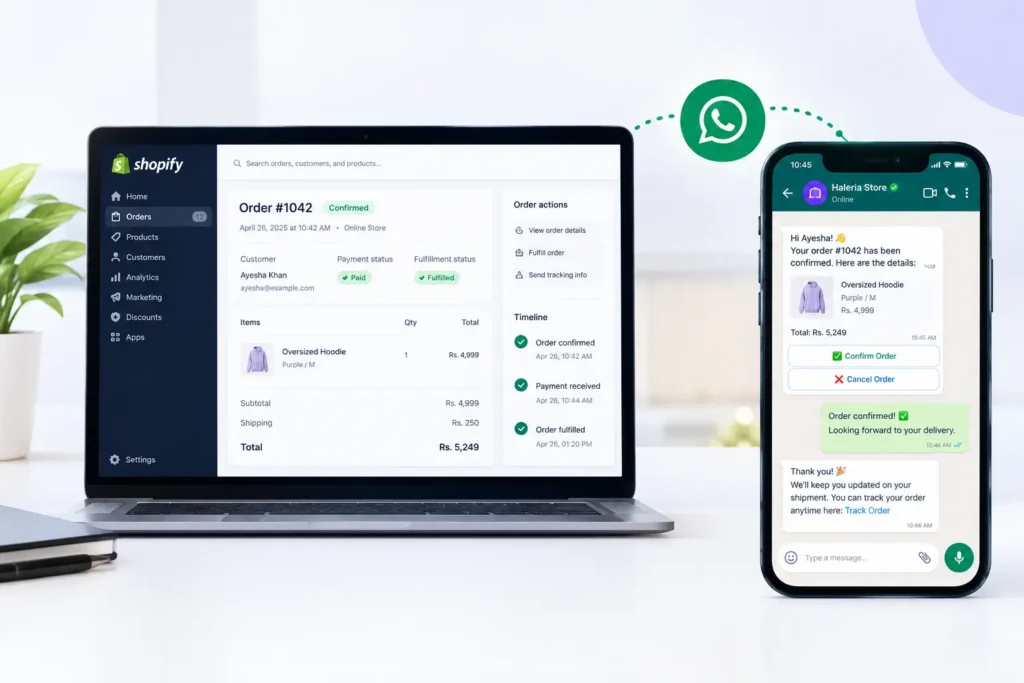
For example, when a customer places an order on your Shopify store, an integrated application could automatically send an order confirmation message. Depending on the app, the customer may be able to confirm the order, request assistance, or receive updates without contacting your support team manually.
With the right integration, businesses can use the WhatsApp Business API for:
- Automated order confirmations and shipping notifications.
- Cash-on-delivery order verification.
- Abandoned checkout reminders.
- Automated customer support and frequently asked questions.
- Product recommendations and shopping assistance.
- Marketing campaigns sent to eligible, opted-in customers.
- Delivery updates and review requests.
These capabilities depend on the provider, the Shopify integration, your plan, and the applicable WhatsApp messaging rules. Meta’s official WhatsApp Business Platform documentation explains its messaging and interactive communication features.
How We Compare WhatsApp Business API Providers
Not every Shopify WhatsApp app solves the same problem. To make this comparison useful, we look at the practical differences that matter to store owners.
Our comparison criteria include:
- Shopify integration: Can the app access relevant store data and trigger order-related workflows?
- Order confirmation: Can customers confirm or cancel orders through an automated workflow?
- Abandoned checkout recovery: Does the app support follow-up messages?
- AI customer support: Can it answer product, policy, or order-related questions?
- Marketing tools: Can merchants send approved campaigns to opted-in customers?
- Team inbox: Can multiple support agents manage conversations?
- Pricing transparency: Are software subscription fees and Meta messaging charges explained separately?
- Regional suitability: Does the provider support your business location, phone number, and intended customer markets?
This is a feature-based comparison, not a claim that every app has been independently tested under identical conditions. Features and pricing can change, so check the current Shopify App Store listing and the provider’s official website before purchasing.
Best WhatsApp Business API Apps for Shopify in 2026
1. Haleria AI Sales & Support — Best for AI Shopping Assistance and Order Automation
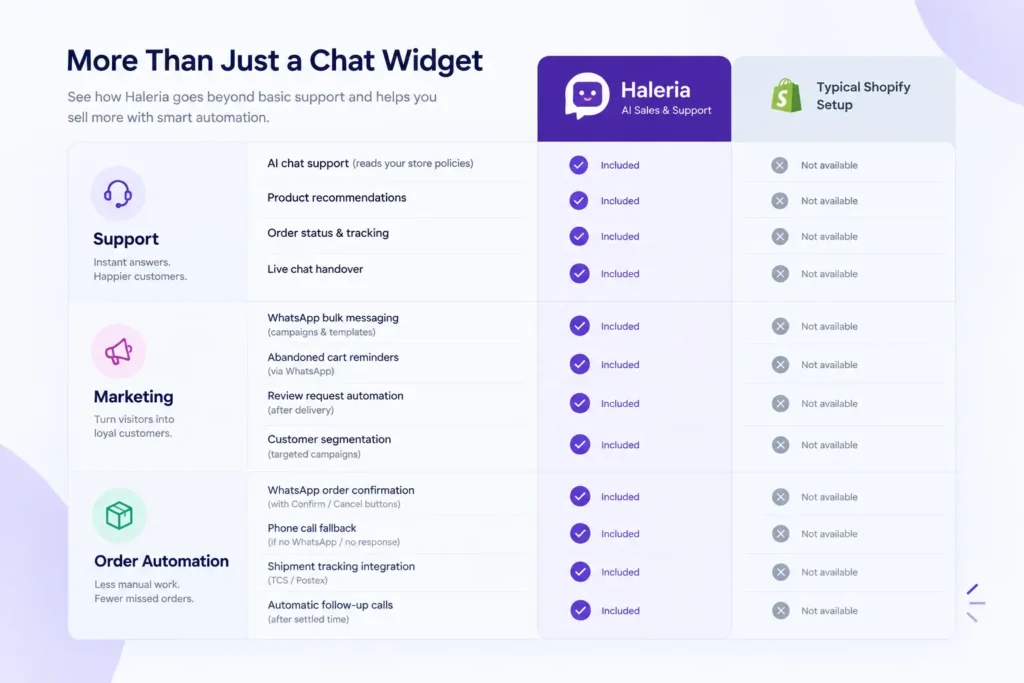
Haleria AI Sales & Support is worth considering for Shopify merchants who want to combine customer conversations with sales and order-related automation.
Rather than treating WhatsApp as just another place to send notifications, Haleria focuses on helping merchants handle customer questions and automate repetitive interactions across the shopping journey.
Key features to explore:
- AI-powered web chat for customer questions.
- Product discovery and shopping assistance.
- Responses based on supported store information, FAQs, and policy pages.
- Official WhatsApp Business API integrations for supported messaging workflows.
- Automated COD order confirmation through WhatsApp.
- Confirmation and cancellation options within supported workflows.
- Automated phone calls as a fallback for eligible orders when WhatsApp confirmation is unavailable or unsuccessful.
- Abandoned checkout reminders and post-delivery review requests.
- Bulk WhatsApp marketing using approved templates.
One useful distinction is how the shopping experience works. With supported AI shopping workflows, a customer may be able to complete an order inside the conversation rather than being redirected to the website to finish the purchase. Merchants should confirm the exact checkout and order-creation flow during a demo.
Best for: Shopify stores that want AI-assisted product discovery, customer support, and reduced manual work around order confirmation.
What to check: Confirm which features are included in your chosen plan, supported countries, call charges, Meta messaging fees, and any setup requirements.
Explore Haleria on the Shopify App Store.
2. WATI — Best for Team-Based WhatsApp Customer Support
WATI is a WhatsApp business messaging platform designed for businesses that need structured customer conversations and automated messaging.
For a Shopify merchant with several support agents, a shared inbox can help the team manage customer questions without relying on one employee’s phone.
Key features to evaluate:
- Shared team inbox and conversation management.
- WhatsApp automation and workflow tools.
- Customer messaging and campaign capabilities.
- Integrations with supported business systems.
- Options for managing customer interactions at scale.
WATI may be a good fit if your main challenge is managing a growing volume of WhatsApp conversations and coordinating a support team.
Best for: Growing ecommerce businesses that prioritize team collaboration and organized customer communication.
What to check: Verify the depth of the Shopify integration, the availability of specific AI features, user limits, automation allowances, and the total monthly cost.
Official website: WATI.
3. Interakt — Best for WhatsApp Commerce and Campaigns
Interakt provides WhatsApp business messaging and commerce-related features for businesses that want to connect customer conversations with online sales.
For Shopify merchants, the features to investigate include product catalog integration, customer engagement campaigns, order-related messaging, and supported shopping workflows.
Key features to evaluate:
- WhatsApp campaigns and customer engagement.
- Automated messages and supported ecommerce workflows.
- Product catalog and shopping integrations.
- Customer conversation management.
- Chatbot and automation options available on eligible plans.
Interakt is worth comparing if you want to combine marketing and commerce workflows instead of using separate tools for every messaging task.
Best for: Small and growing ecommerce businesses that want WhatsApp marketing and shopping-related integrations.
What to check: Confirm which automation features are included in your plan, whether COD confirmation updates Shopify order status, and which messaging charges apply.
Official website: Interakt.
4. Zoko — Best for WhatsApp-Led Ecommerce Selling
Zoko focuses on WhatsApp commerce, helping businesses connect product catalogs, customer conversations, and supported sales workflows.
This can be useful when customers prefer to ask questions, explore products, or interact with a store through WhatsApp before buying.
Key features to evaluate:
- Shopify product catalog integration.
- WhatsApp-based customer engagement.
- Campaigns and broadcast messaging.
- Shared inbox and team workflows.
- Supported automated shopping and order-creation capabilities.
Zoko is worth considering if WhatsApp plays a major role in how your customers discover and purchase products.
Best for: Ecommerce brands that want to build a stronger WhatsApp shopping experience.
What to check: Review plan limits, automation availability, any paid AI features, additional messaging charges, and the exact steps required for customers to complete an order.
Official website: Zoko.
5. DelightChat — Best for Multichannel Customer Support
DelightChat is designed for businesses that want to manage customer support across multiple channels in a more organized way.
For a Shopify store, this can be helpful when customer conversations arrive through WhatsApp, Instagram, Facebook, email, and other supported channels.
Key features to evaluate:
- Unified customer support inbox.
- Team collaboration and conversation assignment.
- WhatsApp marketing tools.
- Supported abandoned cart recovery workflows.
- Shopify order information and customer support integrations.
The main advantage to investigate is whether your team can handle more customer queries from one workspace instead of switching between several applications.
Best for: Shopify brands with a support team that handles customers across several channels.
What to check: Make sure the plan includes the specific WhatsApp automation, campaign, and Shopify features you need.
Official website: DelightChat.
6. AiSensy — Best for WhatsApp Marketing Campaigns
AiSensy is a WhatsApp marketing platform that businesses can evaluate for campaign management, customer engagement, and automation.
If your primary goal is to send promotional messages, communicate offers, or build customer engagement through WhatsApp, campaign tools may be more important than advanced order management.
Key features to evaluate:
- WhatsApp campaign management.
- Approved message templates.
- Customer segmentation and engagement.
- Chatbot and automation capabilities.
- Supported Shopify integrations and ecommerce workflows.
AiSensy may suit merchants who are focused on communicating with existing customers and running structured campaigns.
Best for: Stores that prioritize WhatsApp marketing and customer engagement.
What to check: Verify Shopify integration depth, campaign limits, automation features, and applicable platform and Meta charges.
Official website: AiSensy.
WhatsApp Business API Apps Compared: Quick Overview
The following table summarizes the primary use cases to investigate. It is not a guarantee that every listed feature is included in every plan.
| App | Main use case | Best fit |
|---|---|---|
| Haleria AI Sales & Support | AI shopping assistance and order automation | Stores looking to reduce manual sales and confirmation work |
| WATI | Team inbox and WhatsApp automation | Businesses with growing support teams |
| Interakt | Commerce messaging and campaigns | Stores combining customer engagement and shopping workflows |
| Zoko | WhatsApp-led ecommerce selling | Brands that want customers to shop through WhatsApp |
| DelightChat | Multichannel customer support | Teams managing conversations across several channels |
| AiSensy | WhatsApp campaigns and engagement | Businesses focused on marketing communications |
Before deciding, compare the current feature lists and plan restrictions directly. A marketing platform, a support inbox, and an order-confirmation tool may all use the WhatsApp Business API, but they are not interchangeable.
How to Choose the Right WhatsApp Business API Provider
The best WhatsApp Business API provider depends on the problem you want to solve first.
If You Run a COD Store in Pakistan
Cash-on-delivery stores often need a reliable way to verify orders before dispatch. Unreachable customers, accidental orders, and unconfirmed purchases can create extra work for the sales team.
Look for an application that can:
- Send a confirmation message after an order is placed.
- Offer clear confirmation and cancellation options.
- Update Shopify order records or tags after the customer responds.
- Support a fallback process for customers who do not respond on WhatsApp.
- Provide reporting so you can track confirmations and cancellations.
If phone-based confirmation is important, check whether the provider supports automated calls in Pakistan, which phone numbers can be used, and what additional charges apply.
If You Sell in the US or UK
For stores serving customers in the US or UK, customer support and conversion workflows may be higher priorities than COD verification alone.
Consider tools that support:
- AI-powered product discovery.
- Automated answers to common questions.
- Abandoned checkout reminders.
- Order and shipping notifications.
- Follow-up workflows with appropriate customer consent.
- Integrations with your existing sales and support systems.
If you plan to use automated confirmation calls, verify regional availability, caller identification, applicable telemarketing rules, and consent requirements before activating the feature.
If You Mainly Need WhatsApp Marketing
Choose a platform that makes it easy to manage approved templates, segment customers, schedule campaigns where supported, and measure results.
Do not choose a marketing platform based only on the number of messages it can send. Check audience consent, template approval, opt-out handling, and the full cost of each campaign.
If You Need AI Customer Support
Check whether the AI can use your actual product catalog, FAQs, shipping policy, return policy, and other approved store information.
Also ask what happens when the AI cannot answer a question. A clear handover to a human agent is often more useful than an automated answer that does not resolve the customer’s problem.
WhatsApp Business API Pakistan: What Should Store Owners Know?
Businesses searching for WhatsApp Business API Pakistan usually want to know how to connect a business number, choose a provider, and automate customer communication.
The process generally involves selecting a suitable solution, completing the required Meta business and phone-number setup, connecting the integration, and configuring the messages or workflows you need.
Before selecting a WhatsApp Business API provider in Pakistan, ask these questions:
- Can I use a supported Pakistani business phone number?
- Is the solution connected through the official WhatsApp Business Platform?
- Can I connect it with my Shopify store?
- Does it support COD confirmation and order-status updates?
- Are abandoned checkout messages and customer support automation available?
- What are the software subscription fees and Meta messaging charges?
- Can I access support if my number or integration encounters a problem?
The answers will depend on the provider and its current supported markets. Confirm availability for your business location and the countries where your customers live.
For official technical guidance, consult the WhatsApp Business Developer Hub.
What Does WhatsApp Business API Cost in 2026?
There is no single price for every WhatsApp Business API solution. Your total cost may include several separate charges.
1. Software Subscription
Some providers charge a monthly fee for their dashboard, shared inbox, automation, or AI features. The available functionality can vary by plan.
2. Meta Messaging Charges
Meta’s messaging charges depend on the applicable message category, recipient market, and current pricing rules. Marketing messages and other types of business-initiated messages may have different costs.
3. Additional Automation Costs
Some platforms charge separately for advanced AI features, additional users, automation usage, or phone calls. Others bundle some of these capabilities into their subscriptions.
4. Setup and Integration
Depending on the provider, you may need to budget for onboarding, custom configuration, or technical integration.
A practical way to compare costs: Estimate your monthly order volume, customer support conversations, expected marketing messages, and required automation. Then calculate the subscription and usage costs together.
Always check the latest official WhatsApp Business Platform information and the provider’s pricing page before making a decision.
Is the WhatsApp Business API Different From the WhatsApp Business App?
Yes. They serve different purposes.
The standard WhatsApp Business app is suitable for businesses that mainly communicate with customers manually. The WhatsApp Business Platform is designed to support software integrations and scalable business messaging.
With an API-connected solution, a supported Shopify app may automate order notifications, integrate customer conversations with store data, or trigger workflows based on customer actions.
However, having API access alone does not mean you automatically get every feature. Automation, AI support, marketing campaigns, and order management depend on the application you choose.
How to Get Started With WhatsApp Automation on Shopify
Once you have selected a provider, follow these steps to set up your workflows.
Step 1: Define Your Main Problem
Decide whether you need order confirmation, customer support, abandoned checkout recovery, marketing campaigns, or AI shopping assistance.
Step 2: Verify the Integration
Check that the app supports the Shopify functions you require, including order information, customer records, and the relevant automation triggers.
Step 3: Complete WhatsApp Setup
Follow the provider’s instructions for business verification where required, phone-number setup, account permissions, and message templates.
Step 4: Configure and Test Your Workflows
Test a sample order, customer confirmation, cancellation, and any fallback process before enabling automation for all customers.
Step 5: Track the Results
Monitor metrics such as confirmed orders, cancellation rates, support response times, recovered checkouts, and campaign performance.
Compare these metrics with your previous results. That will help you determine whether the app is actually saving time and improving your store’s operations.
Final Verdict: Which WhatsApp Business API App Should You Choose?
There is no universal winner. The right choice depends on the way your Shopify store operates.
- Choose Haleria AI Sales & Support if AI-assisted shopping, customer support, and automated order confirmation are priorities.
- Consider WATI if your team needs a structured WhatsApp inbox and customer communication workflows.
- Explore Interakt if you want to combine WhatsApp engagement with supported commerce features.
- Consider Zoko if you want to make WhatsApp an important part of the shopping experience.
- Explore DelightChat if your support team works across multiple channels.
- Consider AiSensy if WhatsApp marketing campaigns are your main focus.
Before installing an app, compare its current pricing, available integrations, regional support, and plan restrictions. Most importantly, choose based on the tasks you need to automate rather than the length of its feature list.
If you want to explore AI-powered customer support and order automation for your Shopify store, learn more about Haleria AI Sales & Support.
Frequently Asked Questions (FAQs)
1. What is WhatsApp Business API used for?
The WhatsApp Business API allows businesses to connect WhatsApp with software to support automated messaging, customer service, notifications, and other supported business workflows.
2. Which is the best WhatsApp Business API app for Shopify in 2026?
The best app depends on your requirements. Haleria is worth considering for AI shopping assistance and order automation, WATI for team-based messaging, Zoko for WhatsApp commerce, DelightChat for multichannel support, and AiSensy for marketing campaigns. Verify current features and pricing before choosing.
3. Can I use WhatsApp Business API in Pakistan?
Businesses in Pakistan can explore official WhatsApp Business Platform access through eligible providers. Before signing up, confirm current country support, phone-number eligibility, onboarding requirements, and the features available to your business.
4. How do I find a WhatsApp Business API provider in Pakistan?
Start by checking the provider’s official website, supported countries, integration documentation, and business messaging setup process. Confirm that it uses the official WhatsApp Business Platform and supports your required Shopify workflows.
5. Can WhatsApp Business API automate Shopify COD order confirmation?
Yes, a compatible Shopify integration can send order confirmation messages and process customer responses. Some apps can update order records or tags and offer additional confirmation methods. Confirm that these functions are included in the provider’s current plan.
6. Can WhatsApp Business API recover abandoned checkouts?
Some Shopify integrations support abandoned checkout reminders through WhatsApp. Availability depends on the app, the information available for the checkout, customer consent, and applicable messaging rules.
7. Is WhatsApp Business API free?
The API itself does not mean that every messaging workflow is free. Some apps offer free plans, but Meta messaging charges, software subscriptions, and additional automation fees may apply.
8. What is the difference between Meta WhatsApp Business API and third-party providers?
Meta operates the WhatsApp Business Platform. Third-party providers offer software, dashboards, integrations, and automation built around that platform. The provider’s features, fees, and onboarding process may differ.
9. Can I send bulk marketing messages through WhatsApp Business API?
Yes, eligible businesses can send approved marketing templates to customers who have provided the required opt-in. Businesses must follow applicable messaging policies, template rules, and opt-out requirements.
10. Can WhatsApp Business API automatically call customers to confirm orders?
Some third-party solutions provide automated phone-call workflows, but this is not a standard feature of the WhatsApp Business API itself. Check whether the Shopify app supports calls, whether the feature is available in your country, and what consent and calling rules apply.
11. What should I check before installing a Shopify WhatsApp app?
Check official API connectivity, Shopify integration depth, order confirmation, abandoned checkout recovery, support features, pricing, regional availability, data handling, and customer consent requirements.
12. Does WhatsApp Business API work for stores targeting the US and UK?
Eligible businesses can use supported WhatsApp Business Platform integrations to communicate with customers in these markets. Verify the provider’s country support, message pricing, customer opt-in requirements, and any local rules that apply to your campaigns.