
Table of Contents
Shopify Abandoned Carts: Why Shoppers Leave and How to Get Them Back
You check your Shopify dashboard in the morning and see 40 people added products to their cart yesterday. Only 9 bought. The other 31 just vanished.
That’s what abandoned carts look like in real life. Every one of those carts was a person who was interested enough to pick something, and then something stopped them.
The good news is that most of that money isn’t gone for good. In this guide I’ll walk you through why shoppers leave, how to reduce abandoned carts at the source, and how to recover abandoned carts that already slipped away. I’ll also cover the Shopify apps to recover abandoned carts, so you can pick what suits your store.
What Are Abandoned Carts on Shopify?
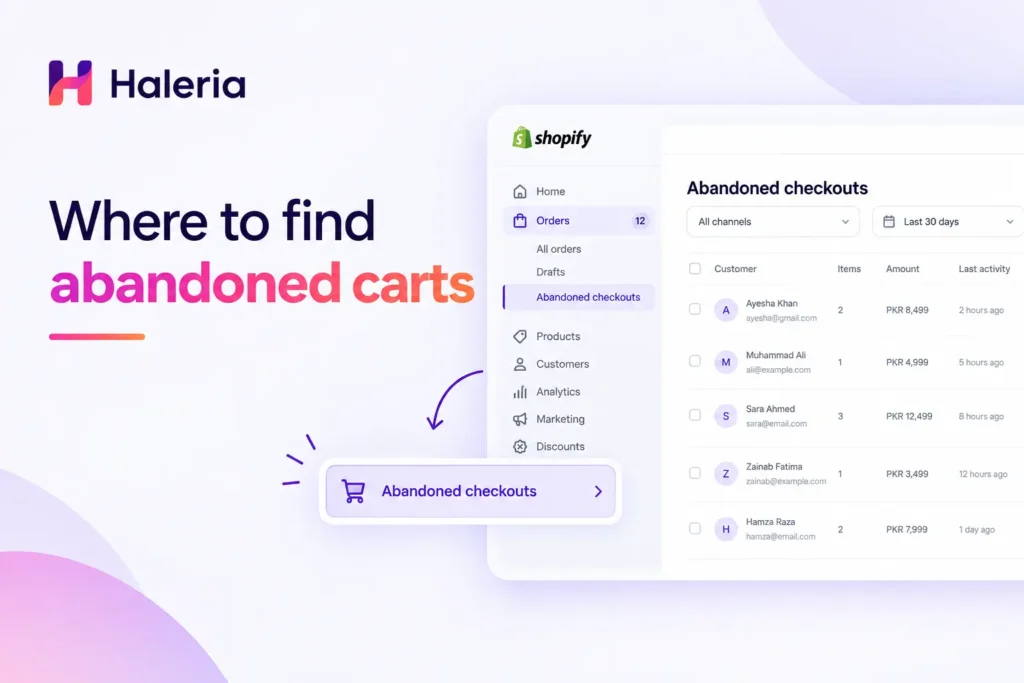
An abandoned cart is when a visitor adds a product to the cart or starts checkout and leaves without paying. Shopify tracks these in your admin under Orders → Abandoned checkouts.
Shopify only records a checkout as abandoned if the shopper reached the stage of entering contact details, usually an email or phone number. Someone who adds an item and closes the tab without typing anything won’t show up there. So the real number of shopify abandoned carts is higher than what your dashboard shows.
How Common Is Cart Abandonment?
According to the Baymard Institute, which has tracked this for years, the average documented cart abandonment rate across online stores sits around 70%. Your own number may be higher or lower depending on your niche and traffic source.
Why Do Shoppers Abandon Their Carts?
Before you fix anything, it helps to know what you’re fixing. These are the reasons that come up again and again, in research and in the stores I’ve looked at:
Surprise Costs at Checkout
Shipping, taxes, or COD fees that appear only at the last step are the number one reason people leave. Nobody likes a surprise at the till.
Forced Account Creation
If a first-time buyer has to create a password just to pay, many simply won’t.
Long or Confusing Checkout
Every extra field is a chance for someone to give up. Asking for a company name, a second address line, and a birthday on a mobile screen is a quick way to lose a sale.
Trust Issues
New stores often lose carts because buyers aren’t sure the store is real. No reviews, no return policy, and no visible contact details all push people away.
Just Browsing
Some people were never going to buy. They were comparing prices or saving items for later. This group is exactly why follow-up works so well.
How to Reduce Abandoned Carts Before They Happen
Recovery is useful, but prevention is cheaper. Here’s what to fix first.
Show the Full Price Early
Put shipping costs or a free-shipping threshold on the product page and in the cart. If delivery is free above a certain amount, say so in a banner at the top of the store.
Turn On Guest Checkout
In Shopify, go to Settings → Checkout and set customer accounts to optional. This one change alone helps a lot of stores.
Add Payment Options Your Customers Actually Use
If your buyers prefer cash on delivery, or a local wallet, or a specific card, offer it. A missing payment method is a silent deal-breaker.
Make Checkout Fast on Mobile
Open your own store on your phone, add something to the cart, and try to pay. Count the taps. If you get annoyed, your customers do too.
Build Trust Where It Counts
Add real reviews, a clear return policy, and a visible WhatsApp or email contact on the cart page. Even a short line like “Questions? Message us, we reply within an hour” lowers the fear of buying.
How to Recover Abandoned Carts
Even a well-built store will see abandonment. This is where recovery comes in. If you’re wondering how to recover abandoned carts, the answer is simple: follow up fast, be helpful, and make it easy to finish.
Step 1: Use Shopify’s Built-In Recovery Emails
Shopify can send an automatic email to people who left a checkout after sharing their email address. Go to Settings → Checkout → Abandoned checkout and turn on automatic recovery emails. You can choose when they send, from 10 hours up to 24 hours after the abandonment.
It’s free and it takes five minutes. If you haven’t turned this on yet, do it today.
Step 2: Write a Recovery Message That Sounds Like a Person
Most recovery emails fail because they sound like a robot wrote them. Compare these two:
- “Your cart is waiting. Complete your purchase now.”
- “Hey, looks like you left a few things behind. If something went wrong at checkout, just reply to this email and I’ll sort it out.”
The second one gets replies. Keep it short, mention the product by name, and show a picture of it.
Step 3: Send More Than One Message
One email isn’t enough. A simple three-step flow works for most stores:
- Within an hour: a gentle reminder, no discount.
- After 24 hours: answer common worries (shipping time, returns, sizing).
- After 2–3 days: a small incentive, such as free shipping or a modest discount, if your margins allow it.
Don’t start with a discount. Some people would have bought anyway, and you’d be giving away profit for nothing.
Step 4: Reach Customers on WhatsApp
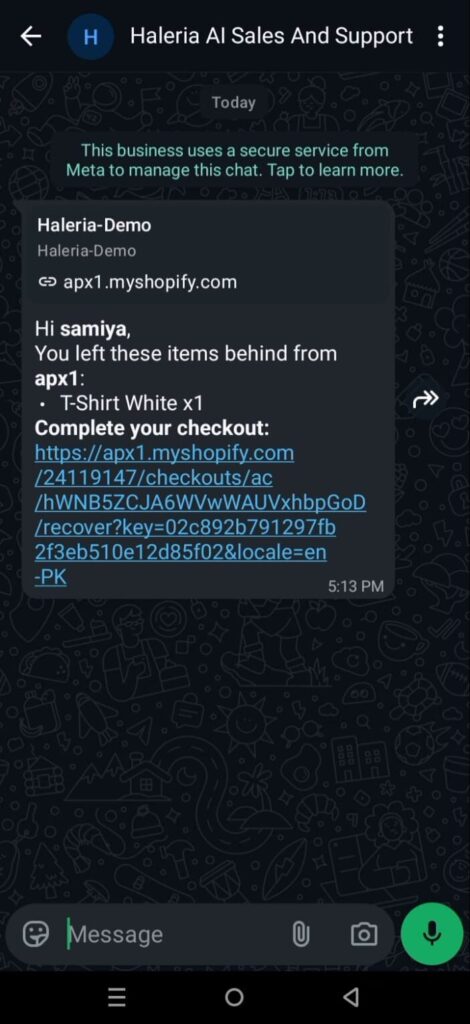
Email open rates can be slow, and a lot of shoppers simply don’t check their inbox. In markets like Pakistan, India, and the Middle East, WhatsApp is where people actually reply. A short WhatsApp message with the cart link often gets a response within minutes. Just make sure the customer has agreed to be contacted on WhatsApp, as the WhatsApp Business policy requires.
Step 5: Use Retargeting Ads
Shoppers who left your checkout are your warmest audience. A Meta (Facebook and Instagram) retargeting campaign showing the exact product they left behind can bring them back. Keep the budget small and the audience window short, around 7 to 14 days.
Shopify Apps to Recover Abandoned Carts
Shopify’s built-in emails are a good start, but apps give you more control. Here are the types of tools worth looking at, and what each is good for.
Email and SMS Marketing Apps
Tools like Klaviyo and Omnisend let you build multi-step flows with segments, product recommendations, and reporting. They’re powerful, but they take some time to set up properly.
WhatsApp-Based Recovery Apps
If your customers live on WhatsApp, an app that sends cart reminders through the WhatsApp Business API makes sense. Haleria AI Sales & Support, built by alignPX, is one option here. It automates WhatsApp messages for abandoned carts and also runs an AI webchat on your store.
Pop-Up and Exit-Intent Tools
These catch people before they leave, by asking for an email or offering a small nudge. They help build your contact list so you have someone to follow up with.
How to Pick the Right App
Ask yourself three questions:
- Where do my customers actually reply: email, SMS, or WhatsApp?
- Do I need a simple setup, or full automation with segmentation?
- What does it cost per month compared to the carts it can realistically recover?
Start with one channel, measure for 30 days, and then add another.
How to Know If Your Recovery Efforts Are Working
Track three numbers:
- Abandonment rate: is it going down over time?
- Recovery rate: what share of abandoned carts end up as orders?
- Revenue recovered: the actual money back, which is the number that matters most.
Shopify’s analytics and your recovery app’s dashboard will show you these. Check them monthly, and change one thing at a time so you know what made the difference.
Final Thoughts
You’ll never get abandoned carts to zero, and you don’t need to. Fix the obvious friction first, turn on Shopify’s recovery emails, add one more channel your customers like, and keep your messages human. Small changes here usually pay for themselves faster than almost any other part of your store.
Pick one thing from this list and do it today. Then come back in a month and see what moved.
Frequently Asked Questions
What is a good cart abandonment rate for a Shopify store?
Most online stores sit around 65–75%. If yours is lower, you’re doing well. If it’s much higher, look at shipping costs and checkout steps first.
How do I find abandoned carts in Shopify?
In your Shopify admin, go to Orders → Abandoned checkouts. You’ll see each customer, the products they left, and a link to send a recovery email.
Does Shopify send abandoned cart emails automatically?
Yes. You can turn this on under Settings → Checkout. Shopify sends the email to customers who shared their email address before leaving.
When should I send the first recovery message?
Within the first hour or so, while the shopper still remembers what they were buying. Waiting more than a day makes recovery much harder.
Should I offer a discount in recovery emails?
Not in the first message. Try a plain reminder first, and save the discount for a later message in the sequence.
Can I recover abandoned carts without an app?
Yes. Shopify’s built-in emails and manual follow-ups from the abandoned checkouts page work fine for small stores. Apps become useful once you have more volume.
Is WhatsApp good for recovering abandoned carts?
In countries where WhatsApp is the main way people communicate, it often performs better than email. Always get customer consent first.