
Table of Contents
Imagine running an online store where customers ask about delivery, product availability, order status, and payment methods throughout the day. Now imagine answering the same questions manually while also managing new orders, marketing campaigns, and customer complaints.
It quickly becomes difficult to keep up.
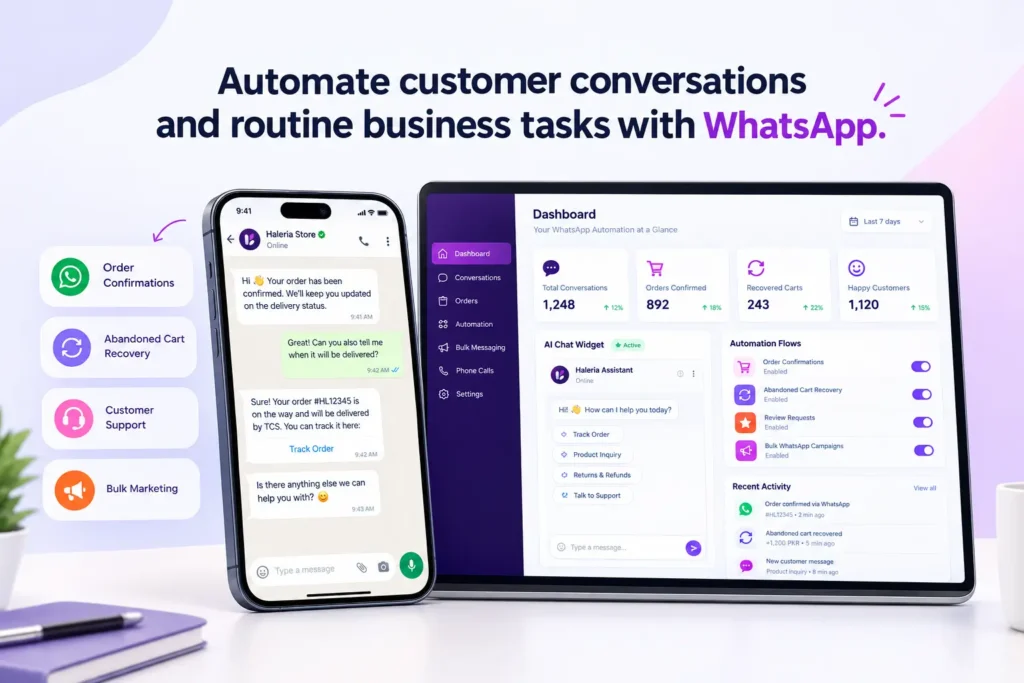
This is where WhatsApp automation can make a real difference. Instead of replying to every message yourself, you can automate routine conversations, send order updates, follow up with interested customers, and help shoppers find the information they need.
For small businesses, ecommerce stores, and growing brands, WhatsApp automation is a practical way to manage customer conversations without hiring a large support team.
In this guide, we’ll explain how WhatsApp automation works, which tasks you can automate, whether a free WhatsApp automation tool is enough, and how AI WhatsApp automation can help your business provide better customer service.
What Is WhatsApp Automation?
WhatsApp automation is the use of software, predefined rules, chatbots, and AI to handle business conversations automatically.
For example, when a customer messages your business to ask about delivery, an automated system can provide your shipping information immediately. When someone places an order, your system can send an order confirmation or delivery update without requiring a team member to type the message manually.
Businesses can use WhatsApp automation for:
- Answering frequently asked questions.
- Confirming customer orders.
- Sending order and delivery updates.
- Recovering abandoned shopping carts.
- Following up with interested customers.
- Sharing product information and offers.
- Collecting customer feedback.
- Routing complicated questions to a human agent.
The idea isn’t to remove the human side of customer service. It’s to reduce repetitive work so your team can spend more time helping customers who genuinely need personal assistance.
How Does WhatsApp Automation Work?
WhatsApp automation usually involves connecting a business messaging account to an automation platform, configuring workflows, and deciding what should happen when a customer sends a message or completes an action.
Here is a simple example.
A customer places a cash-on-delivery order on your Shopify store. Instead of having an employee call the customer, the automation system sends a WhatsApp message asking them to confirm or cancel the order.
The customer’s response can trigger the next step. A confirmed order can receive a confirmation tag, while a cancellation can be recorded for the store team.
A typical workflow looks like this:
- A customer takes an action. They place an order, send a message, or leave a checkout unfinished.
- The system detects the event. A connected store or messaging platform triggers the workflow.
- An automated message is sent. The customer receives a relevant reply or notification.
- The customer responds. They may confirm an order, ask a question, or request assistance.
- The system takes the next action. It updates a record, sends another message, or routes the conversation to a person.
The exact capabilities depend on the software you choose and the integrations available.
Businesses using the official WhatsApp Business Platform should also understand its messaging rules. Outside the customer service window, business-initiated messages generally require approved message templates. Automation must also provide an appropriate way for customers to reach human support when needed.
Benefits of WhatsApp Automation for Businesses
1. Respond to Customers Faster
Customers don’t always want to wait for a reply to a simple question.
Someone shopping online might want to know whether a product is available, how long delivery takes, or whether cash on delivery is offered. Automated replies can provide this information without making the customer wait for your team to become available.
Faster responses are especially useful during busy sales periods, promotional campaigns, and evenings when your support staff may be offline.
2. Reduce Manual Order Confirmations
For ecommerce stores that accept cash-on-delivery orders, confirming every order manually can take considerable time.
An automated WhatsApp order confirmation system can send customers a message with options to confirm or cancel their purchases. Depending on the integration, their responses can update order tags or trigger follow-up actions.
This gives store teams a more organized way to manage orders and identify which customers still need attention.
3. Recover Abandoned Carts
A shopper might add products to their cart and leave without completing checkout. Sometimes they get distracted; other times, they still have questions about shipping, payment, or the product itself.
WhatsApp automation can help businesses send eligible shoppers a timely reminder and answer questions that may prevent them from completing their purchase.
For example:
“Hi Sarah! You left a few items in your cart. Do you need any help with your order?”
The goal is to make it easier for the customer to continue shopping, not to send repeated messages that feel intrusive.
Always ensure that your messaging practices follow the applicable consent requirements and WhatsApp policies.
4. Provide Support Outside Business Hours
Customers may message your business when your employees are unavailable.
An automated chatbot can handle common questions about delivery, returns, store policies, and product details at any time, provided the necessary information has been configured correctly.
If a question requires judgment or access to information the bot doesn’t have, it should direct the customer to a human representative rather than inventing an answer.
5. Manage More Conversations Without Increasing Repetitive Work
As a business grows, its incoming messages often grow too. Without a clear process, customer questions can become scattered across conversations, and follow-ups can be missed.
WhatsApp automation helps standardize common workflows, making it easier for a small team to manage routine interactions.
It doesn’t eliminate the need for customer support staff. Instead, it helps them focus on complicated requests, complaints, and situations where a personal response matters.
What Is AI WhatsApp Automation?
Traditional WhatsApp automation usually follows predefined rules. For instance, when a customer types “delivery,” the system sends a shipping information message.
AI WhatsApp automation can go further by interpreting customer questions, identifying their intent, and generating relevant responses using the information available to it.
Consider a customer asking:
“Can I get this dress delivered before Friday?”
A basic chatbot might respond with a generic delivery policy. An AI-powered chatbot could explain the store’s stated delivery options and ask for the customer’s location if that information is necessary.
However, AI doesn’t automatically know your inventory, delivery schedules, refund decisions, or order details. Those capabilities depend on the data, integrations, and permissions available to the system.
How AI WhatsApp Automation Helps Ecommerce Stores
Product discovery: Customers can describe what they want, and the AI can suggest relevant products when connected product information is available.
Order status questions: An integrated system can retrieve order information and explain its status, subject to the necessary access controls.
Customer support: AI can answer common questions using approved FAQs, shipping policies, return policies, and other business information.
Sales conversations: A chatbot can explain product features, help customers compare options, and guide them toward relevant items.
Human handover: When a conversation becomes complicated, the system can direct the customer to a support representative.
For example, a clothing store could configure an AI chatbot to answer questions about sizes, available colors, fabric details, and return policies. Customers could ask questions naturally instead of navigating multiple pages to find basic information.
The quality of these responses depends on the accuracy and completeness of the information provided to the AI.
Free WhatsApp Automation Tool: What Should You Look For?
If you’re just starting, a free WhatsApp automation tool can be a sensible place to begin. But “free” can mean different things depending on the provider.
Some tools offer basic automated greetings and away messages, while others provide limited chatbot features or a free software plan with usage restrictions.
Before choosing a tool, check what is actually included.
WhatsApp Business App vs. Automation Software
The WhatsApp Business app offers basic features suitable for small businesses, including greeting messages, away messages, and quick replies.
More advanced workflows may require the WhatsApp Business Platform and a compatible automation provider.
| Feature | WhatsApp Business app | Advanced automation platform |
|---|---|---|
| Greeting and away messages | Yes | Depends on the plan |
| Saved quick replies | Yes | Often available |
| Automated order confirmations | Limited native capabilities | Possible with supported integrations |
| Shopify order workflows | Not a built-in full automation system | Available with compatible apps |
| AI-powered product support | Not a full AI support workflow by default | Available with suitable AI integrations |
| Abandoned checkout recovery | Not a complete native workflow | Possible with compatible integrations |
| Multiple-user and team workflows | Depends on available app features | Depends on provider and plan |
This is a general comparison; individual platforms offer different features, and some overlap exists.
How to Choose a Free WhatsApp Automation Tool
Before connecting a tool to your business, consider these questions:
- Does the free plan include the automation you actually need?
- Can it connect to your ecommerce platform or CRM?
- Does it use the official WhatsApp Business Platform where required?
- Are message charges or usage limits separate from subscription fees?
- Can customers reach a human when automation cannot resolve their issue?
- Does the provider explain its data handling and privacy practices?
- Can you upgrade without rebuilding all your workflows?
A free plan may be enough for basic replies and early testing. If your business needs automated order confirmations, abandoned checkout reminders, AI-powered support, or larger messaging campaigns, compare the total cost of the software, message usage, and integrations.
How to Set Up WhatsApp Automation for Your Business
You don’t need to automate every customer interaction on day one. Start with the process that takes the most time or causes the most missed follow-ups.
Step 1: Identify Your Most Repetitive Tasks
Review your recent conversations and note which questions appear most frequently.
These might include delivery times, product availability, order confirmations, return policies, or requests for order status.
Choose one or two workflows to automate first.
Step 2: Choose the Right WhatsApp Solution
For basic business communication, the WhatsApp Business app may be sufficient.
If you need ecommerce integrations, multiple automated workflows, or AI-powered conversations, look for a platform that supports the official WhatsApp Business Platform and your required integrations.
Step 3: Prepare Your Business Information
Before enabling AI responses, organize your FAQs, product details, shipping information, return policies, and contact information.
Review these details carefully. An automated system can only provide dependable answers when it has access to accurate information.
Step 4: Create Your First Workflow
A useful starting point for an ecommerce store is order confirmation.
For example:
- A new order is placed.
- The system sends a confirmation message using the appropriate approved template where required.
- The customer confirms or cancels.
- The connected store records the response.
- Unanswered messages are flagged for follow-up.
Test the workflow with sample orders before making it available to customers.
Step 5: Test Responses and Handover
Check whether the automation handles expected questions correctly, avoids sending duplicate messages, and routes unsupported questions to your team.
Also test what happens when a customer doesn’t respond, changes their mind, or asks for something outside the workflow.
Step 6: Measure the Results
Track practical indicators such as response time, confirmed orders, unresolved conversations, abandoned checkout recovery, and customer feedback.
Compare results before and after implementation. This will help you decide whether the automation is saving time and improving the customer experience.
Is WhatsApp Automation Suitable for Shopify Stores?
Yes. WhatsApp automation can be particularly useful for Shopify stores because customer conversations often connect directly to shopping activity.
Depending on the app and integrations you choose, you may be able to automate:
- New order confirmation messages.
- Cash-on-delivery verification.
- Abandoned checkout follow-ups.
- Delivery and order status notifications.
- Product questions and recommendations.
- Post-purchase support and review requests.
For example, a store receiving many cash-on-delivery orders might begin with automated order confirmation. Once that workflow is running reliably, the store could add AI customer support or abandoned checkout follow-ups.
The important part is choosing an app that supports the specific events and actions your store needs. Not every WhatsApp tool offers the same Shopify integration.
How Haleria Helps Businesses Automate WhatsApp Conversations
Managing orders, answering customer questions, and following up with shoppers can become difficult when everything depends on manual work.
Haleria helps businesses bring WhatsApp communication, ecommerce workflows, and AI-powered customer support into a more organized process.
For Shopify merchants, Haleria supports workflows designed around order confirmations, customer conversations, and sales follow-ups. Depending on the configuration, businesses can also use AI-powered web chat, automated phone calls for order confirmation, and tools for customer engagement.
For example, a Shopify merchant can use a WhatsApp order confirmation workflow to ask a customer to confirm or cancel an order. A separate AI support workflow can help answer common questions using the store’s available information.
Rather than adding every feature immediately, businesses can begin with the workflow that solves their biggest operational problem and expand as their needs change.
If you’re exploring ways to simplify Shopify customer communication, explore Haleria to learn more about its available automation features.
Before choosing a solution, review the current feature list, plan limits, setup requirements, and any applicable messaging charges.
Best Practices for WhatsApp Automation
Automation works best when it makes communication more useful, not more intrusive.
Get the Appropriate Customer Consent
Make sure your business has the necessary permission to send the messages you plan to automate. Follow applicable privacy requirements and WhatsApp’s messaging policies, especially for promotional communications.
Keep Messages Relevant
An order confirmation should provide order-related information. A cart reminder should help the shopper continue their purchase. Avoid sending unrelated promotions in transactional conversations.
Make Human Support Easy to Reach
Customers should have a clear way to request assistance from a person. Automation should not trap someone in a loop when they need help with a complaint, refund, or unusual order.
Keep Business Information Updated
Outdated delivery estimates, incorrect product details, and old return policies can undermine customer trust. Review the information your chatbot uses regularly.
Monitor Your Results
Check conversations for incorrect responses, missed messages, and confusing workflows. Use customer feedback to improve the setup.
Follow Official WhatsApp Messaging Rules
Use a compliant provider and follow the current WhatsApp Business Platform policies, including template requirements, applicable pricing, and customer service rules.
Final Thoughts
WhatsApp automation isn’t only for large businesses. Even a small online store can benefit from automating repetitive conversations and giving customers quicker access to useful information.
Start with a straightforward task, such as answering common questions or confirming new orders. Once you understand how the workflow performs, you can explore AI WhatsApp automation, product recommendations, abandoned checkout follow-ups, and other features.
If you’re looking for a free WhatsApp automation tool, compare its actual capabilities and usage limits before committing. The right solution is the one that fits your business needs, respects customer preferences, and makes everyday communication easier.
For Shopify businesses that want to connect customer support with order-related workflows, Haleria is one option worth exploring.
Frequently Asked Questions About WhatsApp Automation
1. What is WhatsApp automation used for?
WhatsApp automation is used to send automated replies, confirm orders, share order updates, answer common questions, follow up with shoppers, and manage customer conversations. The available features depend on the WhatsApp solution and integrations a business uses.
2. Is there a free WhatsApp automation tool?
Yes. The WhatsApp Business app includes basic messaging features such as greeting messages, away messages, and quick replies. Some third-party platforms also offer free plans or trials, although advanced integrations and usage may require payment.
3. What is AI WhatsApp automation?
AI WhatsApp automation uses artificial intelligence to interpret customer questions and provide relevant responses based on available business information. Depending on the integration, it can support product discovery, customer service, and other conversational workflows.
4. Can I automate WhatsApp order confirmations on Shopify?
Yes. Compatible Shopify apps can send order confirmation messages and record customer responses. The exact workflow depends on the app, its Shopify integration, and the WhatsApp messaging setup.
5. Can WhatsApp automation recover abandoned carts?
It can help recover abandoned carts by sending eligible shoppers timely reminders and answering questions that may prevent them from completing checkout. Results depend on factors such as the offer, timing, customer intent, and messaging quality.
6. Is WhatsApp automation safe for my business number?
Using the official WhatsApp Business Platform and following its policies is important for compliant business messaging. No provider can guarantee that an account will never face restrictions. Businesses should follow consent requirements, messaging limits, and other applicable rules.
7. Do I need the WhatsApp Business API for automation?
Not for every type of automation. The WhatsApp Business app supports basic automated messages, while advanced integrations, ecommerce workflows, and larger-scale automation commonly require the WhatsApp Business Platform or a compatible provider.
8. How much does WhatsApp automation cost?
Costs depend on the provider, subscription plan, integrations, message usage, and applicable WhatsApp charges. Some tools have free plans, but advanced features may require a paid subscription. Check current pricing before choosing a platform.
9. Can WhatsApp automation answer customers 24/7?
Automated systems can respond outside normal business hours when they are configured and operating correctly. However, complex questions may still need human support, and some messaging workflows are subject to WhatsApp’s customer service and template rules.
10. Which WhatsApp automation solution is best for Shopify?
The best option depends on your requirements. Compare Shopify integration, order confirmation workflows, abandoned checkout recovery, AI support, pricing, message charges, and human handover. Choose a tool that supports your actual workflows rather than paying for features you don’t need.