
Table of Contents
A customer places an order on your Shopify store. Great news! But before you start packing the parcel, there is one small step that can make a big difference: confirming that the customer actually wants the order.
If you sell cash-on-delivery (COD), you probably know the routine. You open a new order, find the customer’s phone number, make a call or send a message, and wait for a reply. Meanwhile, more orders keep coming in, and your team has to repeat the same process throughout the day.
This is where a clear order confirmation process helps.
Whether you use Shopify’s built-in notifications, WhatsApp messages, or automated phone calls, the goal is simple: make sure customers know what they ordered and give them an easy way to confirm the details.
In this guide, we’ll cover what order confirmation means, why it matters for Shopify stores, how WhatsApp order confirmation works, and practical message templates you can adapt to your own business.
What Is Order Confirmation?
An order confirmation is a message or notification sent to a customer after they place an order. It acknowledges the purchase and tells the customer that the store has received their order.
A typical order confirmation message includes:
- The customer’s name, where appropriate
- The order number
- The products ordered
- The total amount payable
- Delivery details or an estimated delivery timeframe, if available
- Instructions for confirming or contacting the store
For example, a customer ordering a pair of shoes should know that the store has received the order, which size and color were selected, and how much they need to pay.
For online stores, order confirmation is also an opportunity to catch mistakes early. A customer may have entered the wrong phone number, selected the wrong size, or misunderstood the delivery charges.
One important distinction: a standard order confirmation acknowledges that an order has been placed. A COD order verification process asks the customer to actively confirm that they intend to receive and pay for the parcel. These are related, but they are not the same thing.
Why Order Confirmation Matters for Shopify Stores
An order notification may look like a small part of the shopping experience, but it can affect how smoothly your store handles orders.
1. It gives customers peace of mind
Customers want to know that their order went through. A timely confirmation message reassures them that the store has received their details and explains what happens next.
Without that communication, some customers may contact support simply to ask whether their purchase was successful.
2. It helps identify incorrect or unwanted COD orders
COD sellers may receive orders with incomplete details, accidental submissions, or customers who are no longer interested in buying.
A confirmation step gives customers an opportunity to verify their purchase before the store spends time packing and dispatching it. It does not eliminate fake or refused orders, but it can help your team identify some problems earlier.
3. It reduces repetitive customer support work
Think about how many times your team answers questions such as, “Did you receive my order?” or “What is my order total?”
A well-written order confirmation message answers common questions before customers need to ask them.
4. It keeps order communication organised
When order details and customer responses are recorded consistently, your team can see which orders need attention and which customers have confirmed.
This becomes especially useful as order volume grows and several people handle fulfilment or customer support.
What Should an Order Confirmation Message Include?
A useful message should be short enough to read quickly but detailed enough to prevent confusion.
Essential details
Include the order number, a brief summary of the purchase, the total amount, and a clear next step. For COD orders, make the payment method and confirmation request easy to understand.
Avoid adding information that you cannot verify. For example, do not promise next-day delivery unless your fulfilment process can support it.
Keep the next step obvious
If the customer needs to confirm the order, tell them exactly how. If the message is only an acknowledgement, say that instead of implying that the customer has completed an additional verification step.
Use a natural, helpful tone
Your message should sound like your store, not a legal notice. Use plain language, avoid unnecessary promotional content, and make it easy for the customer to ask a question.
Order Confirmation Message Templates You Can Use
Need a starting point? Here are practical examples for different situations. Replace the sample details with the information from your store and test each message before using it with customers.
1. Standard order confirmation message
Template:
Hi [Customer Name],
Thanks for shopping with [Store Name]! We’ve received your order #[Order Number] for [Product Name].
Order total: [Amount]
We’ll keep you updated as your order moves forward. If you have any questions, just reply to this message or contact our support team.
Thank you for choosing us!
2. COD order confirmation message
Template:
Hi [Customer Name]!
You’ve placed order #[Order Number] with [Store Name].
Order total: [Amount]
Payment method: Cash on Delivery
Please confirm that you’d like us to process this order by replying CONFIRM. If any details need changing, please contact us before dispatch.
Thank you!
Use this template only if your workflow actually collects and records the customer’s confirmation.
3. WhatsApp order confirmation message
Template:
Hi [Customer Name] 👋
Thanks for ordering from [Store Name]!
Your order #[Order Number] has been received.
Items: [Product Summary]
Total: [Amount]
Delivery address: [Address Summary]
For COD orders, please confirm your order using the option below.
[Confirm Order] [Contact Support]
We’re happy to help if you need to correct any details.
4. Order confirmation message for an international store
Template:
Hi [Customer Name],
Thank you for your purchase from [Store Name]. Your order #[Order Number] has been received successfully.
Order total: [Currency and Amount]
We’ll send you another update when your order is ready for dispatch. If you have any questions about your purchase, please contact our support team.
Thanks again for shopping with us!
5. Short order confirmation SMS
Template:
[Store Name]: We received your order #[Order Number] for [Amount]. For COD orders, please confirm using [Confirmation Method]. Questions? Contact [Support Details].
Keep SMS messages concise and make sure any links or contact details are correct.
What Is WhatsApp Order Confirmation?
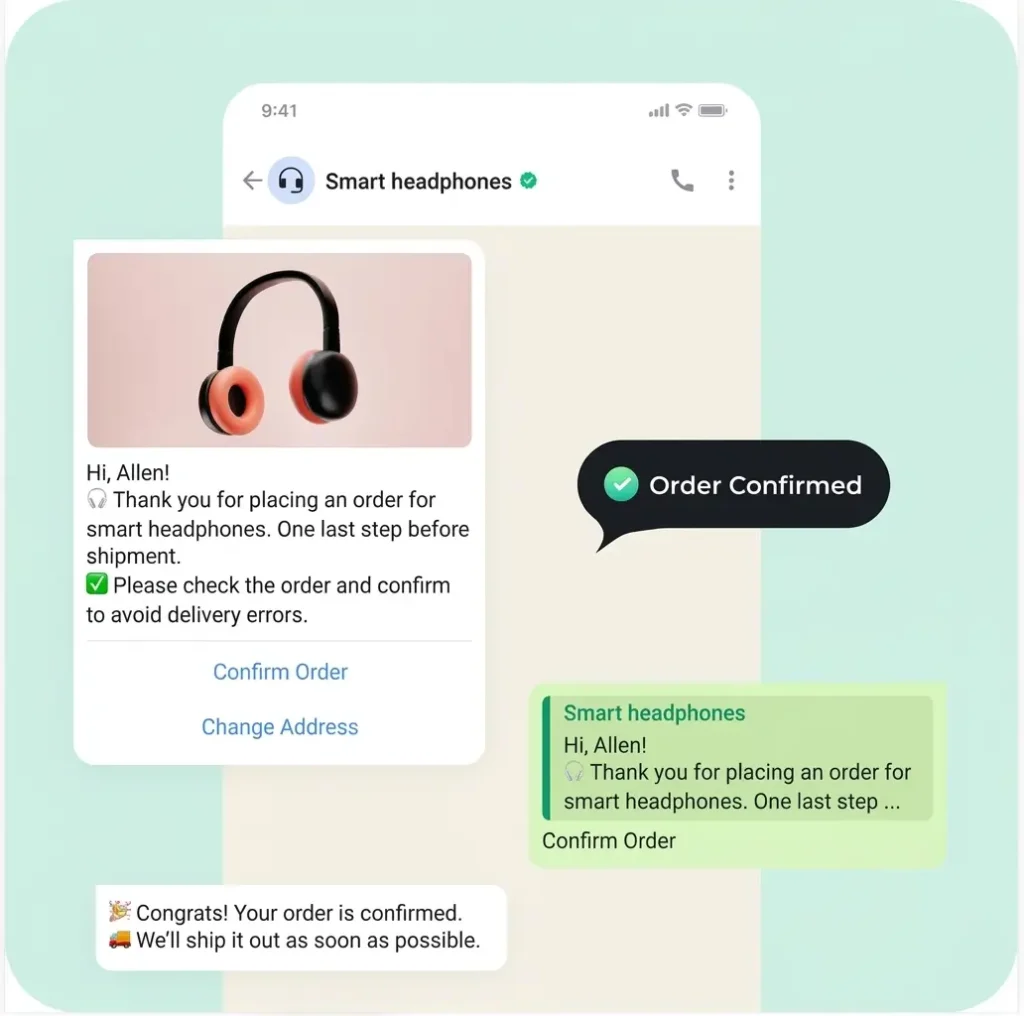
WhatsApp order confirmation is the process of sending customers order-related messages through WhatsApp after they place an order.
For customers who regularly use WhatsApp, receiving a purchase update in a familiar messaging app can be convenient. They can review the details, ask a question, or follow the confirmation instructions without waiting for a phone call.
For merchants, WhatsApp can provide another channel for communicating with customers. The actual workflow depends on the messaging solution, the store integration, and the customer’s response.
A WhatsApp message can acknowledge a purchase, request confirmation for a COD order, or provide subsequent order updates. These messages should have a clear purpose and follow the applicable WhatsApp Business messaging rules.
WhatsApp order confirmation vs. a regular order email
Both channels can help customers understand what happens after checkout, but they serve customers differently.
An email is useful for a detailed purchase record, while WhatsApp can support a more conversational exchange. Some stores use both: an email for the order record and WhatsApp for timely communication or COD verification.
The right setup depends on your customers’ preferences, your order volume, and the communication options available to your store.
How to Set Up WhatsApp Order Confirmation on Shopify
If your store runs on Shopify, you can start by reviewing your existing notifications and then decide whether you need an additional WhatsApp workflow.
Step 1: Check your Shopify order notifications
Shopify provides built-in customer notifications, including order confirmation emails. Review your notification settings and make sure the order details, branding, and customer-facing wording are correct.
Shopify’s standard email notification is useful for acknowledging purchases, but it does not automatically mean that a customer has actively confirmed a COD order.
Step 2: Decide what you want the customer to do
Before choosing an app, define your process.
Do you simply want to notify customers that their order has been received? Do you want COD customers to confirm before dispatch? Or do you need a team member to review orders that receive no response?
Being clear about the outcome makes it easier to choose the right solution.
Step 3: Choose a compatible WhatsApp solution
A Shopify-compatible WhatsApp solution may allow you to connect order events with customer messages. Depending on the app and its features, you may be able to send order details, collect responses, or automate follow-up steps.
Check the integration’s supported triggers, response handling, pricing, and messaging requirements before installing it. Not every WhatsApp app supports the same functions.
Step 4: Create and test your order confirmation template
Prepare a message that includes the order number, amount, and the action required from the customer.
Test the complete journey using a test order: place the order, check the message, respond to it, and confirm that the correct result is recorded in Shopify.
For WhatsApp Business Platform/API messaging, check the current template approval, consent, and messaging-window requirements that apply to your use case. Do not assume that every message can be sent freely to every number.
Step 5: Decide how to handle unconfirmed orders
Not every customer will respond immediately. Create a clear process for pending orders, incorrect phone numbers, customer questions, and cancellation requests.
For example, you might send an appropriate follow-up where permitted, then route unanswered orders to a manual review queue rather than automatically treating silence as confirmation.
Shopify WhatsApp Order Confirmation: What Can You Automate?
The term shopify whatsapp order confirmation often refers to more than simply sending a message. Merchants may want the message and the order-handling process to work together.
Depending on the tools you use, your workflow might include:
- Sending an order acknowledgement after checkout
- Asking COD customers to confirm their purchase
- Recording a customer’s confirmation or cancellation response
- Flagging orders that need manual review
- Sending relevant updates as the order progresses
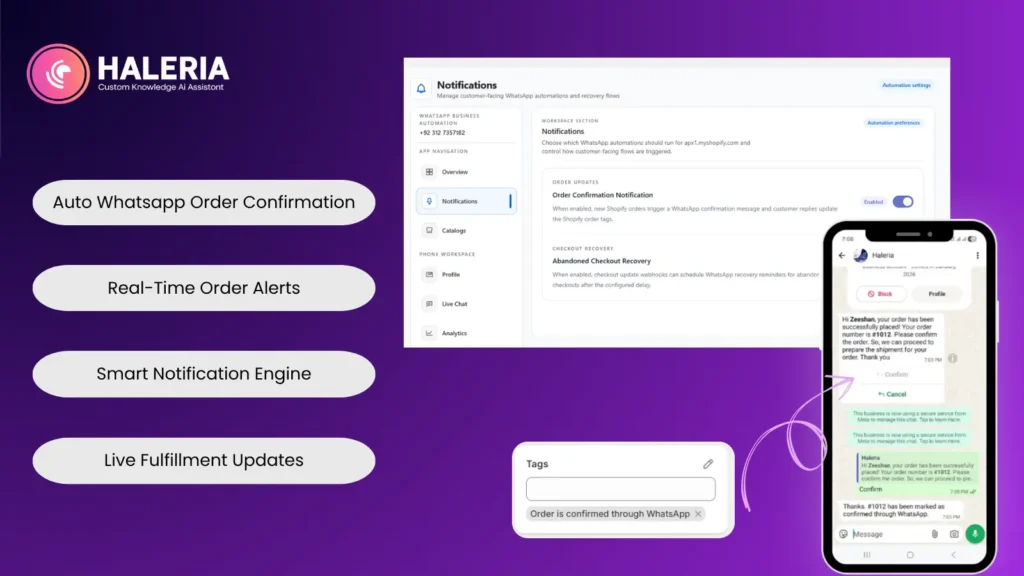
For example, a customer could receive a message asking them to confirm a COD purchase. If the customer chooses the confirmation option, the system could record that response and update the order or add a tag, provided the integration supports that action.
A cancellation response should be handled just as carefully. Make sure the customer understands the action and that your system records the correct status before fulfilment proceeds.
How Haleria Can Help With Order Confirmation
If you’re managing a Shopify store and still confirming every COD order manually, it’s worth looking at how much time your team spends on repetitive calls and messages.
Haleria AI Sales & Support helps Shopify merchants automate customer communication through WhatsApp and other supported channels. Depending on your configured features, this can include WhatsApp automation and automated phone calls for order confirmation.
With a phone-call confirmation workflow, for example, customers can be asked to confirm or cancel their order through the call menu. In a supported setup, pressing 1 can mark an order as confirmed, while pressing 2 can mark it as cancelled. The exact behaviour depends on the configured integration and order-tagging rules.
The main benefit is a more organised process: your team can spend less time repeating the same confirmation questions and more time handling orders that genuinely need attention.
Before adopting any automation, review the workflow with test orders and verify that the correct Shopify order is updated after each customer response.
If you want to see whether Haleria fits your store, explore the Haleria app and try the available demo or free-plan option, subject to the current offering. Start with a small test workflow before enabling it for all orders.
Best Practices for Better Order Confirmation
Getting the message out is only part of the job. The process behind it matters just as much.
Send the right information at the right time
Customers should receive a useful acknowledgement promptly after placing an order. Any additional verification request should explain why a response is needed and what the customer should do.
Keep customer details accurate
Use the order data available in your store, and check that the product summary, amount, phone number, and delivery details are correct. Incorrect information can create more support work instead of reducing it.
Don’t treat every order as suspicious
Confirmation should make the purchase process clearer, not create unnecessary friction for every customer. Consider your payment methods, product type, delivery model, and actual order issues when deciding which orders need extra verification.
Respect customer consent and messaging rules
Use customer information responsibly. Follow applicable privacy requirements and the relevant WhatsApp Business Platform policies, including rules on templates, consent, and permitted messaging.
Monitor the results
Review metrics that help you understand whether your process is working, such as:
- Percentage of orders confirmed
- Time between order placement and confirmation
- Number of orders requiring manual follow-up
- Cancellation rate before dispatch
- Returned-to-origin (RTO) rate for COD orders, where applicable
Compare results over a meaningful period and consider other factors, such as delivery performance, product quality, and customer location. A change in confirmation messages alone may not explain a change in RTO.
Final Thoughts
Order confirmation is a small step that helps connect checkout with fulfilment. Customers want to know that their purchase has been received, and merchants need a reliable way to decide which orders are ready to move forward.
For a Shopify store, the right approach might be a clear email, a WhatsApp order confirmation, an additional COD verification step, or a combination of these options.
Start with a message that tells customers exactly what they need to know. Then build a process that records their responses accurately and gives your team a clear way to handle exceptions.
And if your team spends hours making repetitive confirmation calls, consider whether a suitable automation workflow could make the process easier to manage as your store grows.
Frequently Asked Questions About Order Confirmation
1. What is an order confirmation?
An order confirmation is a message sent after a customer places an order. It acknowledges receipt of the purchase and may include the order number, items, total amount, and next steps.
2. What should an order confirmation message say?
A good order confirmation message includes the customer’s name where appropriate, order number, order summary, total amount, and a clear next step. For COD orders, it can also request an explicit confirmation.
3. How do I send WhatsApp order confirmation on Shopify?
Review your Shopify notifications first, then choose a compatible WhatsApp integration that supports the workflow you need. Configure the message, verify any applicable WhatsApp requirements, and test the complete process before using it for live orders.
4. Is WhatsApp order confirmation available automatically in Shopify?
Shopify provides built-in order notifications, including email confirmations. WhatsApp order confirmation generally requires a suitable WhatsApp integration or supported messaging setup. Available features vary by provider.
5. Can I automate COD order confirmation?
Yes, with a suitable integration you can automate parts of COD verification, such as sending a message or placing a phone call and recording the customer’s response. Test the workflow carefully so that confirmed, cancelled, and unanswered orders are handled correctly.
6. What is the best order confirmation template?
The best template is easy to understand and includes the order number, total amount, and the next step. If you require active COD verification, explicitly ask the customer to confirm instead of merely acknowledging the order.
7. Does an order confirmation mean my order has shipped?
No. Order confirmation generally means the store has received the purchase. Shipping or fulfilment is a separate step, and customers should receive a shipping update when the order is actually dispatched.
8. Can WhatsApp order confirmation reduce RTO?
It may help identify some incorrect, accidental, or unwanted COD orders before dispatch, but it cannot guarantee a lower RTO rate. Delivery quality, customer availability, address accuracy, and other operational factors also influence returns.
9. Can I use the same WhatsApp template for every customer?
You can create a reusable template, but the content and sending rules must suit the message purpose and comply with the applicable WhatsApp requirements. Personalise order details accurately and use the appropriate approved template where required.
10. How can Haleria help with order confirmation?
Haleria AI Sales & Support offers customer communication and automation capabilities for supported Shopify workflows, including WhatsApp automation and automated order-confirmation phone calls. Check the current app features and configuration options to confirm which workflow suits your store.