
WHATSAPP ORDER CONFIRMATION FOR SHOPIFY
Confirm Every Shopify Order on WhatsApp
WhatsApp order confirmation sends each new Shopify customer a message with their order details and two buttons, Confirm and Cancel. Haleria tags the order with the answer, and if the customer doesn’t reply, an AI phone call confirms it instead. You ship only the orders customers said yes to.
Meta-verified Tech Provider · Official WhatsApp Business API · Included in the Free plan
How WhatsApp Order Confirmation Works
Once it is switched on, every new order goes through the same three steps without anyone on your team touching it.
- The customer places an order. Haleria picks up the new Shopify order straight away.
- A WhatsApp message goes out. It is sent through the official WhatsApp Business API and shows the order details with two buttons: Confirm and Cancel.
- The answer is saved on the order. One tap tags the order in Shopify, so your team knows what to ship and what to close.
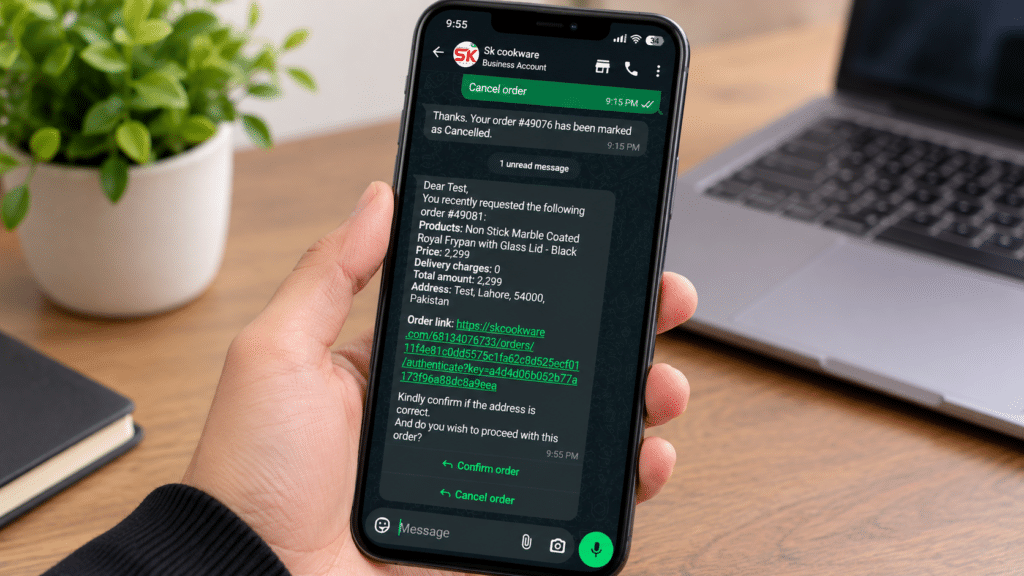
Confirm and Cancel Buttons Tag the Order in Shopify
You don’t have to read replies or update orders by hand. Each button adds a tag to the Shopify order:
- Confirm adds the tag
Confirm through WhatsApp: send it to fulfillment. - Cancel adds the tag
Cancel through WhatsApp: close it before you pay for shipping. - No tag means no answer yet: the AI call backup or your team follows up.
Filter your Shopify orders by these tags to see your confirmation rate, cancellation rate and the short list of orders that still need a person. For cash-on-delivery stores, this is the step that stops fake and impulse orders before they turn into returns.
AI Order Confirmation Calls as Backup
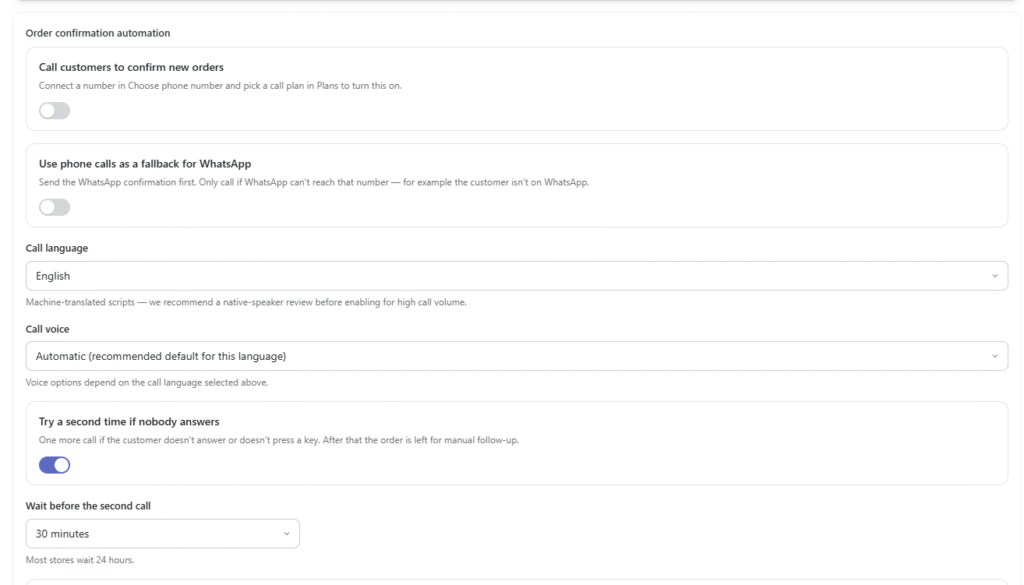
Some customers aren’t on WhatsApp, and some ignore messages but answer calls. Turn on calls as a WhatsApp backup and an AI voice agent phones anyone who doesn’t reply, reads back the order and asks whether to ship it.
- Choose the call language and voice
- Set a delay after the order, and a second attempt if nobody answers
- Call only during daytime in the customer’s time zone
- Customers confirm, cancel or ask for a callback with their keypad, and every attempt shows in your dashboard
Calls come from a dedicated number (available in the United States and Pakistan) or from your own verified business number in the United States, Canada, Puerto Rico, the United Kingdom, Australia, Austria, Germany, France, Finland, Italy and Portugal. Full setup and call scripts: Shopify order confirmation call automation.
Sample WhatsApp Order Confirmation Templates
Keep it short: who you are, what they ordered, what they will pay and one clear action. Meta approves the template before it sends.
Standard cash-on-delivery order
Hi {first_name}, thanks for ordering from {store_name}!
Order {order_number}: {product_summary}
Total to pay on delivery: {order_total}
Please confirm so we can ship your order today.
[Confirm] [Cancel]
High-value order with address check
Hi {first_name}, your {store_name} order {order_number} ({order_total}, cash on delivery) is ready to pack. Please confirm your order and address: {address}.
[Confirm] [Cancel]
Keep marketing out of confirmation messages: Meta reviews templates by category, and promotional text in an order message is a common reason for template rejection. More examples: WhatsApp order confirmation templates for Shopify.
Set It Up in Minutes
- Install Haleria from the Shopify App Store.
- Connect your WhatsApp Business account in the WhatsApp Automation tab.
- Turn on the Order Confirmation Notification. Meta usually approves the template within 24 hours.
- Add a payment method in Meta Business Suite, since Meta bills WhatsApp messages directly.
- Optional: switch on AI calls as a backup, then place a test order.
Step-by-step guide with screenshots: order confirmation automation for Shopify.
Pricing in USD
WhatsApp order confirmation is included in every Haleria plan, including the Free plan. Paid plans are Go at $6 a month, Basic at $29 and Pro at $79, billed in USD through Shopify with a 7-day free trial. Pricing is the same in every country.
WhatsApp message fees are billed by Meta directly to your WhatsApp Business account, at Meta’s rates for each country. AI calls use a phone call plan you choose in the app. Compare plans.
WhatsApp Order Confirmation FAQs
Does Shopify confirm COD orders on WhatsApp by itself?
No. Shopify sends an order confirmation email, but it doesn’t ask the customer to verify the order or record a reply. You need an app such as Haleria to send WhatsApp confirmations and tag the answer on the order.
Do I need the official WhatsApp Business API?
Yes, for automated confirmations at scale. Haleria is verified by Meta as a Tech Provider and sends every message through the official WhatsApp Business API with Meta-approved templates, so your number isn’t put at risk the way unofficial WhatsApp Web tools can.
How does Haleria mark confirmed and cancelled orders?
When the customer taps Confirm, the order gets the tag “Confirm through WhatsApp”. When they tap Cancel, it gets “Cancel through WhatsApp”. You can filter orders by these tags in Shopify.
What happens if the customer doesn’t reply on WhatsApp?
The order stays untagged. If you turned on AI calls as a backup, Haleria phones the customer and can try a second time. Anything still unanswered goes to your team for review.
How much does WhatsApp order confirmation cost?
It is included in Haleria’s Free plan, and paid plans start at $6 a month in USD. Meta charges separately for WhatsApp template messages, billed directly to your WhatsApp Business account.
How long does Meta take to approve the confirmation template?
Usually up to 24 hours, and often faster. Confirmations start sending as soon as the template is approved.
Stop Shipping Unconfirmed Orders
Confirm every order on WhatsApp, with AI calls for customers who don’t reply. Free plan available.