
Table of Contents
For many Shopify merchants, especially those selling with Cash on Delivery (COD), fake orders and unreachable customers can become a daily challenge.
A customer places an order, but later they don’t answer calls, deny placing the order, or refuse delivery. This creates unnecessary losses through return shipping costs, packaging expenses, and wasted inventory handling.
A simple Shopify order confirmation process can help merchants verify orders before shipping. While traditional manual calls take time, automated calling solutions powered by AI can confirm orders instantly without requiring your team to call every customer.
In this guide, we will show you how to set up automated AI order confirmation calls using the Haleria AI Sales & Support App and explain every setting step-by-step.
Why Shopify Order Confirmation Calls Matter for Ecommerce Stores
Order confirmation is one of the most important steps in ecommerce operations.
A normal Shopify order confirmation page only shows that an order has been placed. However, for COD businesses, merchants often need an extra verification step before fulfillment.
Automated confirmation calls help you:
- Verify whether the customer actually placed the order
- Reduce fake COD orders
- Improve delivery success rates
- Save customer support team’s time
- Provide a better ecommerce order confirmation experience
Instead of manually calling hundreds of customers every day, Haleria AI can automatically contact customers and confirm their orders.
What Are Automated Shopify Order Confirmation Calls?
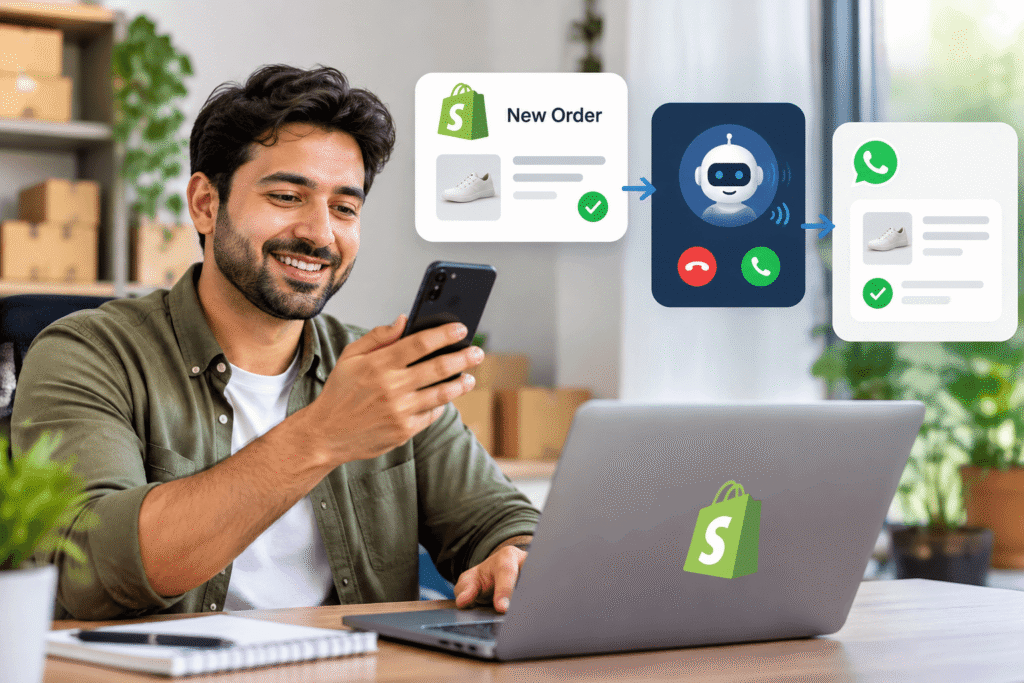
Automated Shopify order confirmation calls are AI-powered phone calls that contact customers after they place an order.
The AI agent can:
- Confirm customer name
- Verify order details
- Ask whether the customer wants to proceed
- Handle simple customer responses
- Mark orders according to confirmation status
This works alongside your existing Shopify order confirmation workflow.
The process looks like:
Customer Places Order → Shopify Receives Order → Haleria AI Calls Customer → Order Status Updated
How to Set Up Order Confirmation Calls in the Haleria AI Sales & Support App
Follow these steps to activate automated confirmation calls for your Shopify store.
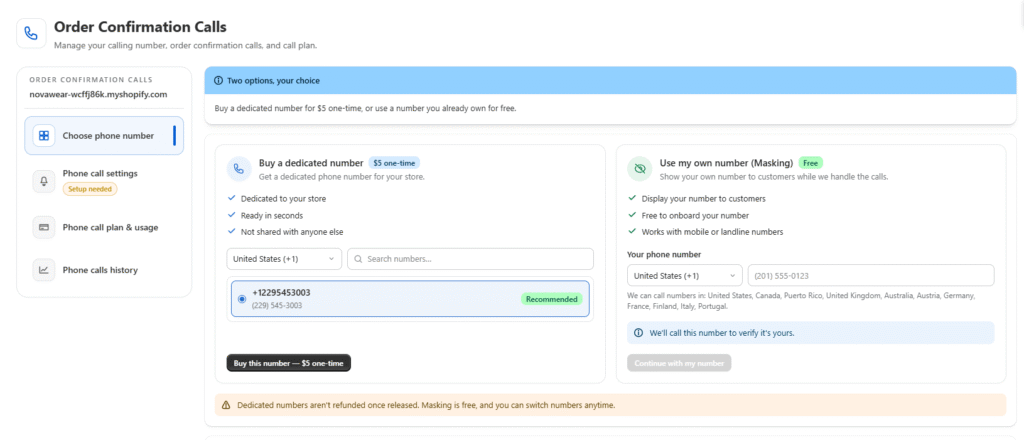
Step 1: Choose Your Calling Number
Open the Haleria AI Sales & Support App and go to:
Order Confirmation Calls
You will see two options.
Option 1: Buy a Dedicated Number
Choose this option if you don’t want to connect your personal business number.
Dedicated numbers are currently available for:
- United States
- Pakistan
This option is useful for businesses that want a separate calling identity for automated customer verification.
Option 2: Use Your Own Number
If you want calls to appear from your existing business number, select:
Use my own number
This option supports:
- United States
- Canada
- Puerto Rico
- United Kingdom
- Australia
- Austria
- Germany
- France
- Finland
- Italy
- Portugal
Using your own number can help maintain brand familiarity because customers recognize the caller ID.
Step 2: Verify Your Phone Number
If you choose your own number, verification is required.
Follow these steps:
- Select your country code.
- Enter your phone number.
- Receive the verification call.
- Answer the call.
- Enter the provided verification code.
- Your number will now be connected.
This verification ensures that automated calls are sent from an authorized business number.
Step 3: Choose Your Phone Call Plan
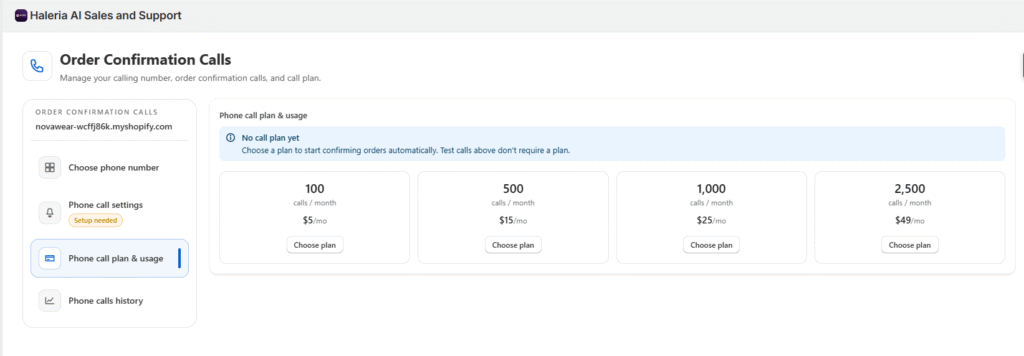
After connecting your number, visit the:
Phone Call Plan page
Choose a plan based on your expected order volume.
Consider:
- Number of daily orders
- COD percentage
- Expected confirmation calls
- Customer support requirements
For smaller stores, a basic plan may be enough.
Growing ecommerce brands handling higher order volumes should select a plan with more calling capacity.
Step 4: Configure Your Shopify Order Confirmation Call Settings
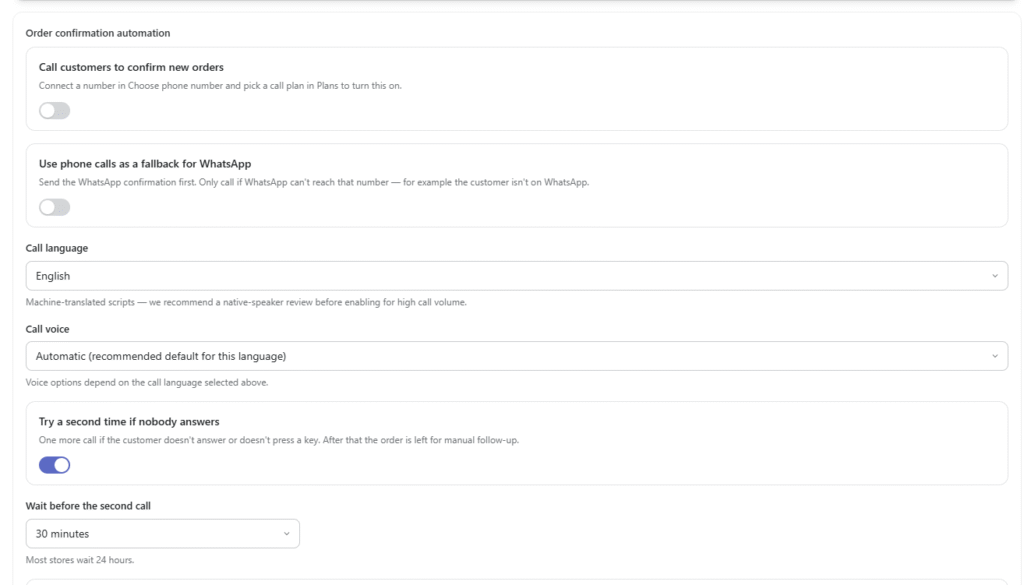
After selecting your plan, you will reach the Phone Call Settings page.
Here you can customize your automated calling workflow.
Enable Calls for New Orders
Turn on:
Call customers to confirm new orders
Once enabled, Haleria AI will automatically call customers whenever a new Shopify order is placed.
Use Phone Calls as WhatsApp Backup
You can use calls together with WhatsApp confirmation.
The workflow:
- WhatsApp confirmation message is sent first.
- If WhatsApp cannot reach the customer, AI call starts.
This is useful because some customers may not use WhatsApp or may have inactive numbers.
Select Call Language and Voice
Choose the language and AI voice that matches your customers.
A familiar language creates a more natural customer experience.
Enable Second Call Attempt
Sometimes customers miss calls.
You can enable:
Try a second time if nobody answers
If the customer does not respond:
- AI makes one additional attempt
- After that, the order can be manually reviewed
Set Call Delay
Choose how quickly the customer should receive the call after ordering.
Examples:
- Immediately after purchase
- After a few minutes
- After manual review
Choose a delay that matches your fulfillment workflow.
Enable Daytime Calling
Activate:
Only call during daytime where the customer is
This ensures customers are contacted during appropriate local hours.
Step 5: Your Automated Order Confirmation Calls Are Live
Once all settings are saved, your automated Shopify order confirmation system is ready.
From now on:
Customer places order → AI verifies order → Your team receives a confirmed order
You can focus more on growing your store instead of manually verifying every COD order.
Create an Effective Order Confirmation Call Script
A good order confirmation call script should be short, clear, and customer-friendly.
Example:
“Hello, this is Haleria calling to confirm your recent order from [Store Name]. We received your order for [Product Name]. Would you like us to process and ship this order?”
A simple conversation improves customer trust and reduces confusion.
Shopify Order Confirmation Page vs AI Confirmation Calls
The Shopify order confirmation page confirms that an order was successfully submitted.
However, it does not verify:
- Whether the phone number belongs to the customer
- Whether the customer still wants the order
- Whether the order is genuine
AI confirmation calls add an extra verification layer before shipping.
Benefits of Using Haleria AI for Shopify Order Confirmation
Reduce Fake COD Orders
Automatically verify customers before shipping.
Save Customer Support Time
Your team no longer needs to manually call every buyer.
Improve Customer Experience
Customers receive quick confirmation without waiting.
Handle High Order Volumes
AI calls can support stores during sales campaigns and busy periods.
Frequently Asked Questions (FAQ)
1. What is Shopify order confirmation?
Shopify order confirmation is the process of notifying customers that their order has been received. It usually happens through Shopify emails, but merchants can add extra verification steps like AI calls.
2. Can Shopify automatically call customers after an order?
Shopify does not provide built-in automated phone confirmation calls. Apps like Haleria AI can add automated AI calling functionality.
3. What is an AI order confirmation call?
An AI order confirmation call is an automated phone conversation where artificial intelligence contacts customers to verify their order details.
4. Can I use my own phone number for Shopify confirmation calls?
Yes. Haleria allows merchants to connect supported business numbers and verify them before making automated calls.
5. Does Haleria support WhatsApp and phone call confirmation together?
Yes. Merchants can configure WhatsApp confirmation first and use phone calls as a fallback option.
6. Can I customize the Shopify order confirmation call script?
Yes. Businesses can create customer-friendly scripts based on their products, industry, and customer communication style.
Written by Haleria AI Team
“Experts in Shopify automation, AI customer support, WhatsApp commerce, and ecommerce workflow optimization.”